Best AI note takers for customer support teams in 2026


In this article
Best overall for in-person support: the Omi pendant. Best for online troubleshooting: the Mac app. Best hardware-free starting point: the phone app. This 2026 guide compares three capture setups within the same system—not three independently tested competing products.
- Omi is the best AI note taker for customer support teams handling in-person conversations and follow-up tasks.
- Choose Mac capture for online troubleshooting; the app records without joining meetings as a bot.
- Start with phone-only capture to evaluate transcripts and action items before choosing a wearable.
- Check recording consent, transcript accuracy, and your ticket handoff before expanding across the team.
Why this matters
A support note needs to preserve more than the customer's complaint. You need the troubleshooting already attempted, what remains unresolved, and the next action someone actually agreed to take.
Choose the capture method before choosing the device. A pendant fits a service-counter conversation. A desktop app fits an online troubleshooting session. A phone app gives you a way to evaluate the workflow without adding another device.
The recommendations below prioritize that fit. They do not assume automatic ticket updates, shared administration, or direct recording from every support channel.
What makes the best AI note taker for customer support teams?
Judge a 2026 shortlist against these criteria before comparing features:
- Capture fit: Match recording to the actual interaction: face-to-face, online meeting, or speakerphone call. Do not assume that recording one channel means recording them all.
- Useful output: Look for transcripts, summaries, and action items. Your test is whether an agent can identify the issue and next step without replaying the entire conversation.
- Retrieval: Search should help you find earlier explanations, commitments, and unresolved questions. Keep the ticket identifier in your approved support workflow so you can connect the right records.
- Data control: Check export, deletion, storage configuration, and who receives the output. A security certification does not replace your own approval process.
- Language handling: Check the customer's language and how the product handles language changes. Multilingual support requires more than a list of supported languages.
- Handoff effort: Establish how reviewed notes reach the ticketing system. Distinguish an integration you have configured from a native connection you merely expect to exist.
Support note-taking setups at a glance
All three options below use the same note-taking system. The ranking separates use cases; it does not imply that a wearable produces better summaries than an app.
| Rank and setup | Best for | Standout feature | Key limitation |
|---|---|---|---|
| 1. Wearable pendant | In-person customer support | Captures spoken interactions while worn | Phone calls require speakerphone capture |
| 2. Mac app | Online troubleshooting meetings | Records Zoom, Meet, and Teams sessions without a meeting bot | Requires a Mac-based capture workflow |
| 3. Phone-only app | Evaluating notes without a wearable | Records through the phone's built-in microphone | Requires you to position the phone for the conversation |
Omi is the best fit for support teams that need searchable notes from in-person customer conversations. For a team working entirely through online meetings, start with the Mac app rather than assuming everyone needs a pendant.
1. Omi pendant: best AI note taker for in-person support
The wearable captures what you say and hear, with transcripts, summaries, action items, and memories available through the companion app. You can wear it around your neck, on a separately sold wrist band, or under a shirt.
That makes the pendant a relevant option for service counters, customer visits, and technician conversations. Choose it when the conversation happens away from the computer where you normally write the ticket.
Wearable pendant pros
- Captures in-person conversations without requiring you to hold a phone throughout the interaction.
- Produces searchable transcripts, summaries, and tasks rather than leaving you with an audio recording alone.
- Supports speaker labels, helping distinguish contributions during a conversation.
- Provides full export and deletion controls for managing captured material.
Wearable pendant cons
- Phone calls require speakerphone capture; do not assume direct access to call audio.
- Wearing a recorder does not establish consent. Your team still needs an approved recording process.
- Ticket updates need a defined handoff; generated tasks are not proof that your help desk has been updated.
Best for: Customer-facing staff whose important conversations happen in person.
Before choosing the pendant for your whole team, test an ordinary troubleshooting interaction. Check whether the transcript preserves product names, error messages, and the difference between an attempted fix and a confirmed resolution.
Use the 2026 evaluation to answer a practical question: does wearing the device solve a capture problem your phone or computer cannot solve conveniently? If it does not, choose the app instead.
Verdict: Buy for approved in-person support workflows; skip the wearable for desktop-only capture.
2. Mac app: best note-taking setup for online troubleshooting
The Mac app records online meetings, including Zoom, Meet, and Teams, without joining as a bot. It also works without the wearable, using the computer's built-in microphone for capture.
Choose this route when your support work centers on scheduled troubleshooting sessions or customer walkthroughs. The useful distinction is where capture happens: at the computer already involved in the interaction.
Mac app pros
- Records online meetings without adding a meeting bot.
- Works without requiring a pendant.
- Connects captured conversations to transcripts, summaries, tasks, and search.
Mac app cons
- Requires a Mac-based recording setup; do not assume identical desktop capture on other operating systems.
- Does not establish direct compatibility with your contact-center telephony system.
- Still requires review before troubleshooting notes become customer-facing instructions.
Best for: Support agents who conduct online troubleshooting from a Mac.
Test the exact setup agents use, including their normal headset and meeting application. Confirm that both sides of the conversation are present before evaluating the quality of the summary.
Then inspect the output for sequence. A useful troubleshooting note distinguishes what the customer reported, what the agent changed, and what happened afterward. An orderly summary that mixes those events is not ready for the ticket.
Verdict: Buy into the Mac workflow for online troubleshooting; skip it as an assumed replacement for telephony recording.
3. Phone app: best hardware-free setup for an initial evaluation
The phone app records through the built-in microphone without requiring the wearable. Apps are available for iPhone and Android, so you can evaluate conversation capture using a phone you already use.
This is the sensible starting point when your question is about note quality rather than wearable convenience. First establish that the output helps your agents; then decide whether another capture device belongs in the process.
Phone app pros
- Lets you evaluate capture without adding a wearable.
- Supports both iPhone and Android.
- Gives you access to the same core features across listening plans.
Phone app cons
- Requires deliberate phone placement for room conversations.
- Phone calls need speakerphone capture rather than assumed direct recording.
- Experimental Local Sync needs evaluation before you depend on it for offline work.
Best for: Support leads validating transcripts, summaries, and follow-up tasks before choosing hardware.
Keep the initial evaluation narrow. Use an approved conversation, review the transcript, and write the ticket from the reviewed output. Record where the summary helped and where the agent still needed to consult the source.
For a 2026 rollout, that exercise gives you a purchase criterion: whether a pendant removes friction from a workflow whose output you already trust enough to review and use.
Verdict: Buy into the phone-first workflow for evaluation; wait on hardware until the capture need is clear.
Build the ticket handoff before expanding
A generated summary is an input to your support process, not a completed support record. Keep the route from conversation to ticket explicit so agents know what requires review and where the approved result belongs.
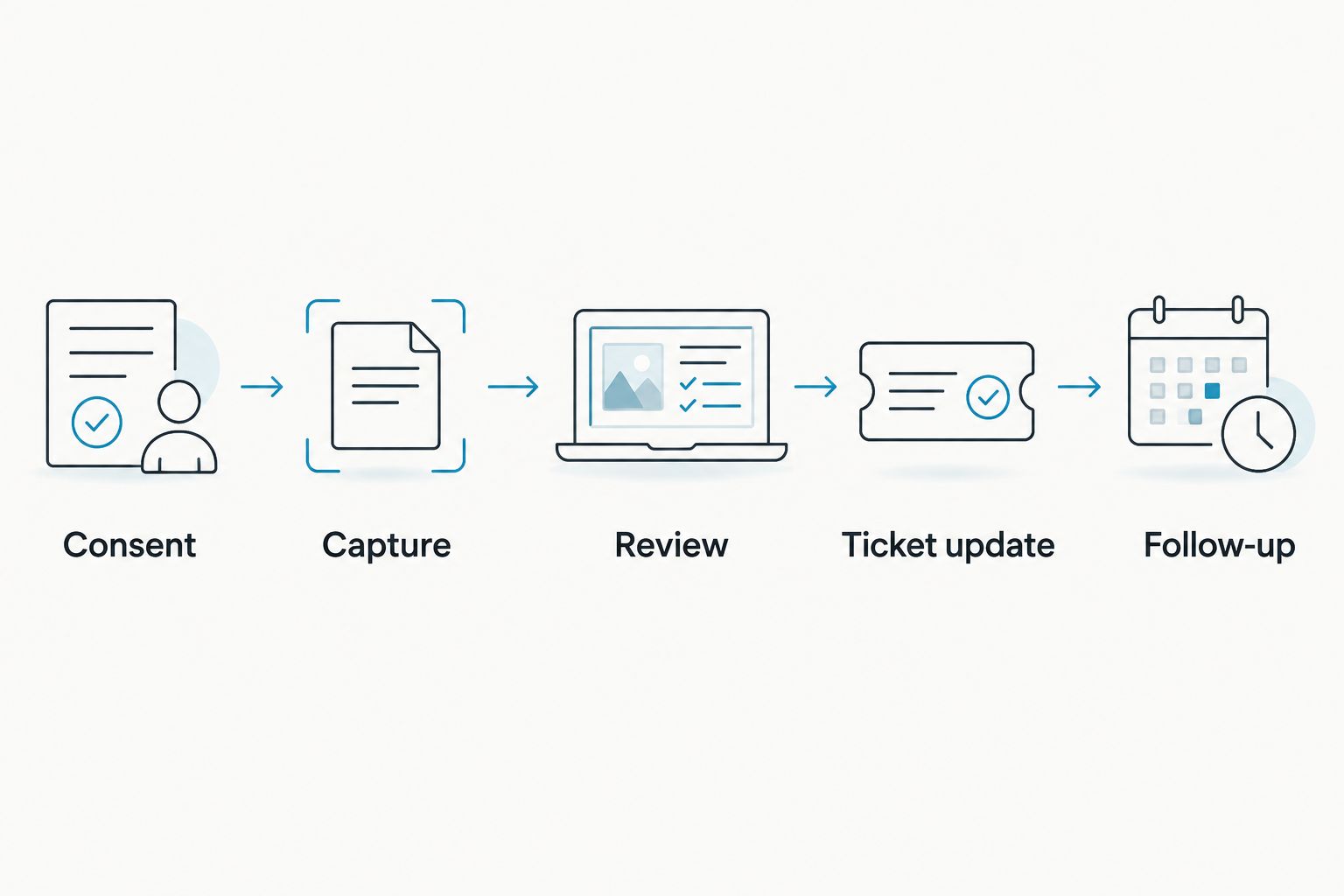
Use this sequence:
- Consent: Follow your approved recording process before capture begins.
- Capture: Use the device or app matched to the interaction.
- Review: Check names, troubleshooting steps, commitments, and unresolved questions against the transcript.
- Ticket update: Place the reviewed information in the correct customer record.
- Follow-up: Assign the next action through your established support workflow.
Keep a clear boundary between spoken commitments and suggested next steps. If an agent promised an update, preserve that commitment. If the summary proposes another troubleshooting step, have an agent approve it before treating it as an instruction.
Integrations run through apps, automation tools such as Zapier, n8n, and Make, webhooks, or the API. Do not assume a native, one-click help-desk integration. Validate the connection, field mapping, and access permissions you intend to use.
Check limits, languages, and recording controls
The plan structure documented by help.omi.me in August 2026 gives Basic 300 listening minutes per month and Plus 1,500 listening minutes per month. Unlimited has no listening-minute cap, and all plans include the same core features.
Reaching a minute cap does not stop recording; audio remains available to manage and export. Separate that behavior from your expectations about processed output when you plan the support workflow.
Language support covers 33 languages, including English, Spanish, French, German, Portuguese, Chinese, Japanese, Korean, Hindi, Russian, and Ukrainian. English is the most accurate. Set the language manually; the system does not automatically switch languages during a conversation.
Speaker labels are available. Speech Profile learns the wearer's voice and names the wearer's lines, but that feature is English-only. Do not confuse it with verified customer identity.
For security review, the verified controls include TLS in transit, AES-256 at rest, full export, and deletion of individual items or everything. Local, cloud-free operation is supported; Local Sync is currently experimental.
Recording consent rules vary by location. Check local law and your organization's requirements; this is not legal advice. Read the guide to recording conversations with a wearable pendant before establishing your team's procedure.
How these recommendations are ranked
This 2026 ranking uses documented capture methods and product capabilities, not a comparative accuracy test. The product facts reflect the verified product and help documentation checked on September 23, 2026.
The wearable ranks first for in-person capture, the Mac app for online troubleshooting, and the phone app for hardware-free evaluation. Each recommendation has a distinct job. None establishes that one setup transcribes speech more accurately than the others.
Which setup should your support team choose?
Start with the phone app if you are undecided. Validate the transcript-to-ticket workflow before choosing hardware, then move capture to the device that fits the interaction.
Choose the pendant for conversations away from the desk. Choose the Mac app for online troubleshooting. If your requirement is direct contact-center recording, automated ticket completion, or shared administrative controls, validate those requirements separately rather than inferring them from transcription features.
FAQ
What's the best AI note taker for customer support teams?
Omi is the best fit here for teams capturing in-person customer conversations. Choose its Mac app for online troubleshooting or its phone app to evaluate note quality without a wearable.
Do support agents need to wear a pendant?
No. The phone and Mac apps record without the wearable, using built-in microphones. Choose a pendant when wearable capture fits the interaction better.
Can it record customer support phone calls?
Phone-call capture requires putting the call on speakerphone and recording the conversation. Do not assume direct access to phone-call audio or a native contact-center connection.
Does the note taker join customer meetings as a bot?
No. Online meetings can be recorded through the Mac app, or through a phone or wearable in the room, without a bot joining the call.
Will generated action items automatically update our support tickets?
Do not assume automatic ticket updates. Establish and validate a handoff through an approved app, automation tool, webhook, or API workflow.
Can it handle multilingual customer support?
The system supports 33 languages, with English the most accurate. Set the language manually because it does not automatically switch languages mid-conversation.
What happens when the listening-minute cap is reached?
Recording does not stop when the minute cap is reached. Audio remains available to manage and export; check the plan's processing limits against your team's workflow.
Is recording customer conversations legal?
Consent rules vary by location, so check local law and your organization's requirements before recording. This article is not legal advice.
One last thing
Test an unresolved case, not just a successful one. The more revealing summary is the one that correctly says the problem remains open, preserves what failed, and identifies the next agreed action. A polished recap that implies resolution is the wrong support note.






