Best AI note takers for executive assistants in 2026


In this article
Best overall: Omi for executive assistants handling in-person conversations and follow-ups. Best for desk-based meetings: Mac app capture. Best without another device: phone-only capture. This 2026 guide ranks capture setups by where you work, what you need to remember, and how you turn conversations into accountable tasks.
- Omi is the best AI note taker for executive assistants who need wearable capture, searchable meeting notes, and action items.
- Choose Mac app capture for desk-based meetings without a meeting bot.
- Choose phone-only capture when you want transcripts and summaries without wearing another device.
- Review owners, deadlines, and permissions before sharing any executive meeting summary.
Why this matters
An executive assistant needs more than a transcript. You need the decision, the person responsible, the deadline, and the detail your executive asks about after everyone has left the room.
Choose the capture method that fits the conversation, not the other way around. A desk-based setup belongs at your computer; a wearable belongs in conversations where you are moving between rooms. Neither removes your responsibility to check what was actually agreed.
This shortlist compares four setups within the same companion-app ecosystem. It is not a claim that unrelated transcription products were tested against each other. The distinction is practical: pick where audio enters the system, then evaluate whether the resulting notes support your work.
What makes the best AI note taker for executive assistants?
For an executive assistant's 2026 workflow, these criteria matter more than a long feature list:
- Capture fit: Record the conversations you actually handle, including in-person discussions and computer-based meetings.
- Usable output: Get transcripts, summaries, action items, and search rather than an audio archive alone.
- Follow-up control: Check task ownership and deadlines before information reaches your executive or colleagues.
- Speaker context: Use speaker labels without treating a label as proof of someone's identity or approval.
- Data control: Check export, deletion, local processing, and organizational permission before recording sensitive material.
- Operational limits: Understand listening allowances, language settings, and the difference between offline capture and later processing.
A useful evaluation starts with a real meeting you are permitted to record. Compare the transcript with your own decision notes. Check names, commitments, and exceptions—not just whether the summary reads smoothly.
Executive assistant note-taking setups at a glance
The 2026 ranking below separates use cases rather than pretending every setup serves the same meeting. All four routes lead into the companion app; their main difference is how you capture audio.
| Rank and setup | Best for | Standout feature | Key limitation |
|---|---|---|---|
| 1. Wearable pendant | In-person conversations across a moving workday | Wearable capture feeding transcripts, summaries, tasks, and memories | Wearing a recorder does not remove consent requirements |
| 2. Phone-only capture | Assistants who do not want another device | Recording through the phone's built-in microphone | You must put the phone where it captures the conversation |
| 3. Mac app capture | Desk-based online meetings | Recording without a meeting bot joining the call | This capture route is Mac-specific |
| 4. Existing Limitless Pendant with the companion app | Assistants who already own that pendant | Reuses supported wearable hardware | A compatibility route, not a reason to change hardware |
1. Omi: best AI note taker for mobile executive support
The wearable captures what you say and hear, then turns conversations into transcripts, summaries, action items, and memories. You can wear it around your neck, on your wrist with the separately sold band, or under a shirt.
Best for: Executive assistants whose work includes in-person briefings, office conversations, and meetings away from a computer.
The strongest reason to choose the pendant is the capture position. You can participate in a conversation without making your phone the center of the interaction. That does not make recording invisible or permission automatic: explain recording and follow your organization's rules.
Wearable pendant pros:
- Captures conversations through a device you wear rather than hold.
- Produces searchable transcripts, summaries, action items, and memories.
- Offers neck and wrist wearing options for different working preferences.
- Includes a charger in the box.
Wearable pendant cons:
- Requires you to wear and manage a separate device.
- Phone calls require speakerphone capture, not an assumed direct call-recording connection.
- Recording permissions still apply when the device sits under clothing.
For executive support, inspect the action items before treating them as assignments. A discussion about a possible introduction is not the same as an instruction to send one. Keep the transcript available when that distinction matters.
Verdict: Buy the pendant if in-person capture is the missing part of your workflow.
2. Phone-only capture: best for avoiding extra hardware
The companion app works without the wearable. On iPhone or Android, you can record through the phone's built-in microphone and use the conversation outputs without adding another device to your day.
Best for: Executive assistants who want to evaluate the note-taking workflow before choosing wearable hardware.
Put the phone where it can capture the speakers and make recording explicit. This setup suits a planned discussion where you can place the phone deliberately; it is less convenient when conversations happen while you move around.
Phone-only capture pros:
- Works without the pendant.
- Supports both iPhone and Android.
- Lets you evaluate transcripts, summaries, and task output before changing how you wear or carry equipment.
Phone-only capture cons:
- Requires deliberate microphone placement.
- Uses the phone as the recording device during the conversation.
- Phone-call capture requires speakerphone rather than an assumed direct connection to call audio.
Do not make your first evaluation a sensitive leadership discussion. Use an approved conversation with clear speakers and known decisions, then check whether the output preserves the distinctions you need. Test retrieval too: a useful record is one you can find when someone asks for it later.
Verdict: Buy into the phone-only workflow first if you do not yet need wearable capture.
3. Mac app capture: best for desk-based online meetings
The Mac app records online meetings without joining as a bot. For Zoom, Meet, and Teams, the supported approaches include recording from the Mac app or capturing the room through the phone or wearable.
Best for: Executive assistants who spend their meeting time at a Mac and want capture without another participant appearing as a recording bot.
No bot does not mean no disclosure. Treat the recording as an organizational decision, tell participants as required, and confirm that your chosen setup captures the audio you need before the meeting begins.
Mac app capture pros:
- Records through the computer-based workflow.
- Does not require a meeting bot to join the call.
- Works without the wearable through the Mac's built-in microphone.
Mac app capture cons:
- Does not provide a Windows desktop capture route in this recommendation.
- A computer-based setup does not follow you into conversations away from the desk.
- Absence of a bot is not evidence that recording is permitted.
Keep the distinction between capturing a discussion and publishing its record. An internal preparation call and an external board conversation need different sharing decisions, even if the recording method is identical. Review the summary's audience before you distribute it.
Verdict: Buy into Mac app capture when desk-based meetings are your main source of follow-up work.
4. Existing Limitless Pendant: best for reusing supported hardware
Existing Limitless Pendant owners can pair their device with the companion app. This recommendation is about supported hardware reuse, not a claim that every device has identical behavior or recording controls.
Best for: Executive assistants who already own a Limitless Pendant and want to evaluate another conversation-management workflow.
Start with pairing and a permitted sample conversation. Confirm that the recording reaches the app and that the resulting transcript, summary, and tasks meet your needs before relying on the setup for executive support.
Existing-pendant route pros:
- Provides an app-compatibility route for an already-owned pendant.
- Lets you evaluate a different workflow without making hardware replacement the first step.
- Keeps the decision focused on useful output rather than another device purchase.
Existing-pendant route cons:
- Requires an existing compatible device.
- App compatibility does not establish identical hardware capabilities.
- This guide does not establish battery performance or hardware reliability for that pendant.
Separate the hardware test from the output review. First establish that capture works in your environment; then inspect names, decisions, and task wording. A successful pairing is the start of the evaluation, not the result.
Verdict: Hold your existing hardware while you evaluate the supported app pairing.
Turn captured conversation into executive-ready follow-up
For a 2026 executive-assistant workflow, use a review sequence that separates recording from approval. The app supplies transcripts, summaries, action items, search, and Ask Omi AI chat; you remain responsible for deciding what becomes an official instruction.
Capture
Confirm permission, choose the recording route, and set the conversation language manually. The app supports 33 languages, but it does not automatically switch languages mid-conversation; English is the most accurate supported language.
Review
Check names, decisions, qualifications, and speaker attribution against the transcript. Speaker labels help organize a conversation, while the English-only Speech Profile learns the wearer's voice so their lines receive their name.
Assign
Separate a proposed task from an accepted commitment. Verify the owner and deadline, and leave unresolved details explicit instead of filling them in from context.
Share
Send the information each recipient needs, not the entire conversation by default. A short approved action list and a full transcript serve different purposes.
Retrieve
Use search and saved conversation records when your executive asks what was decided. Return to the source before repeating an uncertain detail as fact.
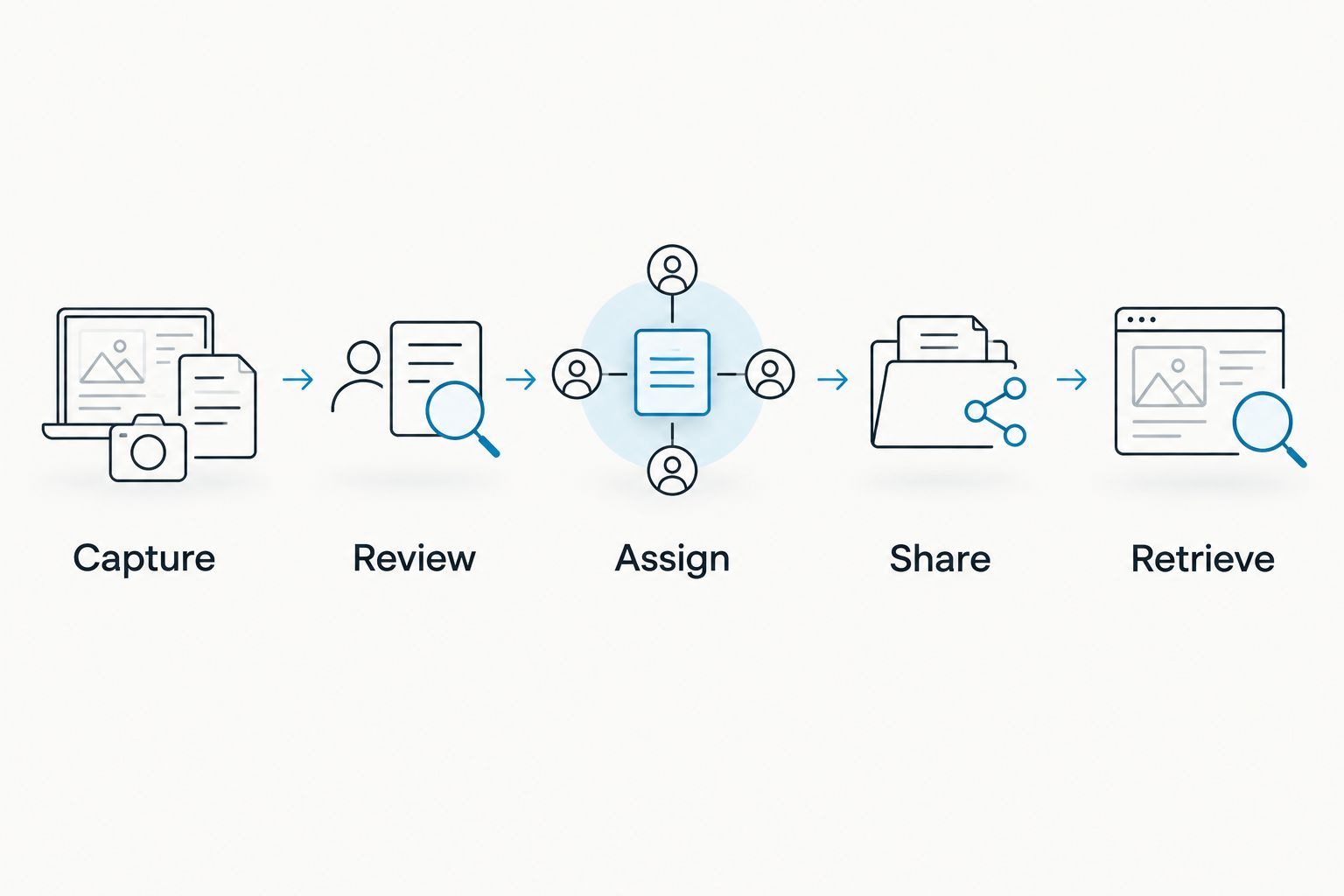
The useful checkpoint is simple: can another person act on the follow-up without guessing? If not, resolve the ambiguity before sending it. A polished summary is not a substitute for a clear commitment.
Check listening allowances and data handling
The August 2026 plan documentation lists Basic at 300 listening minutes per month and Plus at 1,500 listening minutes per month. Unlimited has no minute cap. All plans share the same core features, so compare the allowance with your recording workload rather than assuming a different plan changes the basic output.
Reaching a minute cap does not stop recording; audio remains available to manage and export. Keep that distinction clear when planning your meeting workflow. Recording continuity and the listening allowance are not the same thing.
Offline recording is supported. Local Sync is experimental and stores conversations on the phone without internet before syncing later; do not treat an experimental feature as an unquestioned dependency for a critical meeting.
The platform supports full export, deletion of individual items or everything, and local cloud-free operation. Its hardware, firmware, and software are open source. These are controls to evaluate with your organization, not blanket permission to record confidential discussions.
Consent rules vary by location; check local law and your organization's policy. For sensitive executive material, establish who can record, who can access the output, and when records should be deleted before capture begins. This is not legal advice.
How the setups are ranked
This 2026 ranking prioritizes capture fit, usable output, follow-up control, speaker context, data control, and operational limits. The pendant ranks first for assistants handling conversations away from a desk; phone-only and Mac capture take separate slots because their working environments differ.
The ranking uses the stated product capabilities and plan documentation, not a fabricated accuracy test. No transcription score or time-saving percentage is claimed. The existing-pendant route ranks last because it addresses a narrower situation: reusing hardware you already own.
Which setup should you choose?
Omi is best for executive assistants who need wearable conversation capture and searchable follow-up notes. Choose the pendant when in-person discussions create the information gaps you need to close.
Choose phone-only capture if your first decision is whether the outputs help at all. Choose Mac app capture when your work centers on computer-based meetings. If you already own a supported pendant, test the app pairing before deciding to replace it.
For your 2026 evaluation, judge the complete loop: capture, review, assignment, sharing, and retrieval. A transcript that never becomes a reliable follow-up is unfinished work.
FAQ
What's the best AI note taker for executive assistants?
Omi is best for executive assistants who need wearable capture, searchable transcripts, summaries, and action items. Phone-only capture suits assistants who do not want another device, while Mac app capture fits desk-based meetings.
Can I use the app without buying a pendant?
Yes, the phone and Mac apps can record through their built-in microphones without the wearable. Choose the capture route that fits where your conversations happen.
Does the note taker join Zoom or Teams as a bot?
No, Omi does not join meetings as a bot. Record through the Mac app, or capture the room through the phone or wearable, and follow recording permission requirements.
Can it identify who said what in a meeting?
The app provides speaker labels. Its English-only Speech Profile learns the wearer's voice so the wearer's lines receive their name; review attribution before assigning commitments.
Can an executive assistant record phone calls with it?
Phone-call capture uses speakerphone so the device or app can record the audible conversation. Consent rules vary by location, so check local law and organizational policy before recording.
Does recording stop when I reach the monthly minute cap?
No, reaching the minute cap does not stop recording. Audio remains available to manage and export; Basic includes 300 listening minutes per month and Plus includes 1,500 listening minutes per month.
Does the app automatically switch between meeting languages?
No, set the language manually before the conversation. The app supports 33 languages, with English the most accurate, and does not automatically switch languages mid-conversation.
One last thing
The most useful detail to check is often the qualifier. An executive saying to proceed only after approval has not authorized immediate action. Preserve the condition in the task, not just the verb.
Before sending your next follow-up, read each action item as if you were the recipient. If you cannot tell what is authorized, who owns it, and what remains unresolved, return to the conversation record.






