Best AI note takers for insurance agents in 2026


In this article
Best overall: Omi for insurance agents who split their day between client visits and online meetings. Best for live transcription: Otter.ai. Best for meeting archives: Fireflies.ai. Best for desktop notes: Granola. This 2026 guide ranks each option by capture method, usable notes, and the work left after a conversation.
- Omi is the best AI note taker for insurance agents who need wearable capture alongside phone and desktop recording.
- Choose Otter.ai for live transcription, Fireflies.ai for meeting archives, or Granola for desktop notes.
- Check recording consent, agency approval, data handling, and export before capturing client conversations.
- Review policy details and commitments against the source before sending follow-ups or updating client records.
Why this matters
An insurance conversation can contain a coverage question, a changed circumstance, and a promise to send documents. A tidy summary is not enough. You need to distinguish what the client said from what you agreed to do.
Choose around your actual workday. A meeting assistant that fits scheduled video calls is not automatically the right recorder for an appointment across a desk or a conversation during a site visit.
The best choice in 2026 is the one that captures your approved conversations and leaves you with verifiable next steps. None of these tools replaces your judgment, your agency's recordkeeping process, or the policy documents themselves.
What makes the best AI note taker for insurance agents?
These criteria determine the ranking. Transcription alone does not decide it.
- Capture fit: Does the tool cover your mix of in-person appointments, online meetings, and spoken notes?
- Reviewable source: Can you check the conversation behind a summary before relying on a detail?
- Useful outputs: Do the notes separate questions, decisions, and follow-up work?
- Data control: Check export, deletion, access, and processing arrangements against agency requirements.
- Recording friction: Consider whether you want a wearable, a phone, a desktop app, or a meeting assistant.
- Handoff effort: Assess how much editing and transfer your client records require after capture.
For your 2026 shortlist, make agency approval a pass-or-fail gate rather than another feature to score. A convenient recorder that your organization prohibits is not a usable recommendation.
Best insurance note takers at a glance
| Item | Best for | Standout feature | Key limitation |
|---|---|---|---|
| Omi | Mixed in-person and online work | Wearable capture plus phone and Mac recording | Phone calls require speakerphone capture; language selection is manual |
| Otter.ai | Following live transcripts | Live transcription with meeting summaries | A transcript-centered workflow still needs review and record preparation |
| Fireflies.ai | Reviewing recorded meetings | Searchable meeting transcripts and summaries | Its meeting-focused workflow is not a substitute for every field interaction |
| Granola | Combining desktop notes with transcription | Notes supported by meeting transcription | A desktop-first workflow does not fill the wearable-capture role |
These are workflow recommendations, not measured accuracy rankings. Compare them using the same approved conversation before committing your client-record process to one.
1. Omi: best AI note taker for mixed-location insurance work
Omi is best for insurance agents who need conversation capture across client visits, phone-based recording, and Mac meetings. The wearable captures what you say and hear; the companion app produces transcripts, summaries, tasks, and memories. You can search across captured material and ask questions through its chat interface.
The hardware is not mandatory. The phone or Mac app can record through its built-in microphone, and apps are available for iPhone, Android, Mac, and web. For online meetings, capture from the Mac app or record through the phone or wearable in the room; the service does not join as a meeting bot.
Omi pros:
- Wearable capture fits conversations away from your desk.
- Summaries and action items sit alongside searchable transcripts.
- Full export and deletion support control over captured material.
- Open-source hardware, firmware, and software provide visibility beyond a closed application.
Omi cons:
- Phone calls require speakerphone recording rather than an automatic call-capture assumption.
- You must select the language manually; it does not switch languages mid-conversation.
- Experimental Local Sync needs evaluation before you depend on that offline workflow.
The published plan structure, documented in August 2026, includes Basic with 300 listening minutes per month, Plus with 1,500 minutes per month, and Unlimited without a minute cap. Core features are the same across plans. Reaching a cap does not stop recording; audio remains available to manage and export.
Support covers 33 languages, with English identified as the most accurate. That is language coverage, not a guarantee that names, policy terminology, or spoken figures will be transcribed correctly.
Best for: Agents whose appointments move between the office, client locations, and online meetings.
Verdict: Buy for mixed-location capture, after your agency approves the recording and data workflow.
2. Otter.ai: best insurance note taker for live transcription
Otter.ai centers on transcription, with live text and meeting summaries. Choose this workflow when you want to follow the conversation in writing while it happens and return to the transcript afterward.
For an insurance agent, the useful distinction is live review versus after-the-fact review. Seeing the transcript during a meeting gives you an opportunity to notice an unfamiliar name or phrase and clarify it with the speaker. It does not make every line accurate.
Otter.ai pros:
- Live transcription supports a text-first meeting workflow.
- Meeting summaries provide a shorter starting point for review.
- A transcript lets you revisit wording rather than rely entirely on handwritten notes.
Otter.ai cons:
- Transcript errors still require correction before details enter client records.
- A meeting summary is not an agency-specific insurance file note.
- Live text can compete for your attention if you keep checking it while the client speaks.
Make your evaluation practical. Ask whether the resulting note clearly separates a client's request from your explanation and from an agreed next step. Do not judge the tool only by how readable the summary looks.
Also check how the proposed recording method fits your appointments. Confirm the current capture options and organizational controls directly rather than assuming every meeting type works the same way.
Best for: Agents who want a visible transcript during scheduled conversations.
Verdict: Buy for live transcription; skip it as a decision based solely on summary polish.
3. Fireflies.ai: best insurance note taker for meeting archives
Fireflies.ai records and transcribes meetings and produces summaries. Its searchable meeting records suit a workflow where you return to prior conversations rather than treat each meeting note as a standalone document.
Consider this option when scheduled meetings generate the material you need to revisit. Your evaluation should focus on finding a specific discussion, checking its context, and preparing an appropriate record—not simply accumulating recordings.
Fireflies.ai pros:
- Searchable transcripts support later review of meeting discussions.
- Summaries help you identify material that needs closer attention.
- Recorded meeting content provides a source to check when wording matters.
Fireflies.ai cons:
- Meeting capture does not automatically cover informal conversations away from that setup.
- An archive needs deliberate access and retention decisions.
- Moving a summary into your approved client record still requires review.
Test retrieval with a realistic question: can you locate the discussion about requested documents without confusing it with a later conversation? Then check whether you can tell who requested what and whether anyone agreed to a deadline.
Before adopting a shared archive, confirm current permissions, export, deletion, and processing arrangements with the vendor and your agency. Do not infer organizational suitability from the presence of a search box or a recording feature.
Best for: Agents and teams whose review work starts with a history of scheduled meetings.
Verdict: Buy for searchable meeting records, not as a blanket replacement for field capture.
4. Granola: best insurance note taker for desktop notes
Granola combines meeting transcription with notes you write yourself. That makes it a different choice from a workflow built primarily around reviewing a full transcript after every appointment.
Choose this approach if you already take short notes during desktop meetings and want transcription to support them. Your own notes can mark the moments that need attention, while the captured conversation supplies material for review.
Granola pros:
- Combines your written notes with transcription.
- Fits agents who prefer a concise meeting record over transcript-first review.
- Keeps deliberate note-taking part of the workflow rather than removing it entirely.
Granola cons:
- Desktop-centered capture is not the same as wearing a recorder during client visits.
- Your note-taking choices can shape what receives attention in the final record.
- Generated notes still need checks against the conversation and relevant documents.
Evaluate Granola with the kind of meeting you actually conduct. Take your normal notes, then inspect whether the resulting record preserves unresolved questions as questions rather than turning them into settled decisions.
Do not choose it merely because a short output looks cleaner. A concise record is useful only if it retains the distinctions your follow-up requires.
Best for: Desk-based agents who want their own notes supported by transcription.
Verdict: Buy for desktop note-taking; skip it if wearable capture is your main requirement.
How the ranking works
This 2026 ranking prioritizes capture fit, reviewable source material, useful outputs, data control, recording friction, and handoff effort. It does not claim a controlled transcription test or an insurance-specific accuracy score.
The default recommendation favors mixed-location work. If your appointments happen almost entirely at a computer, live transcription, meeting search, or desktop note support deserves more weight than wearable capture.
Before recording: consent and agency approval
Recording capability is not permission to record. Consent rules vary by location; check local law and your agency's requirements before capturing client conversations. This is not legal advice.
Use the existing guide to recording conversations with a wearable for the consent discussion. Separately, confirm what your organization permits you to record, where records belong, and who can access them.
Security claims do not answer every operational question. Ask about your intended configuration, required agreements, retention, deletion, and exports. Keep those decisions separate from the convenience of the device or app.
Turn a conversation into a usable client record
Use the same review sequence regardless of which recorder you choose. The goal is a checked record and a clear next action—not a longer transcript.
- Confirm consent: Establish permission and follow your approved recording procedure.
- Capture context: Record the purpose of the conversation and identify the participants.
- Check details: Verify names, dates, policy references, and commitments against the source and relevant documents.
- Assign actions: Give each follow-up an owner and confirm any stated deadline.
- Save records: Transfer the reviewed note through your approved process and apply your retention rules.
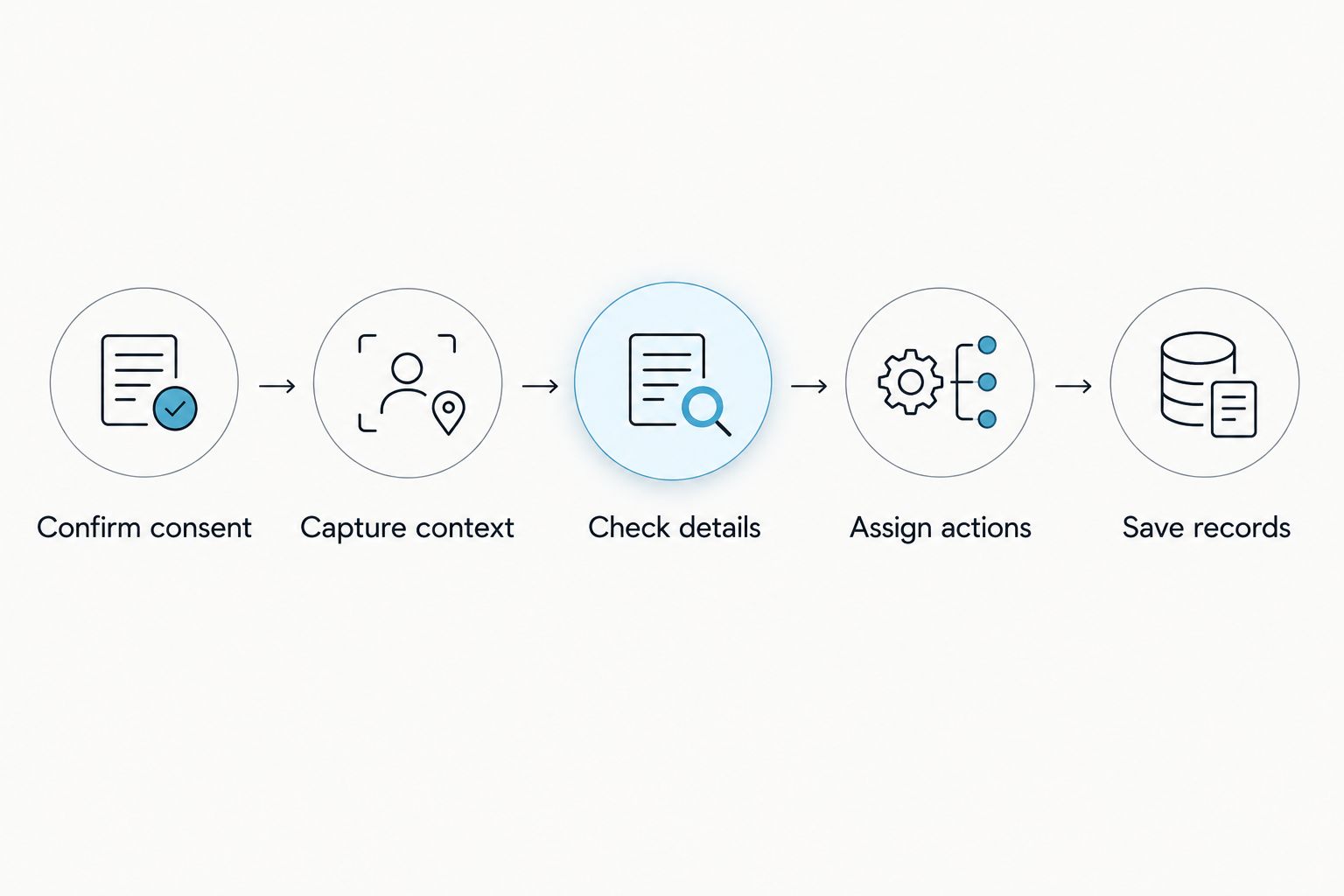
For insurance work, inspect certainty as carefully as wording. A question about whether coverage applies must remain a question unless the conversation and supporting documents establish an answer. Do not let a smooth summary erase that distinction.
Which insurance note taker should you choose?
Choose Omi for insurance note-taking across in-person appointments and desktop meetings. Choose Otter.ai when live transcription drives your decision, Fireflies.ai when meeting retrieval matters most, or Granola when your own desktop notes are the starting point.
Before committing in 2026, try the intended workflow with an approved, non-sensitive conversation. Check capture, correction, export, and follow-up preparation—not just the summary screen.
The deciding question is simple: does the tool reduce your note-preparation work without weakening the checks your client records need?
FAQ
What's the best AI note taker for insurance agents in 2026?
Omi is the strongest default here for agents who combine in-person appointments with phone and desktop recording. Otter.ai, Fireflies.ai, and Granola suit more specific live-transcript, meeting-archive, and desktop-note workflows.
Can an AI note taker record my insurance client phone calls?
Recording depends on the tool and setup; do not assume automatic phone-call capture. The pendant workflow described here requires putting the call on speakerphone and recording it, subject to consent and agency approval.
Can I use a note-taking app without buying a pendant?
Yes, the recommended companion app can record using a phone or Mac microphone without the wearable. That lets you evaluate the note-taking workflow before deciding whether wearable capture fits your appointments.
Will an AI note taker automatically update my insurance CRM?
Do not assume automatic CRM updates. Confirm the supported integration path, field mapping, permissions, and review process before connecting client records; an export is not the same as a native integration.
Is it legal to record an insurance appointment?
Consent rules vary by location, so check local law and your agency's requirements before recording. This article does not provide legal advice or establish permission for a particular appointment.
Can generated notes replace checking the policy documents?
No, generated notes do not replace policy documents or professional review. Check coverage statements, exclusions, figures, dates, and commitments before relying on a summary or sending a follow-up.
How should I compare note takers without exposing client information?
Use an approved, non-sensitive conversation to compare the complete workflow. Review the transcript, correct the summary, prepare follow-ups, and test the export before introducing client material.
One last thing
Ask the client to confirm the next action before the conversation ends. State who will send which document and clarify any deadline aloud. That gives the recorder an explicit commitment to capture—and gives you something concrete to verify afterward.






