Best AI note takers for lawyers in 2026


In this article
Best overall: Omi for wearable conversation capture. Best for online meetings: the Mac app. Best without extra hardware: the phone app. This best AI note taker for lawyers 2026 guide compares four capture setups within the same system, with clear limits for confidential work.
- Omi is the best AI note taker for lawyers 2026 pick here for wearable capture and searchable follow-up.
- Choose Mac recording for desktop meetings, phone recording without a wearable, or Apple Watch recording from your wrist.
- Recording permission and firm approval come before client capture; security features do not settle those questions.
- Review names, dates, commitments, and speaker labels before using generated legal meeting notes.
Why this matters
A client conversation is not just a transcript. You need the facts, the unresolved questions, and the next action without turning a generated summary into an unchecked case record. Capture helps you remember; review determines what you rely on.
For a 2026 buying decision, separate recording hardware from the software that organizes the result. A pendant, computer, phone, and watch offer different ways to capture speech. They do not remove your responsibility to decide whether a conversation belongs in a recording system.
Consent rules vary by location; check local law and your firm's requirements before recording. Start with this guide to recording conversations with a wearable pendant. This article is product guidance, not legal advice.
What makes the best AI note taker for lawyers?
Judge the capture setup against these criteria before choosing hardware:
- Recording fit: Match the microphone location to your work: client interviews, desktop meetings, speakerphone calls, or personal dictation.
- Useful output: Look for transcripts, summaries, searchable records, and action items rather than an audio archive alone.
- Data control: Examine export, deletion, storage configuration, and who can access client material.
- Reviewability: Keep a way to check important statements against the underlying conversation. A tidy summary is not enough.
- Permission fit: Confirm that the recording method fits the setting, participants, and applicable requirements.
- Operational limits: Check language selection, listening allowances, connectivity behavior, and the steps needed to capture each meeting type.
For lawyers evaluating tools in 2026, the strongest choice is the setup you can use correctly and review consistently. Convenience matters only after permission and data handling are settled.
Lawyer note-taking setups at a glance
These are four capture routes within one app system, not four independently tested competing services. The ranking prioritizes practical fit by setting rather than claiming a measured accuracy winner.
| Rank and option | Best for | Standout feature | Key limitation |
|---|---|---|---|
| 1. Wearable pendant | In-person client conversations | Captures spoken interactions without holding a phone | Requires wearing a separate device and managing recording permission |
| 2. Mac app | Desktop meetings | Records through the computer without joining as a meeting bot | Computer-based capture does not replace a portable setup |
| 3. Phone app | Starting without another device | Records through the phone's built-in microphone | Speakerphone is required for the documented phone-call method |
| 4. Apple Watch recording | A wrist-based recording workflow | Adds a watch-based capture route | Recording support alone does not establish workflow suitability |
1. Omi: best AI note taker for in-person legal conversations
The wearable captures what you say and hear, while the companion app turns conversations into transcripts, summaries, tasks, and memories. You can wear the device around your neck, on a separately sold wrist band, or under a shirt.
Omi is best for lawyers who want wearable conversation capture with searchable notes and action items. That is a workflow recommendation, not a claim that every client conversation should be recorded.
For an approved client interview, the appeal is straightforward: you can keep your hands free rather than hold a recording phone. Afterward, search the conversation and review the generated follow-up against what was actually said.
Wearable pendant pros:
- Captures in-person speech while leaving your hands free.
- Produces transcripts, summaries, action items, and searchable memories.
- Supports different wearing positions rather than a single placement.
- Provides full export and deletion of individual items or everything.
Wearable pendant cons:
- Adds a physical device to your work routine.
- Requires an explicit decision about when recording is appropriate.
- Does not remove the need to review speaker attribution and legal details.
Do not choose a pendant because hidden capture sounds convenient. A device worn under clothing still needs to fit applicable consent rules and firm policy. Recording placement and recording permission are separate questions.
Best for: Lawyers whose approved recording workflow centers on face-to-face conversations.
Verdict: Buy for an approved in-person capture workflow; skip for settings where recording is prohibited.
2. Mac app: best AI note-taking setup for desktop meetings
The Mac app records through the computer's built-in microphone. For online meetings on Zoom, Meet, or Teams, the documented options include recording from the Mac app or using a phone or wearable in the room; the system does not join calls as a bot.
That makes the Mac route the practical starting point when your legal meetings happen at your desk. You can assess the recording and review process before deciding whether wearable hardware adds anything to your workday.
Mac app pros:
- Records without requiring a wearable.
- Offers a desktop capture route for online meetings.
- Avoids adding a recording bot as a meeting participant.
- Connects capture to transcripts, summaries, and task output.
Mac app cons:
- Ties this capture route to your computer.
- Still requires permission; the absence of a bot is not consent.
- Requires checking that the intended conversation was captured before relying on its notes.
Before using the setup for client material, run an approved practice conversation. Confirm that you can hear the relevant speakers, find the resulting transcript, and correct your working notes when a name or commitment needs clarification.
Best for: Lawyers who conduct their approved recorded meetings from a Mac.
Verdict: Buy into the desktop workflow first if online meetings dominate your day; hold on extra hardware until you need portable capture.
3. Phone app: best AI note-taking setup without extra hardware
The phone app works on iPhone and Android and records from the built-in microphone without the wearable. For phone calls, the documented method is to put the call on speakerphone and let the system record.
This is the clearest starting point if you want to assess conversation-to-notes output with a device you already use. It also gives you a route for spoken recollections after a meeting, provided your handling of that material follows firm requirements.
Phone app pros:
- Works without a separate recording device.
- Supports both iPhone and Android.
- Captures through the phone's built-in microphone.
- Provides a documented speakerphone method for calls.
Phone app cons:
- The documented call method requires speakerphone, not silent background call interception.
- Phone placement becomes part of the recording setup.
- Speakerphone requires a suitable private environment for confidential discussions.
Do not confuse easy setup with automatic suitability. A phone on a conference table and a phone playing a client call aloud create different practical considerations. Decide where you will record before deciding how you will summarize.
Best for: Lawyers evaluating recorded notes before adding dedicated hardware.
Verdict: Buy into the phone workflow for an initial evaluation; skip speakerphone capture wherever others could overhear confidential material.
4. Apple Watch recording: best for a wrist-based capture workflow
Apple Watch recording is another supported capture route. Consider it when recording from your wrist fits your routine better than holding a phone or wearing a pendant.
The recommendation is deliberately narrow. Recording support does not establish every detail of connectivity, controls, or storage behavior, so assess the actual workflow before making it part of client work.
Apple Watch recording pros:
- Provides a wrist-based recording option.
- Offers an alternative to pendant placement.
- Lets watch users evaluate another capture route within the same system.
Apple Watch recording cons:
- Depends on using an Apple Watch.
- Requires workflow checks rather than assumptions about standalone behavior.
- Does not resolve consent, confidentiality, or review requirements.
Test this route with non-client material first. Confirm how you start capture, locate the result, and review the output before deciding whether the convenience is meaningful for your practice.
Best for: Apple Watch users who specifically want wrist-based recording.
Verdict: Hold until you have checked the recording and retrieval workflow with non-client material.
Check these limits before choosing a setup
The verified 2026 plan structure gives Basic 300 listening minutes per month and Plus 1,500 listening minutes per month. Unlimited has no listening-minute cap. Every plan has the same core features, and reaching a minute cap does not stop recording; audio remains available to manage and export.
Language selection also needs attention. The system supports 33 languages, with English identified as the most accurate. Set the language manually: it does not automatically switch languages mid-conversation.
Speaker labels help organize dialogue, but review the attribution of important statements. Speech Profile learns the wearer's voice in English only. Neither a speaker label nor a polished summary should become an unchecked statement in a client file.
For connectivity, offline recording is supported. Local Sync is experimental: it stores conversations on the phone without internet and syncs them later. Do not treat that experimental feature as a substitute for reviewing your chosen storage configuration.
Turn a recording into a reviewed legal note
Use this 2026 evaluation workflow before adopting any capture route for approved client work. Keep the first trial free of confidential client material so you can inspect the process without introducing unnecessary exposure.
- Approve capture. Check local consent rules, firm policy, participant permission, and whether the setting permits recording.
- Choose input. Select the pendant, Mac, phone, or watch based on where the conversation happens.
- Review transcript. Check names, dates, amounts, speaker attribution, and statements that affect your understanding of the matter.
- Confirm tasks. Verify each action item, responsible person, and deadline against the conversation.
- Control retention. Decide what to export, retain, or delete under your firm's requirements.
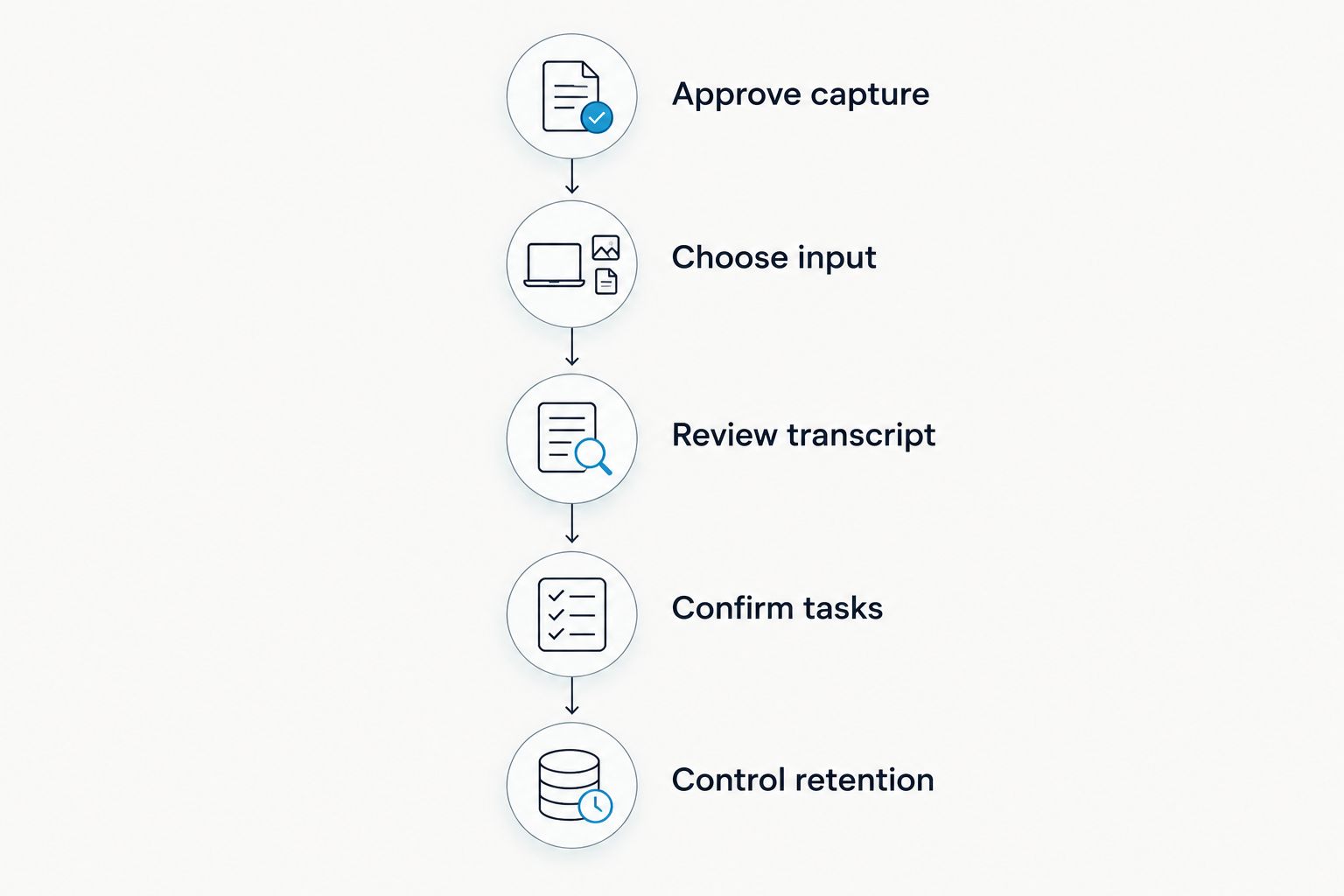
The useful test is not whether a summary reads well. It is whether you can locate the supporting conversation, identify a mistake, and keep the corrected working record under appropriate control.
Security features are not recording permission
Omi lists SOC 2 and HIPAA, TLS encryption in transit, and AES-256 encryption at rest. It also supports cloud-free local operation, full export, and deletion. Hardware, firmware, and software are open source.
Those are relevant product facts, not a legal conclusion about your firm's use. A security credential does not authorize a recording or settle how client material should be handled. Review access, storage, retention, and your intended configuration before introducing confidential content.
Keep that assessment separate from microphone convenience. The best capture position is still the wrong choice when the conversation should not be recorded.
How the setups were ranked
The ranking follows the criteria above: recording fit, useful output, data control, reviewability, permission fit, and operational limits. Wearable capture comes first for in-person work; Mac capture fits desktop meetings; phone capture avoids another device; watch capture serves a narrower wrist-based preference.
This 2026 guide does not claim comparative accuracy scores or independent legal certification. The recommendations distinguish supported capture methods, not measured performance between competing brands.
Which setup should you choose?
Choose the pendant if approved in-person conversation capture is your main need. Choose the Mac app if your work happens on desktop calls. Start with the phone app when you want to assess the output before adding hardware.
For an undecided lawyer, the next move is a non-client trial, not immediate firm-wide adoption. Capture an approved practice conversation, review its notes, and decide whether the result fits your existing matter-handling process.
FAQ
What's the best AI note taker for lawyers in 2026?
Omi is the recommended option here for lawyers seeking wearable conversation capture with searchable transcripts and action items. This guide compares its supported capture setups, not independently tested competing services.
Can I record client conversations with an AI note taker?
Recording permission depends on the location, setting, participants, and applicable requirements. Check local law and firm policy before recording; this article is not legal advice.
Do I need a pendant to use the note-taking app?
No, the phone and Mac apps can record through their built-in microphones without the wearable. Choose hardware only when it improves your approved capture workflow.
Does the recorder join Zoom or Teams as a bot?
No, the system does not join online meetings as a bot. Supported methods include the Mac app or recording with a phone or wearable in the room.
Can I use it to record a phone call?
The documented phone-call method is to put the call on speakerphone and let the system record. Check recording permission and use a setting where confidential audio cannot be overheard.
Can generated notes replace my review of the conversation?
No, review important names, dates, speaker labels, commitments, and action items before relying on generated notes. Treat the output as material to verify, not an automatically approved legal record.
What happens when I reach a listening-minute limit?
Reaching a plan's listening-minute cap does not stop recording. Audio remains available to manage and export, while the plans share the same core features.
One last thing
Before your first client recording, write down when you will choose not to record. A clear stop rule is more useful than another summary feature: it makes permission and confidentiality part of the workflow rather than an afterthought.






