Best AI note takers for property managers in 2026


In this article
Best overall: Omi for property walkthroughs. Best without a wearable: phone-only capture. Best for desk-based owner meetings: Mac capture. This 2026 guide compares three setups within the same note-taking system, with clear limits for each—not an unsupported ranking of competing products.
- Omi is the best AI note taker for property managers who need wearable capture during walkthroughs.
- Phone-only capture suits managers who want transcripts and action items without wearing a device.
- Mac capture suits remote owner meetings; it records without joining calls as a bot.
- Review unit numbers, contractor commitments, and deadlines before turning generated notes into work orders.
Why this matters
A resident describes a leak. A contractor explains the repair. An owner approves the next step. Your notes need to preserve who said what—not just produce a tidy paragraph.
Omi is best for property managers who need searchable notes from conversations while moving between properties. It captures spoken interactions and produces transcripts, summaries, tasks, and memories. That supports the handoff from conversation to follow-up; it does not make the resulting summary an approved work order.
For your 2026 shortlist, start with where conversations happen. A wearable, a phone, and a desktop app solve different capture problems, even when they feed the same system.
What makes the best AI note taker for property managers
Use these criteria before choosing a setup:
- Capture fit: Match the recording method to walkthroughs, resident conversations, or online meetings. A desk setup is not a substitute for something you can carry through a building.
- Useful outputs: Look for transcripts, summaries, and action items. You need the original wording as well as the shortened version.
- Speaker identification: Speaker labels help separate a resident's report from a contractor's recommendation. Verify names before attributing a commitment.
- Search and export: You need to find earlier conversations and move records out of the system. Export matters when your operational records live elsewhere.
- Recording controls: Understand deletion, local processing, and consent requirements. A recording feature is not permission to record.
- Workflow boundaries: Generated tasks still need a property reference, an accountable person, and a verified deadline before you act on them.
Property-management note-taking setups at a glance
These are three ways to use one system, not three independent software products. Choose by setting rather than treating the table as a feature contest.
| Setup | Best for | Standout feature | Key limitation |
|---|---|---|---|
| Wearable capture | Walkthroughs and contractor conversations | Captures what you say and hear while worn | Phone calls require speakerphone recording |
| Phone-only capture | Managers who do not want a wearable | Records through the phone's built-in microphone | You must position the phone for the conversation |
| Mac capture | Remote owner and team meetings | Records meetings without a bot joining | Does not replace mobile capture around properties |
There is no reason to wear hardware for a workday spent entirely at a computer. Equally, a desktop recording workflow does not follow you into a maintenance discussion in a hallway.
1. Omi: best AI note taker for property walkthroughs
The wearable captures what you say and hear, then turns conversations into searchable transcripts, summaries, action items, and memories. You can wear it around your neck, on your wrist with the separately sold band, or under a shirt.
Best for: Property managers whose important conversations happen while walking, inspecting, or speaking with contractors on site.
Wearable capture pros
- Wearable placement keeps the capture device with you during a walkthrough.
- Searchable transcripts preserve more detail than a summary alone.
- Speaker labels help distinguish participants in the conversation.
- Full export lets you move captured information outside the app.
Wearable capture cons
- Phone calls need speakerphone audio; this is not direct phone-call capture.
- Language selection is manual, with no automatic switching mid-conversation.
- Recording under a shirt does not remove the need to address consent.
For a walkthrough, state the property reference and unit before discussing the problem. Then say the location, observed issue, and agreed next step aloud. This gives the transcript context you would otherwise need to reconstruct later.
Do not turn an observation into a diagnosis. A transcript of someone saying a ceiling is stained does not establish the cause of the stain.
Verdict: Buy for mobile, in-person conversation capture—not as a substitute for inspection judgment.
2. Phone-only capture: best without a wearable
The companion app works without the pendant. On iPhone or Android, you can record through the phone's built-in microphone and use the resulting transcripts, summaries, and tasks.
Best for: Managers who want to start with the phone they already carry, especially for seated resident or vendor conversations.
Phone-only capture pros
- No wearable is required to record through the app.
- iPhone and Android apps support the workflow.
- Conversation outputs include searchable transcripts and action items.
- You can evaluate the note-review process before choosing hardware.
Phone-only capture cons
- You must deliberately place and manage the phone during the conversation.
- A phone recording does not provide visual evidence of a property's condition.
- Telephone conversations still require speakerphone capture.
For your 2026 evaluation, use a routine conversation where recording is permitted. Review whether the transcript preserves names, property references, and the exact next step. Judge the correction work, not just how readable the summary looks.
Keep photographs and condition documentation in your established inspection process. Spoken notes add context; they do not replace an image of the defect or a completed inspection record.
Verdict: Buy into the phone-only workflow first if wearing a device does not fit your day.
3. Mac capture: best for remote owner meetings
The Mac app records through the computer and supports capturing Zoom, Google Meet, and Microsoft Teams meetings. Omi does not join calls as a bot.
Best for: Managers handling owner updates, internal planning, and vendor discussions from a Mac.
Mac capture pros
- Captures online meetings without a meeting bot joining.
- Produces transcripts, summaries, and action items from discussions.
- Search helps you revisit earlier conversations.
- Desktop capture works without wearing the pendant.
Mac capture cons
- It is a desk-based setup, not the practical choice for walking a property.
- Recording without a bot does not remove consent obligations.
- Generated action items still need review before becoming operational instructions.
Use this setup when the meeting itself is the work setting. For an owner update, distinguish an issue discussed, a decision made, and an action approved. Those are different records.
If an owner asks for another estimate, do not summarize that as approval to proceed with repairs. Check the original wording before passing instructions to a contractor.
Verdict: Buy into Mac capture for remote meetings; skip it as your only setup if most conversations happen on site.
How these setups were ranked
The ranking prioritizes capture fit, useful outputs, speaker identification, export, recording controls, and workflow boundaries. Wearable capture takes the default position because it fits conversations away from a desk; phone-only and Mac capture win their own settings.
This 2026 ranking does not claim that one setup transcribes more accurately than the others. The distinction is where you record and how much device handling the setting requires.
Choose the capture method before comparing the summary. A polished output is not useful when the relevant conversation was never captured.
Turn a conversation into an accountable next step
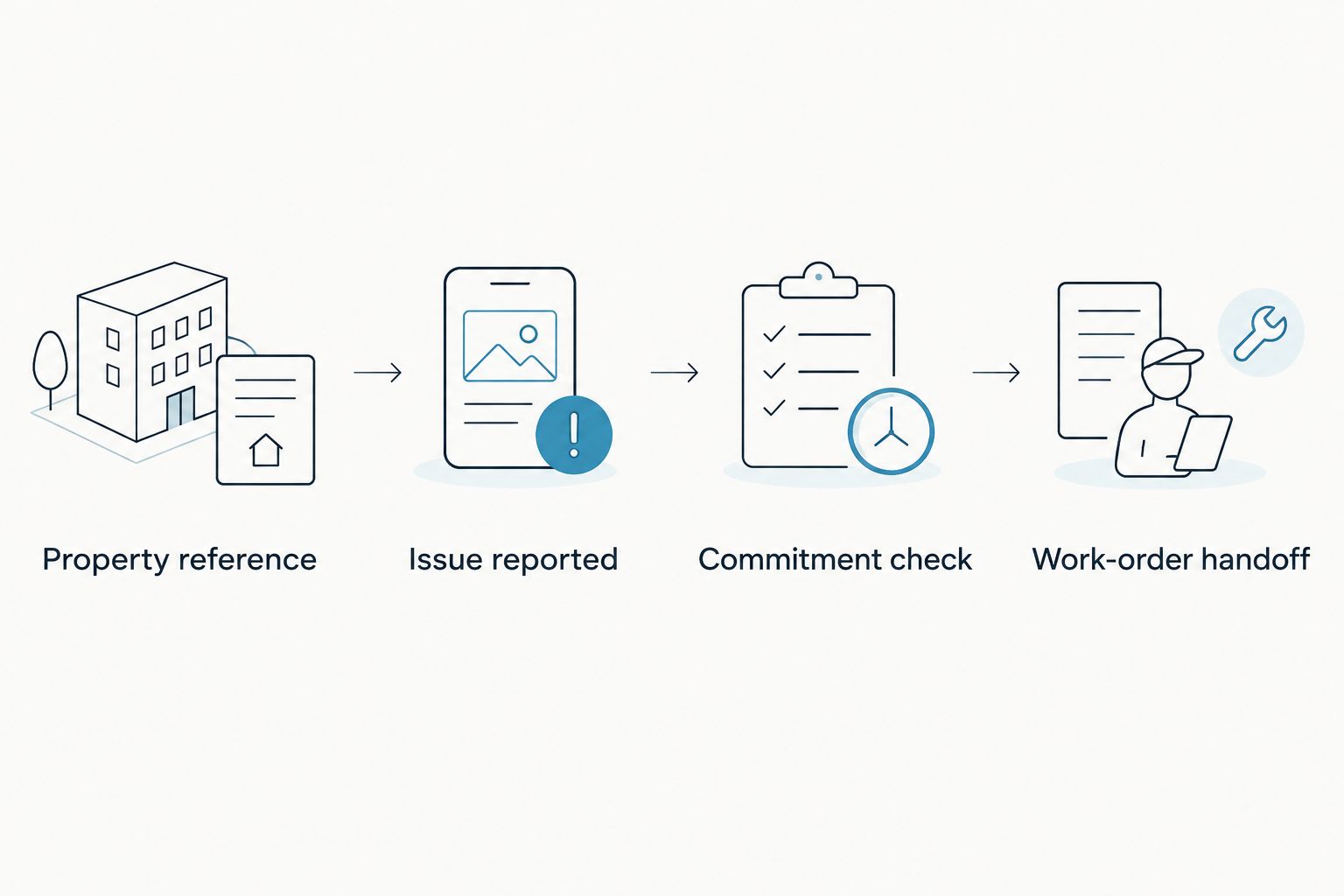
Keep capture and approval separate. Use the following sequence to turn spoken details into a record someone can act on.
- Property reference: Say which property, unit, or common area the conversation concerns. Use an approved identifier rather than unnecessary personal information.
- Issue reported: Describe what was observed or reported. Keep the resident's account separate from your own observations.
- Commitment check: Review who agreed to do what. Confirm names, dates, and any conditions attached to the commitment.
- Work-order handoff: Transfer the reviewed information into your established property-management process. Do not assume an automatically generated task has already reached the responsible contractor.
For example, a resident saying that a contractor will call is not the same as the contractor accepting that task. Preserve the distinction when you review the summary.
The same discipline applies to phone discussions. Comparing AI call transcription tools starts with the capture method: this system records telephone conversations through speakerphone, rather than joining the call as a bot. Confirm that this arrangement fits the conversation before relying on it.
Your final handoff should tell the next person what happened, what was agreed, and what still needs confirmation. Keep unresolved details visible instead of letting a fluent summary hide them.
Check language and listening limits before rollout
For a 2026 rollout, match the plan's listening allowance to the conversations you intend to capture. The verified plan details list Basic at 300 listening minutes per month, Plus at 1,500 listening minutes per month, and Unlimited without a minute cap.
Every plan includes the same core features. Reaching a minute cap does not stop recording; audio remains available to manage and export. Do not mistake a plan limit for a recording cutoff.
Language is a separate decision. The system supports 33 languages, including English, Spanish, French, German, Portuguese, Chinese, Japanese, Korean, Hindi, Russian, and Ukrainian. English is the most accurate, and you must select the language manually.
For multilingual resident conversations, remember that the app does not automatically switch languages mid-conversation. Review the original wording wherever a language change affects a name, request, or commitment.
Privacy is a workflow requirement
Property conversations can include personal information. Decide what belongs in a recording before you begin, then limit distribution of the resulting notes to the people who need them.
Omi supports full export and deletion of individual items or everything. It can run locally without cloud processing. These controls matter, but they do not decide your organization's retention rules or establish permission to record.
Consent rules vary by location; check local law. Also check your organization's recording policy before capturing resident, employee, contractor, or owner conversations. This is not legal advice.
Local Sync is experimental. It stores conversations on the phone without internet and syncs them later, so test that workflow before depending on it in a basement or another location without connectivity.
Do not promise an offline workflow until you have checked how it behaves on your own device.
Which setup should you choose in 2026?
Choose the wearable if your workday moves between properties and people. It is the default recommendation for capturing in-person conversations without treating your phone as the center of every interaction.
Choose phone-only capture if you want the same kind of conversation outputs without wearing hardware. Choose Mac capture if your recording needs are mainly scheduled online meetings.
Do not choose a development kit just because it adds a camera. Property-management note-taking needs a dependable review process, not another capability without a defined purpose.
The deciding question is simple: where do you lose the details today? Put capture there, then make review part of the handoff.
FAQ
What's the best AI note taker for property managers?
Omi is the best fit here for property managers who need wearable capture during walkthroughs and contractor conversations. Phone-only capture suits managers who do not want a wearable, while Mac capture fits remote meetings.
Can I use the app without buying a pendant?
Yes. The iPhone, Android, and Mac apps can record through the device's built-in microphone without the wearable.
Can it record resident phone calls?
Yes, by putting the call on speakerphone and letting the device or app record the conversation. Consent rules vary by location; check local law and your organization's policy before recording.
Will generated action items automatically become work orders?
Do not treat generated action items as completed work-order handoffs. Review the property reference, responsible person, deadline, and approval before transferring information into your established process.
Does it work when a property has no internet connection?
Offline recording is supported, and experimental Local Sync stores conversations on the phone for later syncing. Test the workflow on your own device before relying on it for property visits.
Can it handle conversations in different languages?
The system supports 33 languages, with English the most accurate. Select the language manually; it does not automatically switch languages mid-conversation.
Does recording without a meeting bot mean I do not need consent?
No. Recording without a bot does not remove consent obligations. Check local law and your organization's recording policy before capturing a meeting.
One last thing
State what remains undecided. At the end of a contractor conversation, say which action is approved and which still needs an estimate, owner response, or access arrangement.
That distinction gives you something concrete to check in the transcript. A short summary should shorten the conversation—not erase its conditions.






