Best AI note takers for real estate agents in 2026


In this article
Best overall: Omi for hands-free conversations during property tours. Best without a wearable: phone-app capture. Best for desk-based client meetings: Mac-app capture. This 2026 guide ranks those three recording setups by how you work, rather than treating every agent like someone who spends the day on video calls.
- Best AI note taker for real estate agents 2026: Omi for wearable capture, searchable notes, and follow-up tasks.
- Choose phone-app capture when you want conversation notes without wearing another device.
- Choose Mac-app capture for online meetings; no meeting bot joins the call.
- Check recording consent, verify property details, and review tasks before sending client follow-ups.
Why this matters
A property conversation is not just a meeting transcript. You need to separate buyer preferences, seller statements, questions for the listing agent, and commitments you actually made. A readable summary is useful; an accurate next step is more useful.
Omi is the best fit here for real estate agents who want wearable conversation capture and searchable follow-up notes. The phone and Mac options below use the same app ecosystem with different capture methods. This is a workflow ranking, not a claim that unrelated products were tested against each other.
The right choice for 2026 depends on where your conversations happen. Start there, not with the longest feature list.
What makes the best note taker for real estate agents?
- Capture fit: You need a recording method that suits a walkthrough, a seated consultation, or an online meeting.
- Useful outputs: Transcripts, summaries, and action items serve different purposes. You should be able to return to the source conversation.
- Search and retrieval: Finding a client's earlier requirement matters more than collecting another unread summary.
- Speaker clarity: Speaker labels help you distinguish a client's request from your own suggestion. Review the attribution before acting.
- Data control: Export and deletion matter when your notes contain personal or transaction-related information.
- Review effort: The best setup is one you can check before a follow-up, not one whose output you accept without reading.
Do not confuse an extracted task with a confirmed instruction. A client considering an inspection is not the same as a client asking you to schedule it.
Real estate note-taking options at a glance
| Rank and setup | Best for | Standout feature | Key limitation |
|---|---|---|---|
| 1. Omi wearable | In-person tours and consultations | Wearable capture with transcripts, summaries, tasks, and memories | Phone calls require speakerphone capture |
| 2. Phone app | Agents who do not want another wearable | Records through the phone's built-in microphone | You need to position the phone for the conversation |
| 3. Mac app | Desk-based online meetings | Records meetings without joining as a bot | It is a desk-based setup, not a wearable tour recorder |
All three options lead to the same core outputs. The distinction is the recording setup, not a different quality tier of notes.
1. Omi wearable: best note taker for property tours
The wearable captures what you say and hear, then turns conversations into transcripts, summaries, action items, and memories. You can wear it around your neck with the lanyard and silicone case, on your wrist with the separately sold wrist band, or under a shirt.
That format suits an agent who wants to keep their hands available while walking and talking. Wearing a recorder does not remove your responsibility to explain recording and check consent requirements.
Wearable pros:
- Captures conversations without requiring you to hold a phone throughout the discussion.
- Produces searchable transcripts and summaries alongside tasks and memories.
- Supports speaker labels, with an English-only Speech Profile that learns the wearer's voice.
- Provides full export and deletion of individual items or everything.
Wearable cons:
- Phone calls need to be on speakerphone for recording.
- The language must be set manually; it does not switch languages automatically during a conversation.
- You still need to verify names, addresses, speaker attribution, and commitments before using the notes.
Best for: Agents whose important conversations happen while moving through properties or meeting clients in person.
For your 2026 buying decision, focus on the capture method rather than assuming undocumented hardware specifications. Choose the wearable because wearing the recorder fits your day—not because of an unverified endurance or durability claim.
Verdict: Buy for hands-free, in-person conversation capture.
2. Phone app: best note taker without another wearable
The phone app records through your phone's built-in microphone and works without the wearable. Apps are available for iPhone and Android, so you can start with the device you already use.
This is the simplest setup to evaluate when you are unsure whether recorded notes belong in your workflow. Use a consented consultation or your own post-showing dictation, then inspect the transcript and resulting tasks before changing how you work.
Phone-app pros:
- Does not require a wearable to record.
- Supports both iPhone and Android.
- Connects phone capture to the same transcripts, summaries, search, and task outputs.
Phone-app cons:
- You need to place the phone where it can capture the discussion.
- Carrying a phone does not provide the same wearing options as a pendant.
- Recording a phone call still requires speakerphone capture; do not assume direct call-audio access.
Best for: Agents who want to evaluate searchable conversation notes without adding a wearable.
A useful test is a seated buyer consultation. Record with permission, then check whether the summary preserves the difference between a requirement, a preference, and an unanswered question. That distinction matters more than how polished the summary sounds.
Verdict: Buy into this workflow first if another wearable is the sticking point.
3. Mac app: best note taker for online client meetings
The Mac app records through the computer's built-in microphone and supports recording online meetings, including Zoom, Meet, and Teams. It does not join calls as a meeting bot.
Choose this setup when your consultations happen at your desk. It gives you a different capture route into the same note-taking system, rather than requiring you to wear a pendant for every online conversation.
Mac-app pros:
- Records without a meeting bot joining the call.
- Works without the wearable.
- Supports a desk-based workflow for transcripts, summaries, and action items.
Mac-app cons:
- Does not replace a mobile recording setup for property walkthroughs.
- No bot joining the meeting does not mean recording is automatically permitted.
- You must review the captured discussion before treating the summary as a client instruction.
Best for: Agents who handle buyer consultations, seller updates, or team discussions through online meetings.
For a mixed 2026 workflow, use the Mac app at your desk and choose phone or wearable capture for in-person appointments. You do not need to force every conversation through the same microphone.
Verdict: Buy into this workflow for desk-based meetings; skip it as your only tour-recording method.
How these setups are ranked
The ranking prioritizes capture fit, useful outputs, search, speaker clarity, data control, and review effort. Wearable capture comes first for moving conversations; phone capture removes the need to wear another device; Mac capture fits online meetings.
This order is not an accuracy leaderboard. The options share an app ecosystem, and the recommendation changes with the setting. If you work almost entirely from a desk, the Mac setup becomes your default.
Turn a property conversation into a usable follow-up
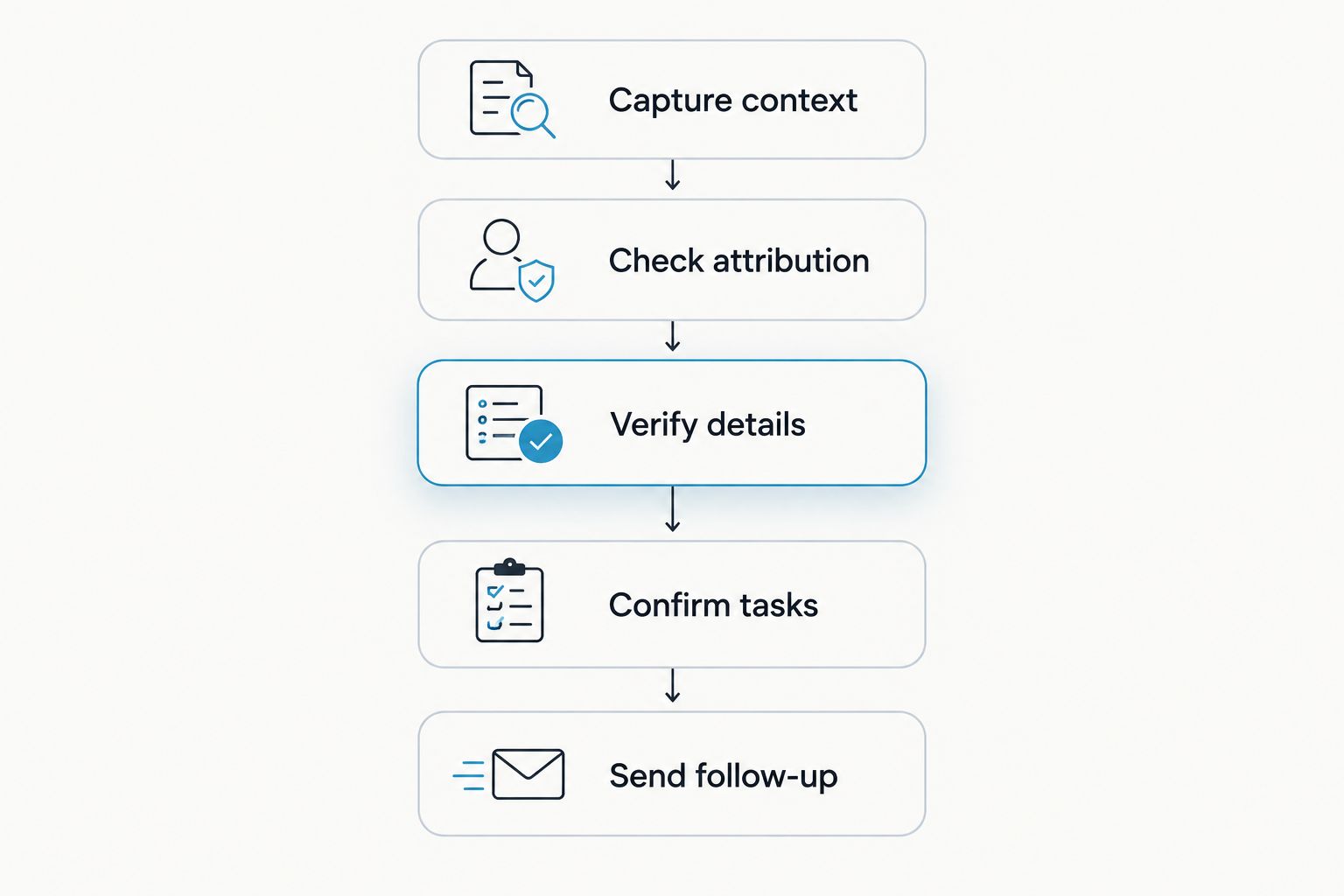
Recording is only the first step. Use this review sequence to turn a conversation into notes you can safely act on.
Capture context
With permission to record, state the property identifier and the purpose of the conversation. If you are dictating your own notes afterward, make clear that you are recording a recollection rather than the original discussion.
Check attribution
Read the relevant transcript sections and confirm who said what. Correct a buyer preference attributed to the agent, or a suggestion presented as a settled decision, before sharing anything.
Verify details
Check addresses, names, dates, and property-specific statements against the appropriate source. A transcript records speech; it does not establish that a spoken claim is true.
Confirm tasks
Review each proposed action item. Add an owner and a deadline only when those details are actually agreed, and separate your internal reminders from instructions received from the client.
Send follow-up
Draft a concise message containing confirmed priorities, open questions, and agreed next steps. Read it before sending. Keep unrelated personal details out of the message.
For example, a hypothetical buyer might describe a home office as essential but a larger yard as optional. Your follow-up should preserve that distinction. Do not flatten both into a generic list of requirements.
Check language, listening limits, and data controls
For 2026, Omi supports 33 languages, including English, Spanish, French, German, Portuguese, Chinese, Japanese, Korean, Hindi, Russian, and Ukrainian. English is the most accurate. Set the language manually before recording; automatic mid-conversation language switching is not supported.
Basic includes 300 listening minutes per month. Plus includes 1,500 listening minutes per month, while Unlimited has no minute cap. Every plan has the same core features, so choose your allowance around listening volume rather than expecting a different set of core outputs.
Reaching a minute cap does not stop recording. Audio stays available to manage and export. Keep that distinction clear when deciding how much listening capacity your work requires.
For data control, full export and deletion are available. Local, cloud-free operation is also supported, while Local Sync is experimental and stores conversations on the phone without internet before syncing later. Do not assume the experimental workflow behaves identically to your usual connected setup.
Recording permission comes before recording convenience
Consent rules vary by location. Check local law and your brokerage's requirements before recording clients, other agents, or anyone else present. This guide is not legal advice.
A pendant worn under a shirt is a wearing option, not permission for undisclosed recording. Likewise, a meeting without a recording bot still needs an appropriate recording process. Use the guide to recording conversations with a wearable pendant for further context.
Keep sensitive notes within your approved workflow. Export capability is useful, but it does not make every destination appropriate for client information.
Which note-taking setup should you choose?
Choose Omi for wearable capture if your day revolves around in-person property conversations. Choose the phone app if you want the same kind of notes without wearing a device, and choose the Mac app when online meetings dominate your schedule.
The default for an undecided agent in 2026 is straightforward: evaluate phone capture in an appropriate, consented conversation, review the output, and decide whether wearable capture would make the process easier. Judge the notes by whether they preserve client intent and produce accurate next steps.
FAQ
What's the best AI note taker for real estate agents in 2026?
Omi is the recommended wearable option in this guide for agents who want in-person conversation capture, searchable transcripts, summaries, and tasks. Choose phone-app capture instead if you do not want to wear another device.
Can I take conversation notes without buying a pendant?
Yes. The phone and Mac apps record through their built-in microphones without the wearable. Choose the capture method that fits the setting and check recording consent first.
Can I record client phone calls with the wearable?
Phone calls require speakerphone capture. Put the call on speakerphone and let the recorder capture the conversation, subject to applicable consent requirements.
Does the Mac app join Zoom or Teams as a meeting bot?
No. The Mac app records online meetings without joining as a bot. You still need an appropriate recording process and must check applicable consent rules.
Will the notes automatically update my real estate CRM?
Do not assume a native, one-click CRM connection. Integrations run through apps, automation tools, webhooks, or the API; confirm the specific workflow before relying on it for client records.
Can I use conversation notes as verified property information?
No. A transcript captures what someone said, not whether the statement is correct. Verify property details and client commitments before using them in advice or follow-up messages.
One last thing
A transcript of your own recap is not a transcript of the client conversation. Label post-showing dictation as your recollection, and keep it distinct from directly recorded client statements. That small habit makes later review much clearer.






