Best AI note takers for researchers in 2026


In this article
Best overall for interview-led research: the Omi wearable pendant. Best without extra hardware: the phone app. Best for remote interviews: the Mac app. This 2026 guide compares research capture setups, including a development-only option for visual experiments—not four unrelated vendors.
- Omi is the best AI note taker for researchers who need wearable interview capture, searchable transcripts, and follow-up tasks.
- Choose phone capture for desk interviews and Mac capture for online research meetings.
- Omi Glass Dev Kit fits visual research experiments, not researchers seeking a finished consumer product.
- Check recording consent, verify quotations against audio, and keep interpretation separate from generated summaries.
Why this matters
A research summary is a shortcut to the evidence, not the evidence itself. You still need to check who said what, preserve qualifications, and distinguish a participant's account from your interpretation.
The best setup in 2026 depends on where your conversations happen. A wearable fits interviews away from a desk; a phone fits planned sessions; a desktop app fits remote calls. Start with that distinction, not a feature checklist full of capabilities you will never use.
This guide ranks those capture choices for spoken research: participant interviews, expert conversations, field observations, and project discussions. It does not rank literature-search tools, reference managers, or qualitative coding software.
What makes the best AI note taker for researchers?
Use these criteria before choosing a device or app:
- Capture fit: Choose a microphone setup that matches your actual research setting. A remote interview and a walking interview need different arrangements.
- Source checking: Keep access to the recording and transcript. Check quotations, technical terms, names, and speaker attribution before using them in research outputs.
- Data control: Check export, deletion, local-processing options, and your institution's requirements before recording sensitive conversations.
- Language handling: Confirm support for your interview language. Do not assume a tool handles language changes within a conversation automatically.
- Useful outputs: Search, summaries, and tasks should help you retrieve evidence and handle follow-ups without becoming substitutes for analysis.
- Workflow limits: Identify listening allowances, experimental features, and development hardware before committing a research project to them.
Choose the capture method first. Evaluate the generated notes second. A polished summary cannot repair a recording that missed the participant's answer.
Research note-taking setups at a glance
The 2026 shortlist below separates four use cases within the same ecosystem. These are configuration recommendations, not claims that four competing products underwent comparative testing.
| Ranked option | Best for | Standout capability | Key limitation |
|---|---|---|---|
| Wearable pendant | Interviews away from a desk | Worn capture with transcripts, summaries, tasks, and memories | Recording still requires an appropriate consent process |
| Phone app | Planned interviews without extra hardware | Records through the phone's built-in microphone | The phone must be positioned for the conversation |
| Mac app | Remote interviews and research meetings | Records online meetings without joining as a bot | This recommendation is specific to Mac capture |
| Omi Glass Dev Kit | Visual capture experiments | Camera and audio capture feeding notes and memories | A developer kit, not a finished consumer product |
1. Wearable pendant: best for interviews away from a desk
The pendant captures what you say and hear, then turns conversations into searchable transcripts, summaries, action items, and memories. You can wear it around your neck with the lanyard and silicone case, under a shirt, or on the separately sold wrist band.
Best for: Researchers conducting interviews or spoken observations while moving between locations.
Wearable capture makes sense when holding a phone would interfere with the conversation or the task you are observing. It does not remove your responsibility to explain the recording. Wearing a device under clothing is a placement option, not permission to record someone without their knowledge.
Wearable pendant pros:
- Keeps the capture device worn rather than held throughout the interview.
- Combines conversation transcripts with searchable notes and follow-up tasks.
- Supports export and deletion of captured material.
- Offers several wearing positions for different working arrangements.
Wearable pendant cons:
- Introduces a physical device into the research session.
- Requires attention to recording consent and participant expectations.
- Does not replace transcript checking or research analysis.
For a field interview, agree on the recording process before discussing the research topic. Then make a short test recording in the actual space and listen back. Check whether both voices are understandable rather than assuming that a worn microphone captures every speaker equally well.
The wearable is the default recommendation when your research conversations regularly leave the desk. Verdict: Buy for interview-led fieldwork with an approved recording process.
2. Phone app: best for interviews without extra hardware
The phone app records through the built-in microphone without requiring the wearable. Apps are available for iPhone and Android, so you can start with a device already in your research routine.
Best for: Researchers running scheduled, seated interviews who do not need a worn recorder.
Put the phone where the conversation happens, not wherever it normally lives. A phone inside a bag is a different recording arrangement from a phone placed between interviewer and participant. Test the arrangement before collecting material you cannot repeat.
Phone app pros:
- Works without purchasing or wearing the pendant.
- Supports both iPhone and Android capture.
- Gives you a practical starting point for evaluating the note-taking workflow.
Phone app cons:
- Depends on deliberate microphone placement during the session.
- Requires handling a phone rather than wearing the capture device.
- Experimental Local Sync needs testing before you depend on it offline.
Local Sync stores conversations on the phone without internet and syncs them later. It is currently experimental. For disconnected fieldwork, test capture, later synchronization, and access to the resulting material before building your research schedule around it.
This is the sensible starting point when you are still deciding whether automated transcripts and summaries fit your work. Verdict: Buy into the phone-first workflow before adding hardware you do not need.
3. Mac app: best for remote research interviews
The Mac app records from the computer and supports capture of online meetings such as Zoom, Google Meet, and Microsoft Teams. It does not join the call as a meeting bot.
Best for: Researchers whose interviews, expert consultations, and project meetings happen primarily on a Mac.
A bot-free recording workflow does not make recording invisible or exempt it from consent requirements. Tell participants how the session will be recorded and handled. Also check whether your research organization permits the proposed capture and processing arrangement.
Mac app pros:
- Matches a desktop-based remote interview workflow.
- Captures online meetings without adding a bot participant.
- Keeps remote conversations within the same searchable note-taking environment.
Mac app cons:
- The capture recommendation here is Mac-specific.
- You must verify the recording setup before the interview.
- Generated summaries still need comparison with the source conversation.
For remote interviews, rehearse the complete workflow with a colleague: start the meeting, record a short exchange, stop capture, and inspect the result. Confirm that the interviewer's and participant's contributions are present and intelligible.
Choose desktop capture because your research happens on the desktop, not because a meeting platform appears in a compatibility list. Verdict: Buy into the Mac workflow for remote-first interviewing.
4. Omi Glass Dev Kit: best for visual capture experiments
The smart-glasses developer kit combines an always-on camera with audio capture and turns what you see and hear into transcripts, summaries, tasks, and memories. It is open-source development hardware for creators, hackers, and researchers—not a finished consumer product.
Best for: Researchers developing or investigating wearable visual-and-audio capture systems.
That is a narrower use case than taking interview notes. Choose this category only when visual capture is part of the research question or prototype. If you only need a conversation transcript, a camera adds another data stream to manage without answering that need better by itself.
Developer kit pros:
- Combines visual and spoken capture for experiments involving both.
- Provides an open-source platform for development work.
- Produces notes, tasks, and memories from captured interactions.
Developer kit cons:
- Is not positioned as a finished consumer device.
- Adds visual recording to your participant-information and data-handling decisions.
- Is unnecessary for audio-only interview transcription.
Do not treat development hardware as the default recommendation for an ordinary interview study. Define what the camera contributes before adding it to your protocol. Verdict: Hold unless visual capture or wearable development is central to the project.
Build a research workflow that preserves the evidence
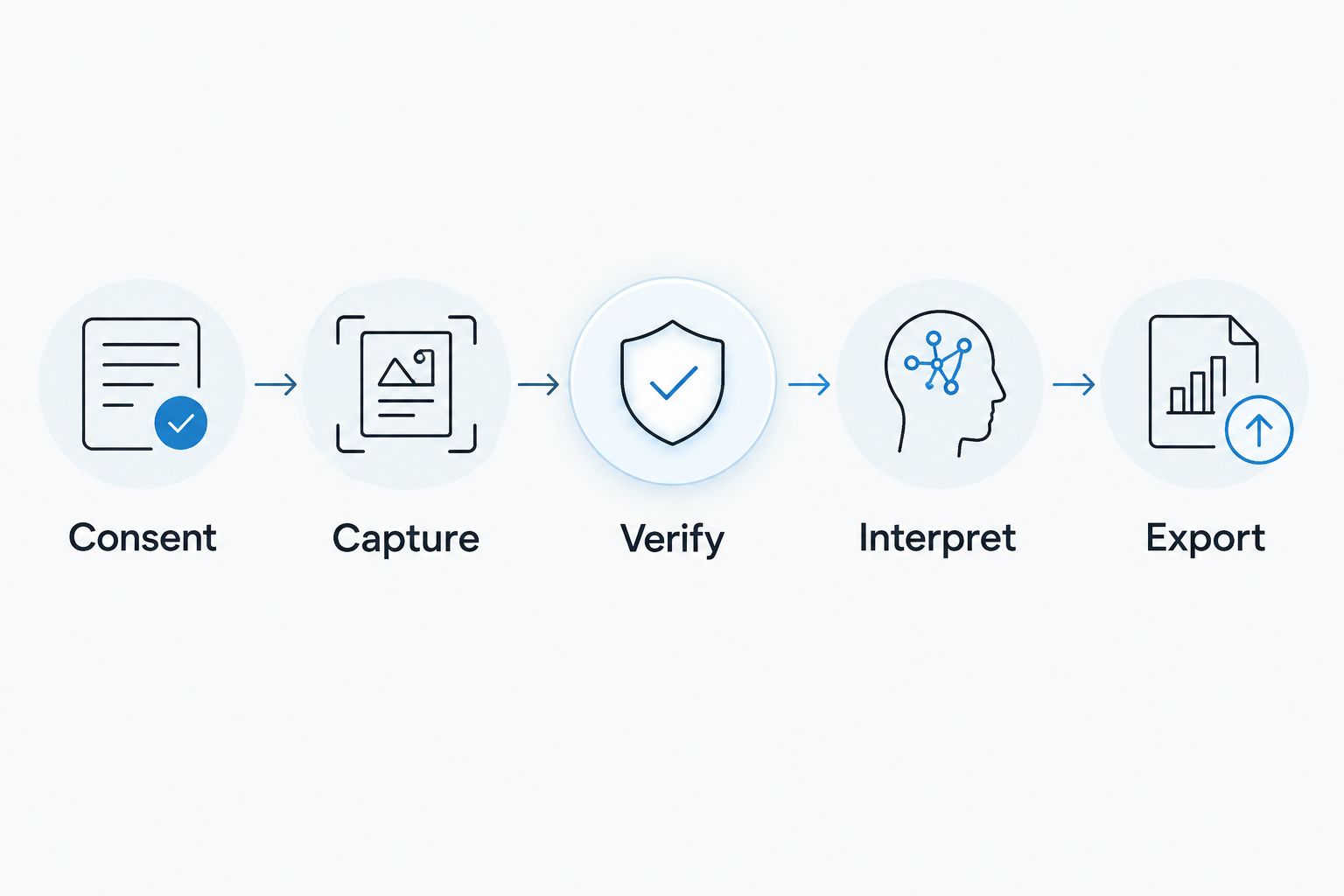
Whichever capture setup you choose in 2026, use a repeatable process. The sequence below keeps a generated summary from quietly becoming your only account of an interview.
Consent
Explain what you will record, how you will process it, and who will access it. Consent rules vary by location; check local law and your institution's requirements. This is not legal advice.
Treat participant agreement and institutional approval as separate checks. A tool's security features do not, by themselves, authorize a particular research use.
Capture
Test the actual room, microphone position, and conversation arrangement. For multilingual interviews, select the intended language manually rather than expecting automatic switching.
The system supports 33 languages, with English identified as the most accurate. Language support is a starting point for evaluation, not a guarantee that specialist terminology will be transcribed correctly.
Verify
Compare important quotations and findings with the recording. Check names, negation, technical vocabulary, and passages where speakers interrupt one another.
Speaker labels help organize a conversation, but you should verify attribution before assigning a statement to a participant. Speech Profile learns the wearer's voice in English; that is not a promise to identify every interview participant by name.
Interpret
Keep the participant's statement, the generated summary, and your interpretation distinguishable. Write your analytical notes separately from the transcript when drawing conclusions or assigning research codes.
Search and Ask Omi AI chat help you revisit captured material. They do not turn a recalled passage into a verified quotation or establish that a theme represents the whole dataset.
Export
Export the material your project needs and store it according to your approved research process. Decide what to retain and delete rather than accumulating recordings without a purpose.
Full export and deletion controls support that process. Confirm the resulting files meet your project's needs before making the tool your primary capture workflow.
Check listening allowances before scheduling interviews
The Basic plan includes 300 listening minutes per month. Plus includes 1,500 minutes per month, while Unlimited has no minute cap. All plans have the same core features; choose the allowance around your expected recording workload rather than assuming a higher tier changes the research method.
Reaching the minute cap does not stop recording: audio remains available to manage and export. Still, check how your planned workflow behaves before a busy interview period. Recording continuity and access to generated outputs are different things to evaluate.
For a 2026 research project, review the current plan details alongside your expected interview schedule. Do not confuse hardware ownership with an unlimited listening allowance.
How the recommendations are ranked
The ranking prioritizes capture fit, source checking, data control, language handling, useful outputs, and workflow limits. The wearable leads for mobile interviews; phone capture leads when extra hardware is unnecessary; Mac capture leads for remote sessions; the developer kit belongs to visual experimentation.
This is a workflow-based recommendation, not an independent accuracy benchmark. No measured transcription-accuracy score or participant-study result supports declaring one configuration universally better than the others.
Which research note-taking setup should you choose?
Omi is best for researchers who want wearable conversation capture with searchable transcripts and follow-up tasks. Start with the pendant when interviews happen away from a desk, and start with the phone app when they do not.
Use the Mac app for remote-first research. Reserve the glasses developer kit for work that genuinely needs visual capture or hardware experimentation.
The decisive question for 2026 is simple: where does your evidence originate? Match capture to that setting, then test consent, recording, verification, and export before relying on the workflow for a study.
FAQ
What's the best AI note taker for researchers conducting interviews?
Omi is the best fit in this guide for researchers who need wearable interview capture, searchable transcripts, and follow-up tasks. Choose phone capture for seated sessions and Mac capture for remote interviews instead.
Can I use the app without buying a pendant?
Yes, the phone and Mac apps record through their built-in microphones without the wearable. Phone apps are available for iPhone and Android.
Can an AI note taker replace qualitative analysis?
No, generated transcripts and summaries do not replace your interpretation of research evidence. Verify quotations against the recording and keep analytical notes distinguishable from generated outputs.
Does the note taker support multilingual interviews?
The system supports 33 languages, and English is identified as the most accurate. Set the language manually because it does not automatically switch languages mid-conversation.
Can I record research interviews without internet?
Offline recording is supported, and experimental Local Sync stores conversations on the phone for later synchronization. Test the full offline-to-online workflow before relying on it during fieldwork.
Does a research note taker need participant consent?
Consent rules vary by location, so check local law and your institution's requirements before recording. Explain the capture, processing, access, and retention arrangements to participants; this is not legal advice.
Should researchers choose smart glasses instead of a pendant?
Choose the glasses developer kit only when visual capture or wearable development is part of the research objective. It is development hardware, not a finished consumer product for routine interview note-taking.
One last thing
Test a difficult passage, not just a friendly introduction. Ask a colleague to use a technical term, correct a statement, and interrupt you during a rehearsal, then inspect the transcript and summary against the audio.
That exercise targets the details you need to verify in real research. Judge the workflow by how easily you can find and correct a mistake—not just how clean the summary looks.






