Best AI note takers for teachers in 2026


In this article
Best overall for approved, in-person teacher conversations: Omi. Best for private lesson reflections: phone-only capture. Best for online staff meetings: Mac meeting capture. These are three ways to use the same note-taking platform, not three competing products; this 2026 guide ranks them by teaching workflow.
- Omi is the best AI note taker for teachers who want wearable capture of approved, in-person conversations.
- Choose phone-only capture for spoken lesson reflections without a separate wearable.
- Choose Mac meeting capture for online staff discussions; no meeting bot joins the call.
- Get school approval before recording students, and review transcripts before using them in school records.
Why this matters
Your next lesson does not wait for you to finish yesterday's notes. Department meetings create follow-ups. A useful explanation surfaces between classes. After a difficult lesson, you want to remember what happened without reconstructing every detail that evening.
The best AI note taker for teachers captures the right conversation, not every conversation. Start with a permitted use case and a clear output: a lesson reflection, an agreed action, or a meeting summary. Recording an entire classroom is not the default recommendation.
For your 2026 shortlist, separate capture convenience from permission to record. A device that produces searchable notes does not decide whether student information belongs in it.
What makes the best AI note taker for teachers?
Judge each setup against these criteria before choosing hardware:
- School approval: Confirm which recordings, accounts, storage arrangements, and uses your school permits. Personal convenience does not override school policy.
- Capture fit: Match the microphone setup to your work: a wearable for in-person conversations, a phone for deliberate reflections, or a Mac for online meetings.
- Useful outputs: Look for transcripts, summaries, and action items. You need something you can review and act on, not just an expanding audio archive.
- Review and correction: Check names, subject terminology, speaker labels, and commitments against the conversation before sharing a summary.
- Data control: Check export, deletion, and local-processing options. Decide what you need to retain before recording sensitive information.
- Language fit: Confirm the spoken language and select it before capture. Support for several languages does not mean automatic switching during a conversation.
Teacher note-taking options at a glance
All three setups below use Omi's companion app and its transcripts, summaries, tasks, memories, search, and Ask Omi chat. The difference is where capture happens.
| Ranked option | Best for | Standout feature | Key limitation |
|---|---|---|---|
| Wearable capture | Approved in-person conversations | Neck or wrist capture without holding a phone | Requires a separate device and careful recording boundaries |
| Phone-only capture | Private lesson reflections | Records through the phone's built-in microphone | You must position and operate the phone deliberately |
| Mac meeting capture | Online staff meetings | Records from the Mac app without a meeting bot | Centers the workflow on a computer rather than movement around school |
Choose by setting, not by the longest feature list. A teacher who mainly dictates reflections after class does not need the same setup as a department lead documenting approved face-to-face meetings.
1. Omi wearable: best for approved in-person teacher conversations
The wearable captures what you say and hear, then the companion app turns conversations into searchable transcripts, summaries, action items, and memories. You can wear it around your neck with the lanyard and silicone case, on your wrist with the separately sold wrist band, or under a shirt.
Best for: Teachers and department leads documenting approved colleague discussions, planning conversations, and professional development follow-ups.
The practical benefit is capture while you participate. You do not have to hold a phone throughout a discussion. Afterward, use the transcript to check what was agreed and the action items to identify your next steps.
That convenience needs a boundary. Under-shirt wear is a supported wearing option, not a recommendation to record secretly. Make recording clear to participants and follow the approval process that applies to the conversation.
Wearable capture pros:
- Records in-person conversations without requiring a phone in your hand.
- Produces summaries and tasks alongside the transcript.
- Supports neck and wrist wearing options.
- Offers full export and deletion of individual items or everything.
Wearable capture cons:
- Adds a separate device to your teaching routine.
- Does not remove consent, school-policy, or student-data obligations.
- Speaker labels still require review before you attribute a statement.
Verdict: Buy if approved, in-person conversations are your main source of unfinished notes. Skip the hardware if your main need is a short reflection at your desk.
2. Phone-only capture: best for private lesson reflections
The Omi phone app records through the built-in microphone on iPhone or Android, without the wearable. Use it to dictate your own observations after a lesson, then review the resulting transcript, summary, and tasks.
Best for: Teachers who want to capture their own thinking without recording students or carrying another device.
Speak concretely. Describe the objective, the explanation that caused confusion, and the change you want to make. For example, dictate that the next lesson needs a worked example before independent practice, rather than leaving yourself a vague reminder to improve the lesson.
Keep identifiable student details out of a personal reflection unless your school has approved that use. You can describe a teaching problem without turning your private notes into a student record.
Phone-only capture pros:
- Works without a separate wearable.
- Fits deliberate, teacher-only voice reflections.
- Provides searchable notes and generated action items.
- Lets you evaluate the app workflow before adding hardware.
Phone-only capture cons:
- Requires you to start capture and place the phone appropriately.
- A reflection records your account, not an independent account of the lesson.
- Generated tasks still need checking for meaning and priority.
Verdict: Buy into the workflow, not the hardware. Start here if your main problem is forgetting your own ideas between lessons.
3. Mac meeting capture: best for online staff meetings
The Mac app records online meetings without joining as a bot. It supports capture for discussions on Zoom, Google Meet, and Microsoft Teams through the Mac recording workflow.
Best for: Teachers attending online department meetings, remote planning sessions, and professional development discussions.
Use the transcript to verify decisions, then reduce the summary to actions that matter. A meeting about curriculum changes should leave you with the agreed change, its owner, and the deadline discussed—not an unreviewed wall of text.
For a 2026 department workflow, agree on who records and who distributes the checked summary. Avoid treating several personal recordings as a substitute for a shared, approved process.
Mac meeting capture pros:
- Records from the computer used for the online meeting.
- Does not introduce a meeting bot.
- Produces transcripts, summaries, and action items.
- Supports searching past discussions after capture.
Mac meeting capture cons:
- Is not the natural choice for conversations away from your computer.
- Still requires participant awareness and school approval.
- Does not make a generated summary an approved set of minutes.
Verdict: Buy into Mac capture if online meetings generate most of your follow-up work. Skip a wearable purchase solely for this use case.
Check listening limits and language before choosing
The published 2026 plans separate listening allowances from core features. Basic includes 300 listening minutes per month; Plus includes 1,500 listening minutes per month; Unlimited has no minute cap. Every plan has the same core features.
Hitting a listening cap does not stop recording. Audio stays available to manage and export. Check the current plan terms against the amount of conversation you intend to capture rather than assuming a cap means the microphone stops.
Omi supports 33 languages, with English identified as the most accurate. Set the language manually before recording; the app does not automatically switch languages mid-conversation. Speech Profile learns the wearer's voice in English only, so distinguish language support from named-speaker recognition.
For multilingual teaching, test your actual subject vocabulary and speaking pattern before relying on summaries. A language appearing on a support list is not a guarantee that every technical term or mixed-language exchange will be captured correctly.
Use a capture-to-action routine
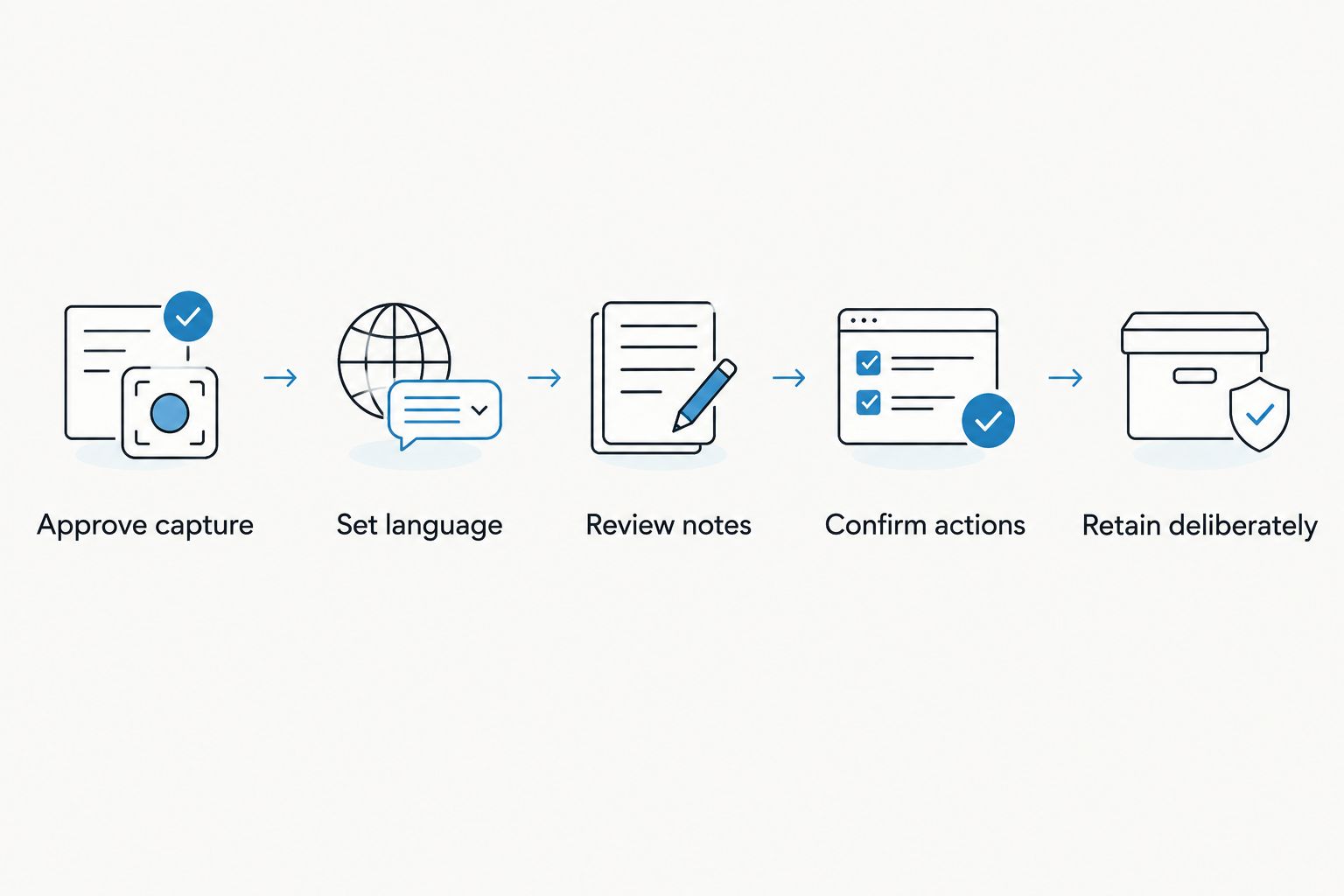
Make the recording useful before it becomes another item to sort. This sequence works for an approved staff discussion or a private teaching reflection.
Approve capture
Check school policy and participant permission before recording. Consent rules vary by location; check local law rather than treating this guide as legal advice. The guide to recording conversations with a wearable pendant covers the consent questions to investigate.
Set language
Choose the language before capture. Keep the microphone near the intended conversation and avoid deliberately collecting unrelated discussions.
Review notes
Check names, dates, terminology, speaker attribution, and decisions. Compare a questionable summary with the underlying transcript or audio before passing it on.
Confirm actions
Separate a suggestion from a commitment. Give an action an owner and deadline only when the conversation established them; otherwise, ask for clarification.
Retain deliberately
Keep what your approved workflow requires. Use export and deletion controls according to school policy, rather than retaining every recording indefinitely.
Privacy features do not equal school approval
Omi provides TLS encryption in transit, AES-256 encryption at rest, full export, and deletion controls. It can also run locally without the cloud. These are useful controls, but your school must still decide whether a particular configuration and use are acceptable.
Offline recording is supported. Local Sync, which stores conversations on the phone without internet and syncs them later, is experimental; do not treat an experimental workflow as an established school deployment.
For your 2026 review, ask who can access recordings, where information is processed, how long it is retained, and how deletion is handled. Keep ordinary staff planning separate from sensitive student discussions until the relevant school authority approves the latter.
How these options were ranked
This ranking prioritizes capture fit, useful outputs, review requirements, data control, and language limitations. Wearable capture comes first for approved in-person conversations; phone-only capture wins for private reflections; Mac capture wins for online meetings.
This is a workflow comparison within one platform, not a claim that competing products were tested. No ranking here establishes classroom transcription accuracy or suitability for a school's student-data requirements.
Which teacher note-taking setup should you choose?
Choose phone-only capture first if you are undecided. Dictate your own lesson reflection, review the output, and decide whether searchable notes and tasks actually improve your routine.
Choose wearable capture when approved face-to-face conversations are the gap. Choose Mac capture when online meetings are the gap. For 2026, the sensible default is the smallest recording footprint that solves your problem—not continuous classroom recording.
FAQ
What's the best AI note taker for teachers?
Omi is the best fit in this guide for teachers who want wearable capture of approved, in-person conversations. Choose phone-only capture for private lesson reflections or Mac capture for online staff meetings.
Can I use the app without buying a pendant?
Yes. The iPhone, Android, and Mac apps can record through the device's built-in microphone without the wearable.
Can teachers record students with an AI note taker?
Teachers should record students only after checking school policy, required permissions, and applicable local law. Consent rules vary by location; a device's recording capability does not establish permission.
Does a meeting bot join my online class or staff meeting?
No meeting bot joins through this platform. Online meeting capture uses the Mac app, or a phone or wearable recording the conversation in the room.
Can it identify different speakers?
The app provides speaker labels. Speech Profile learns the wearer's voice in English so the wearer's lines get their name; review attribution before using a transcript as a record.
Does it work for bilingual lessons?
The app supports 33 languages but does not automatically switch languages mid-conversation. Select the language manually and check mixed-language material carefully.
Will recording stop when I reach my listening allowance?
Reaching the listening cap does not stop recording. Audio remains available to manage and export, so check how the current plan handles your intended workflow.
Should I use generated notes as official school records?
Do not treat an unchecked generated summary as an official school record. Verify the content and follow your school's approval, storage, and retention requirements.
One last thing
Your most useful teaching recording might contain no students at all. Dictate what you would change while the lesson is still fresh, turn that reflection into a specific task, and check whether you acted on it before the next lesson.
Start by capturing your own thinking. Expand only when permission and purpose are clear.






