
Best AI transcription apps in 2026


In this article
Best overall for capturing spoken work: Omi. Best for meeting transcripts: Otter. Best for editing recorded interviews: Descript. This 2026 AI transcription guide also covers Google Recorder for Pixel users and Whisper for people who want to run transcription locally.
- Omi is the best AI transcription choice here for turning everyday conversations into tasks and searchable memories.
- Otter fits meeting-focused transcription; Descript fits transcript-based audio and video editing.
- Google Recorder suits Pixel voice recordings; Whisper suits technical users who want local speech recognition.
- Choose your capture method first, then check language support, export options, and recording consent.
Why this matters
A transcript is not the same thing as a useful record. You need to find the decision, identify the speaker, and act on the promise without replaying the whole conversation.
The right app depends on where your audio starts. A wearable, a meeting assistant, an editor, and a local speech-recognition model solve different problems. Start with the audio-to-text workflow if you need the basics; use this comparison to choose the right tool for your actual work.
Choose the capture workflow before you choose the transcription app. A strong transcript does not help if the tool cannot capture the conversation you need.
What makes the best AI transcription app?
For this 2026 ranking, these criteria matter more than an impressive feature list:
- Capture route: Can you record the conversations you actually have, whether in person, at your desk, or in an interview?
- Useful output: Do you need plain text, meeting notes, action items, searchable memories, or an editable recording?
- Language fit: Does the app support your spoken language, and can you set it correctly before recording?
- Data control: Can you export, delete, or keep recordings local when your work requires it?
- Review effort: How easily can you check names, speaker labels, decisions, and transcription errors against the audio?
Do not treat automatic summaries as approved records. Check the source before sending a customer commitment, assigning a task, or documenting a sensitive conversation.
Best AI transcription apps at a glance
| App or tool | Best for | Standout feature | Key limitation |
|---|---|---|---|
| Omi | Everyday conversations that need follow-through | Transcripts, tasks, memories, and search across captured conversations | Does not join online meetings as a bot |
| Otter | Meeting-focused transcription | Live transcription with speaker identification and meeting summaries | Meeting notes are not a transcript-based media-editing workflow |
| Descript | Editing interviews and recorded content | Edit audio and video through the transcript | More editing functionality than a notes-only workflow needs |
| Google Recorder | Voice recordings on supported Pixel devices | Recording, transcription, and search in the same app | Device and language support limit who can use it |
| Whisper | Local transcription for technical users | Open-source speech recognition that can run locally | Requires software setup rather than a ready-made notes workflow |
These are different kinds of tools, not interchangeable versions of the same app. A meeting transcript, an edited interview, and a searchable conversation history have different finishing points.
1. Omi: best AI transcription for spoken work and follow-through
The wearable and companion app capture what you say and hear, then produce transcripts, summaries, action items, and memories. You can search captured conversations or ask questions through the app's chat. Omi is best for professionals who want AI transcription to turn everyday conversations into tasks and searchable memories.
You do not need the pendant to start. The phone or Mac app can record through its built-in microphone, and apps are available for iPhone, Android, Mac, and web. Apple Watch recording is also supported.
Pendant and app pros:
- Capture in-person conversations without turning the workflow into a scheduled online meeting.
- Get summaries, tasks, memories, and a Daily Recap alongside the transcript.
- Export your data and delete individual items or everything.
- Use open-source hardware, firmware, and software, with a local, cloud-free option.
Pendant and app cons:
- Online meetings require the Mac app or recording from a phone or wearable in the room; there is no meeting bot.
- Set the language manually. The app does not switch languages automatically mid-conversation.
- Local Sync is experimental, so do not treat that specific offline-sync workflow as settled.
Language support covers 33 languages, with English the most accurate. Speech Profile learns the wearer's voice in English so their lines receive their name.
Basic includes 300 listening minutes per month; Plus includes 1,500 listening minutes per month. Unlimited has no minute cap, and every plan has the same core features. Reaching a listening cap does not stop recording; audio remains available to manage and export.
Best for: Professionals, sales teams, healthcare workers, and technicians who need a record of spoken interactions and the next action.
Verdict: Buy for conversation capture and follow-through; skip if a meeting bot is essential.
2. Otter: best AI transcription for meeting-focused notes
Otter focuses on turning spoken meetings into readable transcripts and summaries. Its workflow includes live transcription and speaker identification, making it a direct fit when your main output is a meeting record.
Keep the buying decision narrow. If you mostly need to revisit discussions, find decisions, and review what participants said, a meeting-focused tool belongs on your shortlist. If your main job is cutting an interview into a finished episode, choose an editing workflow instead.
Otter pros:
- Live transcription gives you text while the discussion happens.
- Speaker identification helps separate contributions in a conversation.
- Meeting summaries provide a shorter review path than reading the full transcript.
Otter cons:
- Speaker identification still needs checking before you attribute an important statement.
- A meeting-summary workflow does not replace transcript-based audio or video editing.
Best for: People whose primary transcription workload is meetings rather than field conversations or media production.
For a useful trial, bring a meeting with multiple speakers and specific follow-up commitments. Check whether you can recover the decision and its owner, not just whether the text looks readable.
Verdict: Buy for meeting-focused transcription; skip for production editing.
3. Descript: best AI transcription for editing interviews
Descript combines transcription with audio and video editing. You work with the transcript to make changes to the recording, which makes the text part of the production process rather than just a document beside it.
That distinction matters for interviews, podcasts, and recorded explanations. When your next step is removing a passage or reshaping the recording, transcript-based editing saves you from treating transcription and editing as unrelated jobs.
Descript pros:
- Edit recorded media through text instead of using the transcript only as reference material.
- Keep transcription and production work inside the same editing environment.
- Review spoken passages in the context of the recording you are preparing to publish.
Descript cons:
- Editing functions add work you do not need when the only goal is a meeting summary.
- Incorrect words require review before you rely on the transcript to guide an edit.
Best for: Interviewers, podcast producers, and teams turning recorded speech into published content.
Use a real recording for your evaluation. Find a passage, make a cut, and listen to the result. The important question is whether the text helps you edit accurately, not whether the first transcript looks polished.
Verdict: Buy for transcript-based production; skip for a notes-only routine.
4. Google Recorder: best AI transcription for Pixel voice recordings
Google Recorder brings audio recording, transcription, and search together on supported Pixel devices. It fits a straightforward job: record speech on your phone and find the relevant passage afterward.
This is the narrower option in the list. That is useful when you want a voice-recording workflow rather than a separate meeting assistant or a full media editor.
Google Recorder pros:
- Keep the recording and its transcript together in a phone app.
- Search recordings to locate spoken content without replaying everything.
- Use a recording-first workflow for personal notes and spoken observations.
Google Recorder cons:
- Supported devices constrain the choice; it is not a universal phone recommendation.
- Language support depends on the supported device and transcription features.
Best for: Pixel users who want searchable voice recordings without building an editing or meeting-management workflow.
Check your exact phone and spoken language before making Recorder your default in 2026. Device compatibility is a purchase constraint, not a detail to discover after you commit to a workflow.
Verdict: Buy into this workflow if your Pixel supports what you need; skip otherwise.
5. Whisper: best AI transcription for local technical workflows
Whisper is an open-source speech-recognition model, not a finished meeting-notes app. You can run it locally and build a transcription workflow around recorded audio.
That makes it a different choice from the other entries. You gain control over how the software runs, but you also take responsibility for setup, file handling, and whatever happens after the transcript is generated.
Whisper pros:
- Run speech recognition locally when keeping audio on your own system is the priority.
- Build a workflow around an open-source model rather than a fixed notes interface.
- Use the transcription output in your own downstream process.
Whisper cons:
- Installation and operation require technical work.
- The model itself is not a complete app for speaker labels, task management, or meeting summaries.
- Local processing still needs appropriate hardware and secure handling of saved files.
Best for: Developers and technical users who want local speech recognition and accept responsibility for the surrounding workflow.
Do not confuse open source with ready to use. Before choosing Whisper, decide who will maintain the setup, where recordings will live, and how another person will retrieve the finished transcript.
Verdict: Buy into the local workflow if you can maintain it; skip if you need a finished app.
How to choose without wasting a trial
Use the same representative recording when you compare transcription output. For capture features, use the same kind of real conversation. Otherwise, you are judging different audio conditions instead of different tools.
Capture
Start where you work. Use an in-person discussion for a wearable workflow, an online meeting for a meeting tool, or a recorded interview for an editor. Confirm recording consent before you begin.
Review
Check proper names, specialist terms, speaker attribution, and explicit commitments. Listen to the source whenever an error would change the meaning. Clean-looking text is not proof of accuracy.
Act
Perform the job that follows transcription: assign a task, prepare meeting minutes, edit a recording, or retrieve a past detail. The best app is the one that supports your next action, not just your first transcript.
Export
Export a record and confirm you can use it outside the app. Then check deletion controls and where the audio remains stored. Make data handling part of the evaluation, not an afterthought.
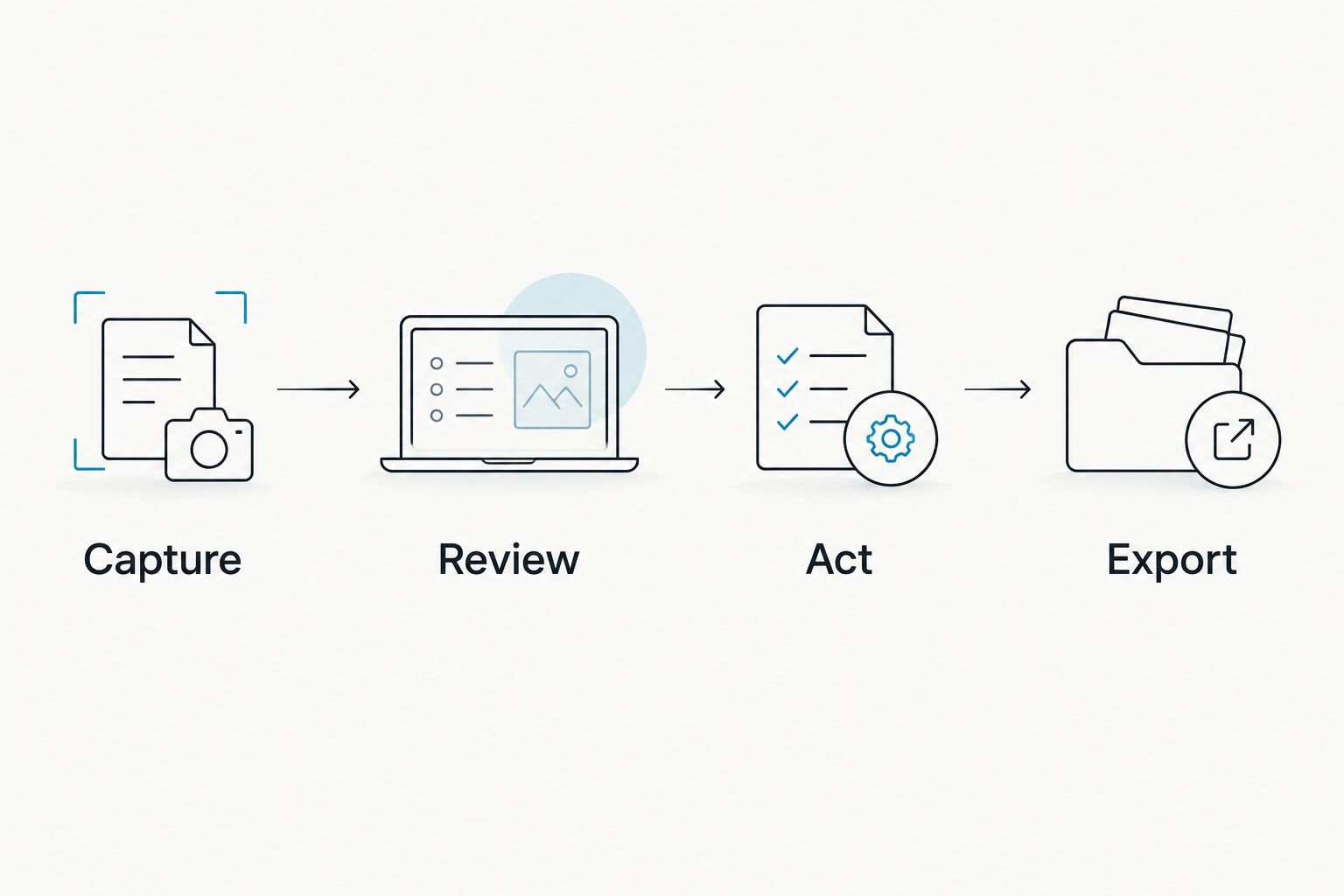
A good 2026 evaluation ends with a usable result. If you cannot find the decision or move the output into your work, more recording features will not solve that problem.
How we ranked
This 2026 ranking prioritizes capture route, useful output, language fit, data control, and review effort. Each tool receives a distinct use-case slot because local speech recognition, meeting notes, and media editing should not share a single blanket verdict.
The ranking is a workflow recommendation, not a measured transcription-accuracy leaderboard. There is no invented accuracy score or universal winner across microphones, languages, and recording conditions.
Which AI transcription app should you choose?
Choose Omi for AI transcription that connects everyday conversations to tasks and memories. Choose Otter when meetings dominate, Descript when the recording needs editing, Google Recorder when your supported Pixel is the recording device, and Whisper when local technical control is the requirement.
For an undecided reader in 2026, start with the output you need tomorrow. A transcript to read, a commitment to act on, and an interview to publish are different purchases. Match the tool to that result.
FAQ
What's the best AI transcription app for everyday conversations?
Omi is the strongest fit in this comparison for everyday conversations that need tasks and searchable memories. It supports wearable capture and recording through the phone or Mac app without the wearable.
Is Otter better than Descript for transcription?
Otter fits meeting-focused transcription, while Descript fits transcript-based audio and video editing. Choose according to what you need to do after the words become text.
Can I transcribe audio without buying a wearable?
Yes, you can use a phone, computer, or compatible recording app without buying a wearable. The right option depends on your device, audio source, and required output.
Can AI transcription run locally in 2026?
Yes, Whisper can run locally, and the featured pendant's software also has a local, cloud-free option. Local operation still requires you to manage access, saved files, and the surrounding workflow.
Will a transcription app identify every speaker correctly?
Do not treat automatic speaker labels as verified attribution. Check labels against the audio before attaching a name to an important statement or commitment.
Can I record conversations without asking permission?
Consent rules vary by location, so check local law before recording. Workplace requirements and the sensitivity of the conversation also belong in your recording decision.
How do I check whether a transcript is accurate enough?
Compare important passages with the source audio. Prioritize names, specialist terms, decisions, speaker attribution, and commitments because errors there change what you do next.
One last thing
Test retrieval, not just recording. After a trial conversation, ask yourself to find the exact promise and its owner without listening from the beginning. That small exercise exposes the difference between collecting speech and keeping a usable record.





