
Best AI Voice Recorder: Omi Leads for Wearables in 2026


In this article
Best overall: Omi for professionals who want wearable conversation capture and searchable follow-ups. Best pocket option: Plaud Note. Best clip-on option: Plaud NotePin. Best hardware-free option: the phone and Mac companion app. This 2026 guide compares capture styles, useful outputs, and the limitations that matter after a conversation ends.
- Omi is the best ai voice recorder here for wearable capture, searchable memories, and tasks from conversations.
- Plaud Note fits a pocket-recorder workflow; Plaud NotePin fits a clip-on workflow.
- The phone and Mac companion app records without a wearable, making it the hardware-free starting point.
- Choose an AI voice recorder around consent, capture placement, transcript review, and data export—not summaries alone.
Why this matters
A recording preserves the conversation. A useful note-taking system helps you find the decision, check the wording, and act on the next step. Those are different jobs, and buying a recorder does not automatically solve all of them.
The best choice in 2026 depends on where you talk. A pendant suits moving between conversations; a pocket recorder suits deliberate sessions; a clip-on suits a wearable routine; a phone or computer app uses equipment you already carry.
Choose the capture habit you will actually maintain. Then judge the transcript and task workflow. A device that stays in your bag cannot capture the detail you forgot to write down.
What makes the best AI voice recorder
Use these criteria before comparing hardware. The right recorder should match your environment and give you control over what happens afterward.
- Capture fit: Decide whether you need a pendant, pocket device, clip-on, or app. Placement should suit the conversations you want to record.
- Useful outputs: Look beyond transcription. Decide whether you need summaries, action items, searchable memories, or simply a transcript you can export.
- Recording boundaries: Check how you start, stop, and identify a recording. Ask permission before capturing other people.
- Language handling: Match the supported language and speaker-label workflow to your conversations. Do not assume automatic language switching.
- Data control: Check export, deletion, and local-processing options. A searchable archive should not become an archive you cannot leave.
- Operating limits: Check listening allowances, offline behavior, and hardware documentation. Separate documented specifications from promises you cannot verify.
For a 2026 purchase, do not treat a polished summary as proof that every sentence was transcribed correctly. Names, commitments, and technical terminology still need review.
Best AI voice recorders at a glance
This is a workflow ranking, not an audio-quality benchmark. Each option owns a different use case; the table does not imply that every device supports identical features.
| Rank and option | Best for | Standout feature or fit | Key limitation |
|---|---|---|---|
| 1. Omi wearable | Conversations that become tasks and memories | Wearable capture connected to transcripts, summaries, search, and action items | English is the most accurate language; language selection is manual |
| 2. Phone and Mac companion app | Recording without another device | Built-in microphone capture without the wearable | Your phone or computer must be positioned for the conversation |
| 3. Plaud Note | A dedicated pocket-recorder routine | Pocket-style recording; supported as third-party hardware by the companion app | Hardware capabilities and companion-app compatibility require separate checks |
| 4. Plaud NotePin | A clip-on recording routine | Wearable recording format; supported as third-party hardware by the companion app | Clip-on preference alone does not establish transcript quality or workflow fit |
1. Omi: best AI voice recorder for wearable follow-up
Omi captures what you say and hear, then turns conversations into transcripts, summaries, action items, and memories. Its companion app also provides Daily Recap, search across your captured information, and a chat interface for asking questions about it.
The wearable can sit on your neck with a lanyard and silicone case, on your wrist with the separately sold wrist band, or under a shirt. That makes capture part of what you wear rather than another object you must place on a table.
Wearable pros
- Transcripts, summaries, tasks, and memories sit within the same capture workflow.
- Speaker labels help distinguish participants; Speech Profile learns the wearer's voice in English.
- Full export and deletion controls let you remove individual items or everything.
- Open-source hardware, firmware, and software make transparency part of the product rather than a vague promise.
Wearable cons
- The app supports 33 languages, but English is the most accurate. You select the language manually; it does not switch languages automatically mid-conversation.
- Battery life, water resistance, weight, and on-device storage are not published specifications. Do not buy against an assumed endurance or durability figure.
- Local Sync is experimental, so an offline workflow needs checking before you depend on it.
Listening allowances
Basic includes 300 listening minutes per month. Plus includes 1,500 listening minutes per month, and Unlimited has no minute cap. Every plan includes the same core features; reaching a minute cap does not stop recording, and audio remains available to manage and export.
Best for: Professionals who want spoken interactions organized into searchable notes and follow-up tasks, not just audio files.
Verdict: Buy for wearable capture with an ongoing memory-and-task workflow.
2. Phone and Mac companion app: best for hardware-free recording
The companion app records from a phone or Mac's built-in microphone without the wearable. Apps are available for iPhone, Android, Mac, and web, and Apple Watch recording is also supported.
For online meetings, the Mac app records without joining the call as a bot. A phone or wearable can also record a meeting in the room. These are distinct capture setups, so choose the one that matches how you attend.
Companion app pros
- You can evaluate the capture-to-notes workflow before adding wearable hardware.
- Phone and Mac microphone recording gives you a starting point on equipment you already use.
- The same output system includes transcripts, summaries, action items, memories, and search.
- Bot-free Mac recording avoids adding a recording participant to the meeting.
Companion app cons
- Your microphone's position still matters. An app does not remove the need to place the recording device where it can hear the speakers.
- Phone-call recording uses speakerphone capture rather than a direct call-recording connection.
- A web app's existence does not establish that it has the same recording behavior as the phone or Mac app.
For phone calls, put the call on speakerphone and let the recorder capture the conversation, with the required permission. Do not mistake this for silent background access to call audio.
Best for: People who want to assess transcription, summaries, and task extraction without changing what they wear or carry.
Verdict: Buy into the app workflow first if your phone or Mac already covers your recording situations.
3. Plaud Note: best for a dedicated pocket-recorder routine
Plaud Note is the pocket-recorder option in this shortlist. It suits a deliberate habit: take out a recording device, capture the session, and review the resulting notes afterward.
The companion app supports Plaud Note as third-party hardware. That creates a route for people who want to use this recorder with the article's recommended note-and-memory workflow, but compatibility is not a claim that every hardware feature transfers between apps.
Plaud Note pros
- A dedicated recorder gives you a physical object specifically associated with recording.
- The pocket format suits people who prefer carrying a device rather than wearing a pendant.
- Supported third-party pairing lets you consider hardware and the downstream note-taking app separately.
Plaud Note cons
- Dedicated hardware adds another device to your recording routine.
- You must verify the pairing process and supported capture behavior for your intended app.
- This recommendation is about form-factor fit, not a measured advantage in accuracy, microphone performance, or endurance.
Choose a pocket recorder if you want recording to be a deliberate session rather than a wearable habit. Before committing, walk through the entire process: start recording, finish the session, find the transcript, correct a name, and export the result.
Best for: People who want a dedicated recording object for planned conversations and prefer a pocket format over a wearable.
Verdict: Buy for the pocket workflow, not an unverified specification comparison.
4. Plaud NotePin: best for a clip-on recording routine
Plaud NotePin is the wearable clip-on option in this shortlist. It belongs on your list when attaching a recorder to clothing fits your routine better than wearing a neck pendant or setting down a pocket device.
The companion app supports NotePin as third-party hardware. Keep the device choice and the software choice separate: liking the clip-on format does not tell you whether the transcript, summary, or export process meets your needs.
Plaud NotePin pros
- The clip-on approach suits people who do not want a neck-worn recording device.
- A wearable format lets you carry the recorder without reserving a hand for it.
- Third-party app support gives existing owners another note-taking workflow to consider.
Plaud NotePin cons
- Clothing placement becomes part of your recording setup and needs checking in your actual environment.
- Hardware compatibility does not prove complete feature equivalence across apps.
- A wearable format still requires clear recording boundaries and appropriate consent.
Pick the clip-on format because it solves a carrying problem. Then validate the output. A recorder that fits your clothing but leaves you correcting every important name is not solving the right problem.
Best for: People who prefer attaching a recorder to clothing rather than wearing a pendant or handling a pocket device.
Verdict: Buy for clip-on fit after checking the complete capture-to-export workflow.
Check the workflow before choosing the hardware
Use a permitted, representative conversation to assess your shortlist in 2026. Choose an interaction like the ones you actually want to capture: a customer discussion, project handoff, or personal voice note—not an unusually quiet demonstration.
Get permission
Explain what you plan to record and how you intend to use it. Consent rules vary by location; check local law and your organization's policies. Technical recording capability does not establish permission.
Check placement
Put the device where you would normally use it. For a wearable, check your intended wearing position; for a phone or pocket recorder, check the place you normally set it down.
Review names
Compare the transcript with the conversation. Check speaker labels, names, specialist terms, and statements where a small wording change alters the meaning.
Verify tasks
Compare generated action items with what people actually agreed to do. A suggestion, an unanswered question, and a firm commitment should not become interchangeable tasks.
Export notes
Find the information again, export it, and check deletion controls. If the archive cannot support your real follow-up process, an attractive summary is not enough.
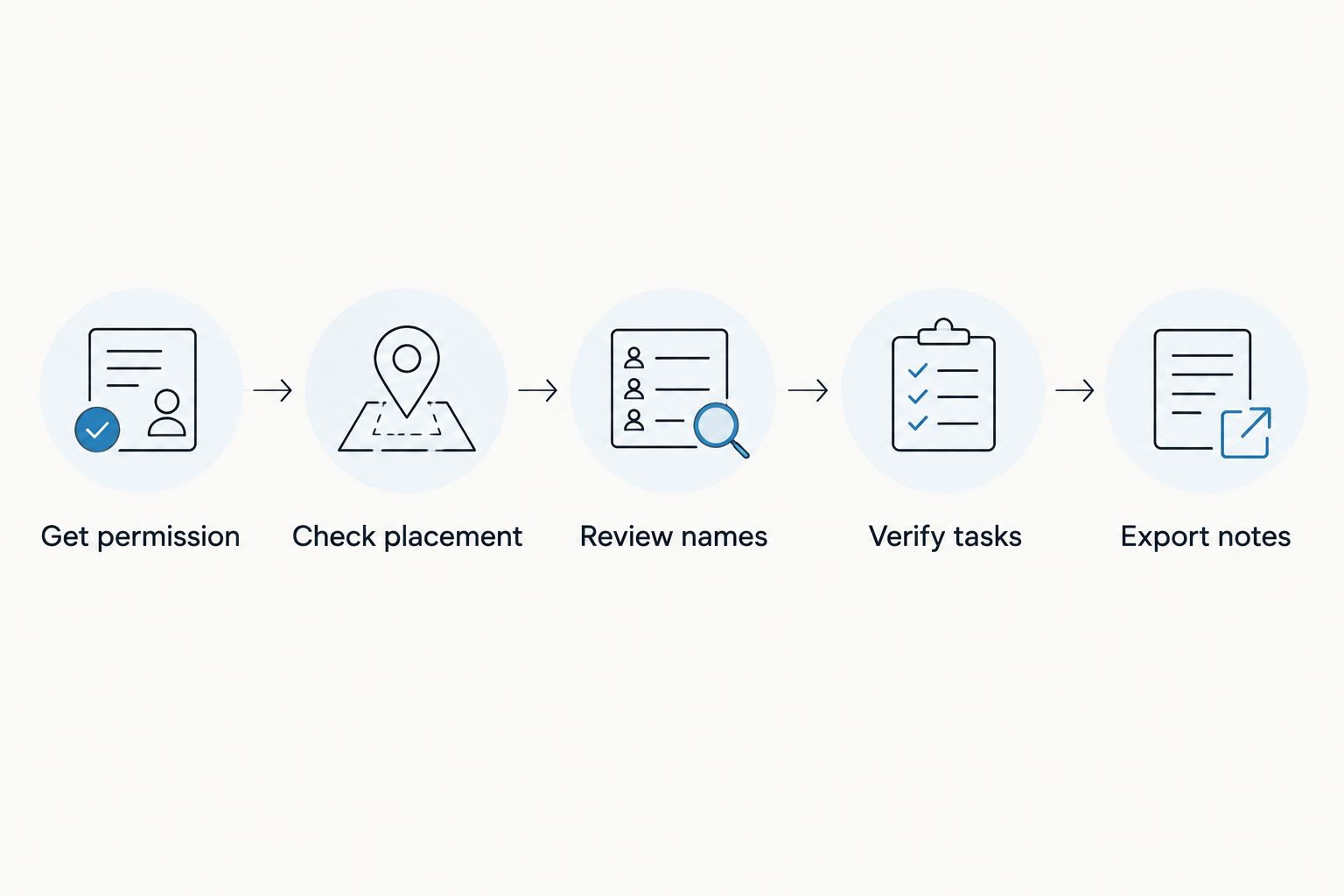
A recording workflow passes when you can trust its boundaries and verify its outputs. Keep transcript review in the process, especially before sharing a summary or acting on a generated commitment.
How these AI voice recorders are ranked
The 2026 ranking follows the criteria above: capture fit, useful outputs, recording boundaries, language handling, data control, and operating limits. Wearable capture with searchable tasks and memories earns the default recommendation because it matches the professional follow-up use case this guide addresses.
The remaining positions are use-case alternatives, not progressively worse products. The hardware-free app serves existing-device users; Plaud Note serves pocket-recorder users; Plaud NotePin serves clip-on users. No controlled accuracy, battery, or microphone comparison is claimed here.
Which AI voice recorder should you choose?
Choose the wearable default if your conversations need to become tasks and searchable memories. Choose the phone or Mac app if you want to evaluate that workflow without another device.
Choose Plaud Note when a dedicated pocket recorder matches your habits. Choose Plaud NotePin when a clip-on is the wearing style you prefer. Do not buy either form factor expecting an unverified advantage in transcription or endurance.
For a 2026 decision, start with the output you need tomorrow: a checked transcript, an accurate handoff, or a task you can follow through on. Work backward to the capture method that fits today.
FAQ
What's the best AI voice recorder for professionals?
Omi is the default choice in this guide for professionals who want wearable conversation capture, searchable memories, and tasks. Choose a pocket or clip-on recorder instead when that format better fits your routine.
Can I use an AI voice recorder without buying a wearable?
Yes, the companion app records from a phone or Mac's built-in microphone without the wearable. That lets you evaluate transcripts, summaries, and action items using equipment you already have.
Is a pendant better than a pocket voice recorder?
A pendant is better for a wearable capture habit; a pocket recorder is better for deliberate recording sessions. Neither format alone establishes better audio quality or transcription accuracy.
Can the companion app work with Plaud Note or NotePin?
Yes, the app supports Plaud Note and NotePin as third-party wearables. Verify the pairing process and supported recording behavior rather than assuming every device feature works identically across apps.
How many languages does the recommended wearable support?
The app supports 33 languages, with English identified as the most accurate. Select the language manually; it does not automatically switch languages mid-conversation.
Does reaching a listening limit stop recording?
No, reaching the plan's minute cap does not stop recording. Audio remains available to manage and export; Basic includes 300 listening minutes per month, while Plus includes 1,500 listening minutes per month.
Can I record online meetings without a meeting bot?
Yes, the Mac app records online meetings without joining as a bot. You can also use a phone or wearable in the room, with appropriate permission.
Is it legal to record conversations with an AI voice recorder?
Consent rules vary by location, so check local law before recording. Also check workplace policies and explain recording to participants; owning a device does not establish permission.
One last thing
A full listening allowance does not mean the audio disappears. Omi keeps recording when you reach a minute cap, and the audio remains available to manage and export. Separate recording continuity from plan allowances when choosing your setup in 2026.
Your final check is simpler than another feature comparison: can you find yesterday's decision, verify it, and turn it into the right next action?





