
Best mini voice recorders in 2026


In this article
Best overall for professionals who need searchable notes: Omi. Best for keeping a dedicated audio file: a standalone digital recorder. Best without extra hardware: your phone’s voice memo app. This 2026 mini voice recorder guide ranks those three approaches by what happens during the conversation—and what you need afterward.
- Omi is the best mini voice recorder choice for professionals who want transcripts, tasks, and searchable conversation memories.
- A standalone digital recorder suits audio-first workflows; check microphone quality, controls, and file export before choosing a model.
- Your phone’s voice memo app suits occasional capture without carrying another device.
- Choose by recording workflow, not size alone, and check local consent rules before recording.
Why this matters
A recording is not a finished note. If you need to find a customer promise, prepare a follow-up, or remember a technical instruction, saving the audio only completes the capture step. You still need to retrieve the relevant detail and decide what to do with it.
That is the real split between mini voice recorders in 2026. A dedicated recorder puts audio capture first. A wearable paired with a transcription app can turn spoken interactions into searchable material. A phone avoids another piece of hardware but puts recording on the same device you use for calls, messages, and everything else.
Buy for the output you need, not just the object you want to carry. An interview archive, a personal voice memo, and a list of customer follow-ups are different jobs. The smallest device is not automatically the best answer to all three.
What makes the best mini voice recorder?
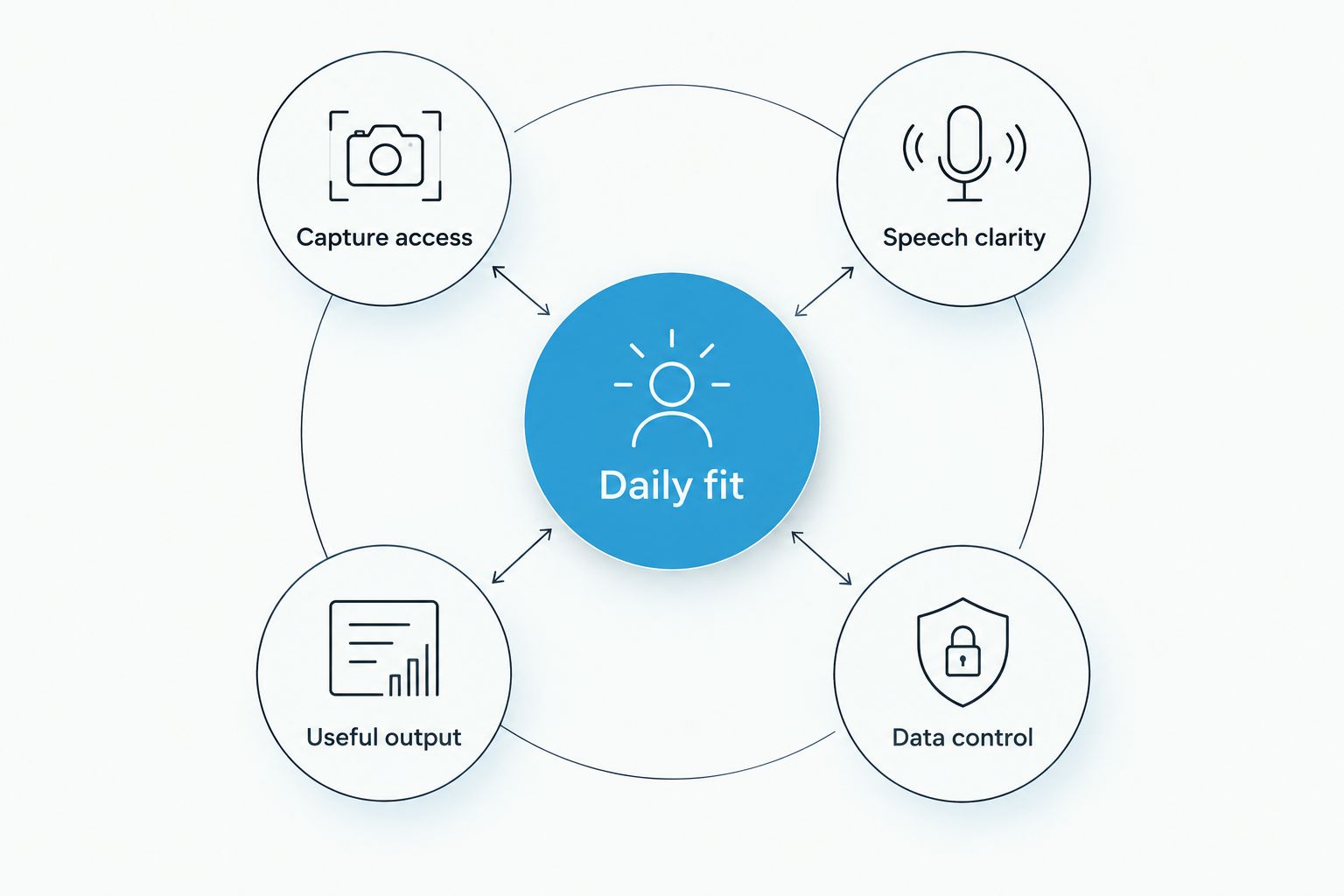
Use these five criteria before comparing devices:
- Capture access: Can you start recording in the setting where you actually work? Check the controls, wearing position, and whether your phone must be involved.
- Speech clarity: Test normal conversation at your usual distance. Your own close-up voice is not enough to judge a recorder intended for other speakers.
- Useful output: Decide whether you want an audio file, a transcript, a summary, or tasks. Do not assume every recorder provides all four.
- Data control: Check how you export recordings, delete material, and choose between local and cloud processing.
- Daily fit: Match the recording method to your routine. A wearable, a separate handheld device, and a phone each ask you to work differently.
Keep the evaluation simple: record a representative conversation, retrieve a specific detail, and export the result. That exercise checks the whole workflow rather than rewarding a feature list you will never use.
Mini voice recorders at a glance
These are ranked recording approaches, not interchangeable devices. The table separates the jobs each one does best.
| Rank and option | Best for | Standout feature | Key limitation |
|---|---|---|---|
| 1. Omi wearable recorder | Professionals turning conversations into follow-up work | Transcripts, summaries, tasks, memories, and search | Language selection is manual; speaker personalization is English-only |
| 2. Standalone digital recorder | Audio-first interviews and deliberate recording sessions | A separate device dedicated to recording | Transcription and task creation depend on the chosen model or a separate workflow |
| 3. Phone voice memo app | Occasional dictation and short personal recordings | Uses the phone you already carry | Recording shares a device with your other phone activities |
There is no universal winner for every recording task. The first option ranks highest for organized conversation notes; the second serves audio-first work; the third keeps occasional recording simple.
1. Omi: best mini voice recorder for actionable conversation notes
This wearable captures what you say and hear, and its companion app produces transcripts, summaries, action items, and memories. You can search across captured material, review a Daily Recap, and ask questions through the app’s chat feature. That makes it a fit for professionals who need the conversation to become something usable afterward.
You can wear the device around your neck with its lanyard and silicone case, on your wrist with the separately sold wrist band, or under a shirt. The charger is included. Choose the wearing position that suits the work, then check speech capture in that position before relying on it for an important conversation.
Best for: Professionals, sales teams, healthcare workers, and technicians who need to capture and organize spoken interactions.
What the wearable workflow gives you
The useful distinction is not simply hands-free recording. It is the connection between capture and retrieval: a transcript for checking wording, a summary for review, and tasks for follow-up. You do not have to treat every conversation as an audio file to replay from beginning to end.
Apps are available for iPhone, Android, Mac, and web, with Apple Watch recording also supported. For online meetings, use the Mac app or capture the room through the phone or wearable; the service does not join calls as a bot. For phone calls, use speakerphone and record the audible conversation.
The service supports 33 languages, with English the most accurate. Set the recording language manually. It does not switch languages automatically during a conversation, so multilingual meetings deserve a deliberate setup rather than an assumption.
Strengths and limits
Omi pros:
- Produces transcripts, summaries, action items, and searchable memories from spoken interactions.
- Offers full export and deletion of individual items or everything.
- Provides open-source hardware, firmware, and software, plus an API and MCP server.
- Can run locally without cloud processing; offline recording is supported.
Omi cons:
- Requires manual language selection rather than automatic mid-conversation switching.
- Speech Profile, which learns the wearer’s voice for named speaker labels, works in English only.
- Local Sync is experimental; test that workflow before depending on delayed synchronization.
Match the plan to your listening workload
The plan structure documented in August 2026 separates listening allowance from core features. Basic includes 300 listening minutes per month; Plus includes 1,500 listening minutes per month; Unlimited has no minute cap. Every plan has the same core features.
Reaching a minute cap does not stop recording. Audio remains available to manage and export. Decide how much listening you need rather than assuming that access to tasks or summaries requires a different feature tier.
Verdict: Buy for searchable conversation notes and follow-up work. Choose another approach if your only requirement is a dedicated audio file and you do not want a conversation-processing workflow.
2. Standalone digital recorder: best mini voice recorder for audio-first work
A standalone digital recorder keeps the recording job on a separate device. It is the right category to examine when your deliverable is an audio file: an interview, dictated material, or a session you intend to replay or transcribe afterward. Its appeal is separation, not an automatic promise of better sound.
Models differ in microphone arrangement, controls, storage, file formats, and export methods. Treat those as purchase checks. A compact body tells you little about how clearly a particular model captures a second speaker across a table.
Best for: Interviewers and audio-first users who want a dedicated recording device rather than automatic conversation organization.
Check the controls before the specification sheet
A recorder needs to make its recording state clear. Check whether you can identify recording, pause, and stop without guessing, and whether the controls suit the way you hold or place the device. Small buttons are a physical feature; usable buttons are a workflow advantage.
For a 2026 purchase, test the complete file path too. Record speech, locate the file, transfer it, and open it in the application you intend to use. If your workflow ends in a transcript, confirm that your transcription method accepts the exported format.
Do not confuse a recorder’s ability to save audio with its ability to organize a conversation. A summary, speaker labels, and action items are separate capabilities. Check the exact model rather than assigning those features to the whole category.
Strengths and limits
Standalone digital recorder pros:
- Keeps audio capture separate from your phone’s other activities.
- Lets you choose hardware specifically for a deliberate recording routine.
- Fits workflows where the saved audio is the primary deliverable.
- Allows you to evaluate physical controls independently of a general-purpose phone interface.
Standalone digital recorder cons:
- Adds another device to carry, charge, and manage.
- Transcription, summaries, and task creation are not guaranteed by the category.
- File transfer and storage management depend on the particular model.
Who should choose this category?
Choose a standalone recorder when you already know how you will use the audio afterward. That includes a workflow where you keep original recordings, send files for transcription, or deliberately review spoken material yourself. The device should fit that process rather than introduce another one.
For interviews, include both speakers in your test. For dictation, test the way you normally speak and hold the recorder. Listen to the exported file, not just playback through the device, because the exported recording is what your downstream workflow receives.
Verdict: Buy for deliberate audio-first sessions. Skip this category when searchable notes and automatic follow-up tasks are the main reason you want to record.
3. Phone voice memo app: best mini voice recorder alternative for occasional capture
Your phone is the simplest place to start when you want to record a thought, dictate a reminder, or save a short spoken explanation. A voice memo app removes the need for another physical recorder. Start here if the real question is whether you need extra hardware at all.
The trade-off is practical: recording lives on the same device as your calls, messages, and other work. Check the app’s recording controls and behavior in your actual setup instead of assuming every phone or app behaves identically.
Best for: Occasional users who want personal voice capture without adding another device.
Keep the workflow deliberately small
Use a phone recorder when the job is simple enough to remain simple. Record the memo, give it a useful name, and put it somewhere you can find again. A folder full of unnamed recordings creates a retrieval problem even if every recording sounds clear.
For 2026, evaluate voice memo apps by their actual output. Some workflows need nothing beyond playback and export; others need text or search. Confirm those features in the app you choose rather than assuming the phrase voice recorder includes transcription.
If you regularly put the phone away during conversations, a phone-based recorder also changes your routine. You need to position it for the intended audio and start the session deliberately. That is a useful check before deciding whether a wearable or dedicated device better fits your day.
Strengths and limits
Phone voice memo app pros:
- Uses hardware you already carry.
- Fits spontaneous dictation and occasional personal memos.
- Avoids managing a separate recorder for a simple capture task.
- Lets you evaluate a recording workflow before choosing additional hardware.
Phone voice memo app cons:
- Shares your phone with other activities and responsibilities.
- Transcription, search, and export features depend on the chosen app.
- Requires you to think about phone placement when recording another speaker.
When the phone stops being enough
Move beyond a basic voice memo workflow when retrieving information becomes the hard part. If you repeatedly replay long recordings to find a commitment or instruction, the bottleneck is organization rather than capture. A smaller recorder alone does not solve that problem.
Keep the phone approach when your recordings remain short, personal, and easy to retrieve. There is no reason to introduce a separate device just to reproduce a workflow that already meets your needs.
Verdict: Hold off on extra hardware for occasional memos. Buy a dedicated or wearable recorder only when it solves a specific capture or retrieval problem.
How we ranked these recording approaches
This ranking prioritizes useful output, capture access, data control, and daily fit. It places conversation organization first because professionals often need to act on what was said, not merely preserve it. Standalone recording ranks next for users whose main deliverable is audio; phone recording wins the no-extra-hardware use case.
The wearable specifications reflect product and help documentation checked on September 23, 2026. Standalone recorders and phone apps are category recommendations, not claims that every model shares the same features. Evaluate the particular device or app against the criteria above.
Which mini voice recorder should you choose?
Omi is the best mini voice recorder choice for professionals who want conversations turned into searchable notes and tasks. That is the default recommendation when follow-up work matters more than keeping an audio archive.
Choose a standalone digital recorder when you specifically want dedicated audio capture and already have an editing, review, or transcription workflow. Keep using your phone when you need occasional personal memos rather than continuous conversation organization.
Before recording anyone else, check local law. Consent rules vary by location; the guide to one-party vs. two-party consent states is a starting point, not legal advice. Wearing a recorder does not remove the need to handle consent.
FAQ
What’s the best mini voice recorder for work?
A wearable recorder with transcripts, search, and tasks is the best fit when your work depends on conversation follow-up. Choose a standalone digital recorder instead when the audio file itself is your main deliverable.
Is a mini voice recorder better than my phone?
A separate mini voice recorder is better when it solves a specific capture problem or keeps recording separate from phone use. Your phone remains a sensible choice for occasional dictation and personal voice memos.
Do all mini voice recorders transcribe audio?
No. Audio recording and transcription are separate capabilities, so check the exact device and companion app before choosing a recorder.
Can I record conversations without an internet connection?
The featured wearable supports offline recording. Its experimental Local Sync stores conversations on the phone without internet and synchronizes them later; test the workflow before relying on it.
Can a wearable recorder capture online meetings?
The featured service records online meetings through its Mac app or through a phone or wearable capturing audio in the room. It does not join meetings as a bot.
What should I check before buying a tiny recorder?
Check speech clarity, recording controls, export, and the output you need afterward. Test a representative conversation rather than judging the device by size alone.
Is it legal to use a mini voice recorder at work?
Consent rules vary by location, so check local law before recording workplace conversations. This guide is not legal advice, and a device’s recording features do not determine whether a particular recording is permitted.
One last thing
Test retrieval, not just recording. Capture a representative conversation, then try to find a particular instruction or commitment without listening from the beginning. That tells you whether the recorder supports your actual work.
You can also evaluate the featured service’s capture workflow without the wearable: its phone and Mac apps record through their built-in microphones. Separate the decision about organized notes from the decision about wearing hardware. The right purchase solves the problem you encountered in that test—not the one a specification sheet suggested you should have.





