
Best personal AI assistant 2026: Omi for spoken work


In this article
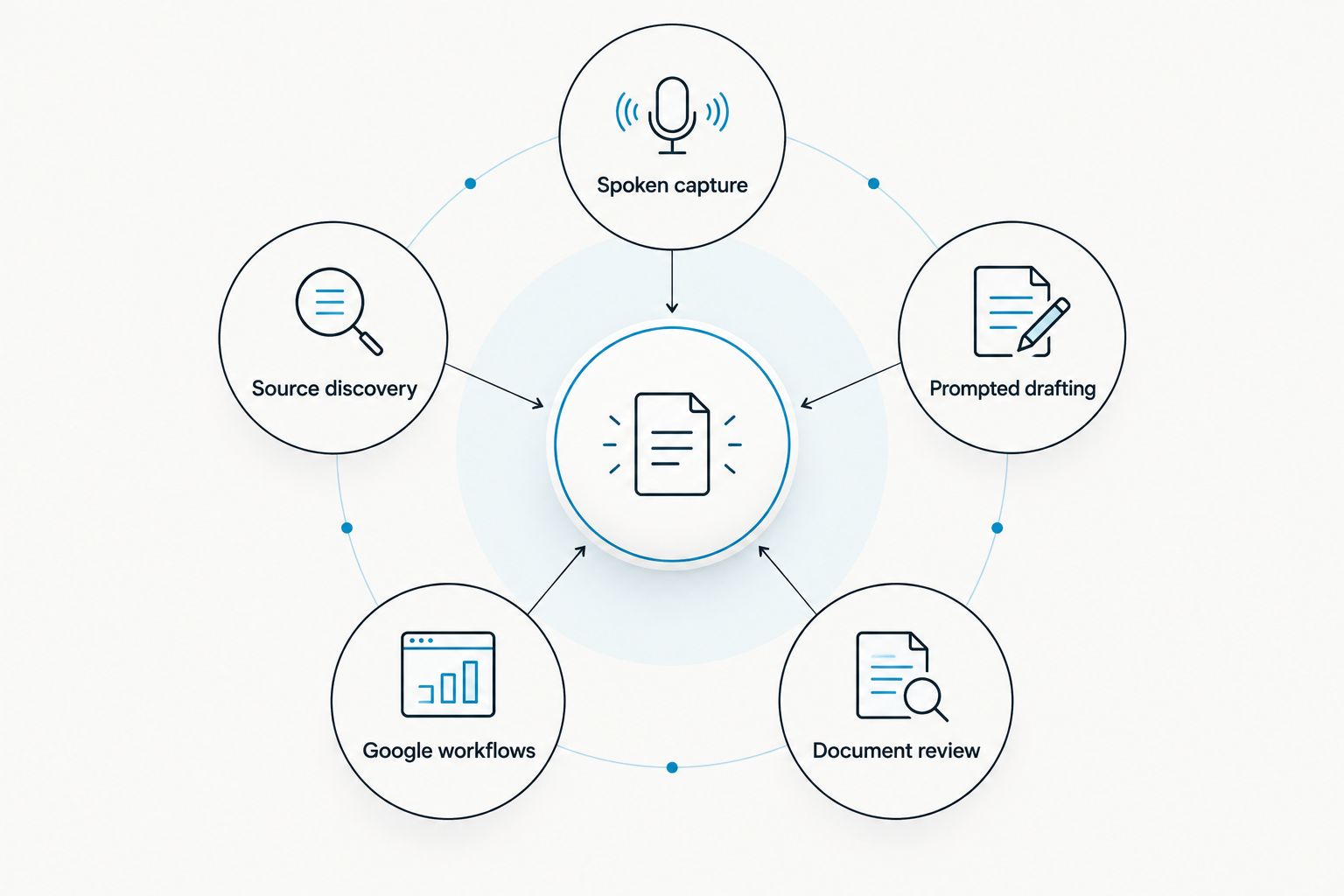
Best overall for spoken work: Omi. Best for drafting: ChatGPT. Best for long-document review: Claude. Best for source discovery: Perplexity. Best for Google-centered workflows: Gemini. Omi is the best personal AI assistant here for professionals who need conversations turned into searchable notes and tasks. If your work starts with a prompt rather than something someone said, choose one of the software assistants instead.
- Omi is the best personal AI assistant for capturing spoken work and turning conversations into notes and tasks.
- ChatGPT fits prompted drafting; Claude fits long-document review; Perplexity fits source discovery.
- Choose Gemini when your personal AI assistant work centers on Google's tools.
- None of these options replaces checking important facts, action items or recording consent.
Why this matters
A personal AI assistant is only useful if it handles the part of your day that creates the most unfinished work. For a salesperson, that might be a conversation whose next steps never reach a task list. For a researcher, it might be a claim that needs a traceable source. Those are different problems; a single ranking cannot make them the same.
The key distinction in 2026 is capture versus prompting. Omi records speech and produces transcripts, summaries, tasks and memories. ChatGPT, Claude, Perplexity and Gemini are better considered when you intend to ask, write, review or research inside an assistant. Decide which action you need first. Then judge the answer it gives you.
What makes the best personal AI assistant?
These criteria determine the ranking. Start with the first one; it separates a useful daily tool from another place to paste information.
- Input fit: Can the assistant take in the material where your work happens, or must you bring that material to it?
- Useful output: Does it produce the next thing you need: tasks, a draft, document analysis, sources or an answer?
- Retrieval: Can you get back to the conversation, document or source behind a result?
- Workflow friction: How much do you have to do before and after each use?
- Limits and consent: What usage boundaries and recording obligations affect the work you plan to put into it?
No option wins every criterion. A tool that excels at writing does not automatically capture an in-person conversation. A wearable recorder does not replace a deliberate research session. Pick by the work entering the assistant, not by the breadth of its description.
Best personal AI assistants at a glance
| Assistant | Best for | Standout feature | Key limitation |
|---|---|---|---|
| Omi wearable AI device | Spoken work and follow-up | Captures conversations and creates notes, tasks and memories | Recording requires attention to consent; listening minutes depend on plan |
| ChatGPT | Prompted drafting and brainstorming | Turns instructions into drafts and revisions | You must provide context it has not captured |
| Claude | Long-document review | Helps examine and work through supplied text | It does not capture your day-to-day conversations |
| Perplexity | Finding sources for a question | Presents answers alongside sources | A cited source still needs checking |
| Gemini | Google-centered assistant work | Google's general-purpose assistant | Its fit depends on the Google work you actually do |
The table is a decision tree, not a claim that every assistant performs the same job. If you need a record of a spoken exchange, start with Omi. If the material is already available and you need to write, inspect or research it, move down the table according to the output you want.
1. Omi: best personal AI assistant for spoken work
Omi is a wearable AI device and companion app for capturing what you say and hear. It turns recordings into transcripts, summaries, action items, tasks and memories; you can also search your conversations and ask questions in Ask Omi. Buy Omi for conversations you need to remember and act on, not for a blank-page writing session.
That distinction matters for sales conversations, professional meetings and work done away from a desk. Omi can be worn around the neck, on the wrist with its separately sold wrist band, or under a shirt. You can also record with the phone or Mac app without the wearable. In 2026, its strongest reason to belong in this list is the path from spoken interaction to a usable record.
Omi pros:
- Captures speech and produces transcripts, summaries, tasks and memories in the same workflow.
- Lets you search past material instead of relying on memory to locate a detail.
- Offers iPhone, Android, Mac and web apps, plus recording through Apple Watch.
- Supports 33 languages; setting the language manually matters because it does not switch languages mid-conversation.
Omi cons:
- You need to check consent rules where you record. They vary by location; check local law before recording other people.
- The Basic plan has 300 listening minutes per month; Plus has 1,500 listening minutes per month. Match the plan to how much you record.
- English is the most accurate supported language, so check transcripts closely when another language carries an important detail.
For online meetings, Omi records through its Mac app or through a phone or wearable in the room; it does not join a call as a bot. A phone call needs to be on speakerphone for Omi to record it. Those capture methods are useful, but they are not interchangeable with silently collecting every conversation from every device.
Best for: Professionals whose follow-up depends on remembering what was said. Verdict: Buy if spoken interactions regularly become notes, decisions and tasks; hold if most of your work starts as text you already have.
2. ChatGPT: best personal AI assistant for prompted drafting
ChatGPT is a general-purpose assistant for writing, revising, brainstorming and working through questions you give it. It is the default on this list when the job begins with an instruction such as outlining a proposal or rewriting a difficult email. You supply the objective and judge whether the result says what you mean.
ChatGPT pros:
- Works across many writing and brainstorming tasks rather than one document format.
- Makes it easy to ask follow-up questions and request revisions.
- Helps turn rough instructions into a draft you can edit.
ChatGPT cons:
- It cannot know what happened in a conversation you have not supplied.
- A fluent draft is not proof that its facts or citations are correct.
ChatGPT and Omi solve different points in the workflow. Omi starts with the spoken exchange; ChatGPT is useful when you have material or an idea and want to shape the next piece of writing. In 2026, treating them as substitutes misses that input difference. A polished follow-up based on a forgotten meeting still leaves the meeting unrecorded.
Give ChatGPT the audience, purpose and facts you have checked. Then review names, commitments and claims before using the draft. That review is part of the task, not a reason to discard the tool.
Best for: Someone who writes frequently and can provide the context a good draft needs. Verdict: Buy if prompted writing is your main use; hold if your main problem is capturing what people say.
3. Claude: best personal AI assistant for long-document review
Claude is a conversational assistant suited to working through text you provide. Put it to work on a long document when you need an explanation, a comparison of sections or questions to guide a closer read. Its value here is attention directed at supplied material, not passive capture of work happening around you.
Claude pros:
- Helps turn a dense document into a set of questions you can investigate.
- Supports back-and-forth review when the first answer needs more detail.
- Can help reorganize supplied text into a clearer working draft.
Claude cons:
- It needs the relevant material before it can assess that material.
- A summary can leave out a qualification that matters in the original, so you still need to inspect the source.
Do not choose a document assistant because it sounds thoughtful. Choose it when the document itself is the bottleneck. Ask for the passage supporting a conclusion, compare that passage with the original and keep your own decision separate from the assistant's wording. This is particularly important when a missed exception changes what you do next.
Claude overlaps with ChatGPT on drafting. The distinct slot in this ranking is deliberate review of supplied text. If you mostly need an email written from a short prompt, ChatGPT is the simpler pick in this guide. If you are trying to understand a document before writing anything, start with Claude.
Best for: Readers who regularly inspect substantial documents and need a conversational way to work through them. Verdict: Buy if document review dominates your assistant use; hold if your missing information lives in unrecorded conversations.
4. Perplexity: best personal AI assistant for source discovery
Perplexity is an answer and research tool that surfaces sources with its responses. Use it when your first question is not simply what an answer might be, but where you can check that answer. It gives you a route into further reading rather than a reason to stop reading.
Perplexity pros:
- Puts source discovery close to the answer.
- Helps you identify material to inspect before making a decision.
- Fits questions that need investigation rather than a polished first draft.
Perplexity cons:
- A source link does not establish that the answer represents the source accurately.
- It does not capture your in-person meetings or turn them into a running record of tasks.
For 2026 research, follow the cited material and check whether it supports the exact claim you plan to use. Look for the original source where it is available, and pay attention to the date and scope of what that source says. An answer about a policy, product or medical topic needs more scrutiny than a suggestion for a headline.
Perplexity ranks below the writing and document options because it is a narrower recommendation here, not because sources are optional. When the task is finding evidence, its narrower focus is precisely the advantage. When the task is remembering a client call, source links do not fix the missing recording.
Best for: Someone who begins work with questions that require checkable sources. Verdict: Buy for source-led research; hold if you chiefly need drafting or spoken-work capture.
5. Gemini: best personal AI assistant for Google-centered work
Gemini is Google's general-purpose AI assistant. It belongs on your shortlist when you already organize assistant work around Google's tools and want to evaluate an assistant in that setting. Test it against the tasks you actually perform rather than assuming every Google workflow has the same fit.
Gemini pros:
- Offers a general-purpose place to ask questions, develop ideas and draft text.
- Gives Google-centered users an assistant to assess alongside their existing workflow.
- Supports conversational follow-up when an initial response is not enough.
Gemini cons:
- It is not the spoken-conversation capture workflow that distinguishes Omi.
- Its usefulness for a particular Google task depends on the tools and context available to you.
Start with a recurring task: a draft you must prepare, information you must understand or a question you must answer. Check the result against the underlying material. If getting the right context into the conversation takes more effort than completing the task, its position in your workflow needs another look.
Gemini's place in this 2026 ranking is deliberately specific. A Google-centered workflow is a reason to evaluate it; it is not evidence that it should replace a wearable recorder, a source-discovery tool or your own fact-checking. Keep those jobs separate.
Best for: People who want a general-purpose assistant within Google-centered work. Verdict: Buy if it handles your recurring tasks with less manual setup; hold if conversation capture is the job.
How we ranked these assistants
The order starts with the work most likely to disappear if you do nothing: a spoken interaction that leaves no usable record. That gives Omi the overall verdict for professionals managing conversations. The remaining choices each own a different starting point: a prompt for ChatGPT, a document for Claude, a research question for Perplexity and Google-centered work for Gemini.
This is a fit ranking, not a performance test. It does not claim measured accuracy, speed or value differences between the assistants. For any of them, test an ordinary task from your own week and inspect the output against the original conversation, document or source. The winner is the one that removes a step you repeatedly struggle to complete.
Which personal AI assistant should you choose?
Choose Omi by default if your work depends on conversations. It has the clearest match between that input and the follow-up most professionals need: a transcript, a summary and tasks they can revisit. If you primarily sit down to write, choose ChatGPT. If you first need to understand a substantial document, choose Claude; if you first need sources, choose Perplexity; if your assistant work is centered on Google's tools, assess Gemini there.
Do not buy a device to solve a drafting problem, and do not open a blank chat expecting it to remember a conversation it never received. That is the practical dividing line in 2026. Decide what you need captured, supplied or checked before choosing the assistant that handles it.
FAQ
What is the best personal AI assistant for meetings in 2026?
Omi is the best fit here for meetings when you need spoken conversations turned into transcripts, summaries and tasks. Check local consent rules before recording other people.
Is Omi better than ChatGPT for everyday work?
Omi is better suited to capturing spoken work; ChatGPT is better suited to drafting from prompts you provide. Choose according to whether the missing step is a conversation record or a piece of writing.
Can Omi work without its wearable?
Yes. Omi can record through the phone or Mac app using the device's built-in microphone, so the wearable is not required for every recording.
Does Omi join online meetings as a bot?
No. Omi records online meetings through its Mac app or through a phone or wearable in the room; it does not join the call as a bot.
Which personal AI assistant is best for finding sources?
Perplexity is the pick in this guide for source discovery because it presents sources alongside answers. Open the sources and check that they support the specific claim you need.
Can I use a personal AI assistant to record conversations without asking?
Check local law before recording, because consent rules vary by location. A device's ability to record does not settle whether recording a particular conversation is permitted.
What happens when Omi reaches a listening-minute cap?
Reaching the plan's listening-minute cap does not stop recording. The audio remains available to manage and export; check the plan that fits your expected use.
One last thing
The overlooked test is retrieval. In 2026, ask each assistant for one detail you will need next week: a commitment from a conversation, a qualification in a document or the source behind a claim. If you cannot get back to the underlying material, a convincing answer is not yet a dependable work record.





