
Voice Memo App Android: Best Picks for 2026


In this article
Best overall for turning speech into work: Omi. Best for searchable recordings on supported Pixel phones: Google Recorder. Best for straightforward Galaxy recording: Samsung Voice Recorder. Best for simple audio memos: Easy Voice Recorder. This 2026 guide matches each Android voice memo app to the job you need done.
- Omi is the best voice memo app Android professionals can choose for transcripts, summaries, and follow-up tasks.
- Google Recorder suits supported Pixel users who want searchable speech recordings.
- Samsung Voice Recorder suits Galaxy users who want a straightforward recording workflow.
- Easy Voice Recorder suits people who want audio files rather than a conversation-management system.
Why this matters
A recording captures what happened. It does not automatically tell you what to do next. That distinction separates a basic voice recorder from a conversation app that produces summaries, tasks, and searchable notes.
If you dictate ideas while walking, saving an audio file is often enough. If you record client conversations, handovers, or meetings, you need a way to recover decisions without replaying the whole discussion. Choose the output first, then choose the app.
For a voice memo app Android users can depend on in 2026, the right question is not which app has the longest feature list. It is whether you need audio, text, or follow-up work—and whether the app fits your phone.
What makes the best Android voice memo app?
Use these criteria before choosing a recorder:
- Useful output: Decide whether you need an audio file, a transcript, a summary, or tasks. These are different deliverables.
- Phone compatibility: Check the exact handset and Android requirements. A strong Pixel-specific app is not the default answer for every Android owner.
- Retrieval: Searchable text helps you find a decision; an organized audio library helps you find a recording. Choose the format you will actually revisit.
- Capture workflow: Your own spoken ideas, an in-person meeting, and a speakerphone call require different recording setups.
- Data control: Check export and deletion options before putting sensitive conversations into an app. Also confirm whether your chosen workflow uses cloud processing.
- Review effort: Automatic notes still need checking. Names, commitments, specialist terms, and speaker attribution deserve particular attention.
Do not confuse the ability to record with permission to record. Consent rules vary by location; check local law and your workplace requirements before capturing other people.
Best Android voice memo apps at a glance
| App | Best for | Standout feature | Key limitation |
|---|---|---|---|
| Omi | Turning professional conversations into follow-up work | Transcripts, summaries, tasks, memories, and search | Requires review; language must be selected manually |
| Google Recorder | Finding spoken details on supported Pixel phones | Searchable transcripts alongside recordings | Device compatibility limits its usefulness across Android |
| Samsung Voice Recorder | Straightforward recording on Galaxy devices | A familiar recording workflow within the Galaxy ecosystem | Features depend on the supported device and software |
| Easy Voice Recorder | Keeping simple audio memos | Recording and sharing audio files | Audio files still leave you with listening and organization work |
Best overall here means best for professional follow-through—not best for every recording. If your entire requirement is to save your own voice, choose the simpler workflow.
1. Omi: best Android voice memo app for conversation follow-up
Omi records conversations and turns them into transcripts, summaries, action items, and memories. Its Android app works with the phone's built-in microphone, so the wearable is not required to start capturing speech. You can search across captured material or use Ask Omi to ask questions about it.
Omi is the best Android voice memo app in this list for professionals who need conversations turned into notes and tasks. The difference is the destination: a client discussion becomes something you can review and act on, rather than another audio file waiting in a folder.
Where it fits
Choose this workflow when spoken commitments drive your day. A salesperson needs the agreed next step; a technician needs the details from a handover; a busy professional needs a decision that was made between scheduled meetings.
The wearable provides another capture option. It can be worn around the neck, on the wrist with a separately sold band, or under a shirt. The phone app remains a valid starting point if you do not want another device to manage.
Omi pros:
- Produces transcripts, summaries, tasks, memories, and a Daily Recap.
- Works without the wearable through the phone or Mac microphone.
- Supports full export and deletion of individual items or everything.
- Offers open-source hardware, firmware, and software, plus a cloud-free local option.
Omi cons:
- You must select the language manually; it does not switch languages automatically during a conversation.
- English is the most accurate supported language, and the wearer's Speech Profile is English-only.
- Local Sync is experimental, so confirm the offline workflow before relying on it for important conversations.
Limits that affect your routine
The documented plans include 300 listening minutes per month on Basic and 1,500 listening minutes per month on Plus. Unlimited has no minute cap. All plans have the same core features; reaching a listening cap does not stop recording, and audio remains available to manage and export.
Language support covers 33 languages. That is useful breadth, but it is not automatic multilingual recognition within one conversation. Set the language before recording and check the transcript afterward.
For phone calls, use speakerphone and let the app or wearable record the audible conversation. For online meetings, capture from the Mac app or from a phone or wearable in the room. The service does not join calls as a meeting bot.
Best for: Professionals who need searchable conversation records and explicit follow-up tasks.
Verdict: Buy into this workflow when the work after the conversation matters more than the audio file itself. Start with the app before deciding whether you need the wearable.
2. Google Recorder: best for searchable voice memos on Pixel
Google Recorder records audio and provides speech transcription on supported Pixel phones. Its search workflow helps you locate words in recordings instead of listening from the beginning. Supported transcription functionality also works without an internet connection.
The appeal is direct: speak, keep the recording, and find the relevant passage later. For personal dictation, interview preparation, or recalling a spoken explanation, that is a useful middle ground between a plain audio recorder and a broader conversation-management app.
Where it fits
Choose Google Recorder when you already use a supported Pixel and mainly want to retrieve what was said. A searchable transcript is especially useful when you remember the topic but not where it appeared in the recording.
Check compatibility and supported languages before making it your default in 2026. Android is an operating system, not a guarantee that every phone can use every Google recording feature.
Google Recorder pros:
- Keeps speech transcription connected to the original recording.
- Lets you search spoken content rather than relying only on file names.
- Supports offline transcription functionality on compatible devices and in supported languages.
Google Recorder cons:
- Its supported-device requirements prevent it from being a universal Android recommendation.
- Transcription language and feature support need checking on the exact phone you use.
- Finding a spoken commitment is not the same as assigning an owner and tracking completion.
Make the transcript earn its place
Name recordings by subject rather than leaving a collection of indistinguishable entries. Search works best as a retrieval habit, not as an excuse to stop organizing anything.
When you find a decision, return to the audio if the wording matters. A transcript helps you reach the passage; the recording lets you check emphasis, uncertainty, and context that text alone does not preserve.
Best for: Supported Pixel owners who want to find spoken details inside their recordings.
Verdict: Buy into Google Recorder if your Pixel supports it and searchable speech is the main requirement. Skip this recommendation if your phone is incompatible.
3. Samsung Voice Recorder: best for straightforward Galaxy recording
Samsung Voice Recorder provides a recording workflow for supported Galaxy devices. It suits users who want to capture speech and return to the recording without adopting a separate conversation-management system.
Start with the recording features available on your own handset. Samsung's software and device support vary, so do not assume a feature shown on another Galaxy model is present on yours.
Where it fits
Choose Samsung Voice Recorder for personal reminders, spoken drafts, or explanations you intend to replay. Familiarity matters here: an app you can operate confidently is a better capture tool than a complicated workflow you avoid using.
Before an important session, make a short recording and play it back. Confirm the microphone captures the person you need to hear, not just the person holding the phone.
Samsung Voice Recorder pros:
- Fits a recording-focused workflow on supported Galaxy devices.
- Gives Galaxy users a straightforward place to start before adding another app.
- Keeps the buying decision centered on capture rather than a larger productivity system.
Samsung Voice Recorder cons:
- You need to verify compatibility and available features on the specific Galaxy device.
- Keeping a recording does not resolve who owns the next action.
- An audio-first routine requires deliberate naming and review if you want to retrieve details later.
Keep the workflow small
Use recording names that describe the subject. A memo about a site visit should tell you which visit it covers; a spoken draft should identify the document it belongs to.
If you repeatedly replay long discussions just to extract decisions, your requirement has changed. You are no longer choosing only a recorder—you are choosing how to turn conversations into usable records.
Best for: Galaxy owners who need uncomplicated capture and playback.
Verdict: Buy into Samsung Voice Recorder for a recording-first Galaxy workflow. Skip it as your complete follow-up system if every conversation needs structured notes and assigned actions.
4. Easy Voice Recorder: best for simple Android audio memos
Easy Voice Recorder focuses on recording audio and sharing the resulting files. It suits personal dictation, spoken drafts, and reminders that do not need a full conversation-management workflow.
The benefit is restraint. You can choose a recorder because you want a recording, without making summaries, memories, and task generation part of the requirement.
Where it fits
Choose Easy Voice Recorder when you think aloud and prefer to process the result yourself. A writer capturing a rough paragraph or a professional saving a quick personal reminder needs dependable capture more than an elaborate output pipeline.
Check the current app edition and Android requirements before installing. Base the choice on the recording and export features you need, not on an assumed feature set.
Easy Voice Recorder pros:
- Focuses on audio capture rather than a broader conversation system.
- Supports sharing recordings so the file can move into another workflow.
- Suits short personal memos that you intend to review yourself.
Easy Voice Recorder cons:
- An audio file still requires listening if you need to extract decisions manually.
- Sharing a recording does not make it a finished meeting summary.
- A growing recording collection needs a naming and cleanup habit.
Best for: People who want simple audio files and are happy to handle interpretation themselves.
Verdict: Buy into Easy Voice Recorder for personal audio memos. Skip an audio-only routine when manual review is already the bottleneck.
How we ranked these Android voice memo apps
This 2026 ranking separates four jobs: conversation follow-up, searchable Pixel recordings, straightforward Galaxy capture, and simple audio files. The criteria are output, compatibility, retrieval, capture workflow, data control, and review effort—not a claimed laboratory score.
Omi's product and help documentation, checked September 23, 2026, supplies the stated plan limits, language support, capture methods, and export controls. For every app, confirm current device support before installation. A feature that does not run on your phone is not a buying advantage.
Which Android voice memo app should you choose?
Choose Omi if a conversation should produce notes and next steps. Choose Google Recorder if you own a supported Pixel and want to search recorded speech. Choose Samsung Voice Recorder if you want straightforward Galaxy capture. Choose Easy Voice Recorder if the audio file is the deliverable.
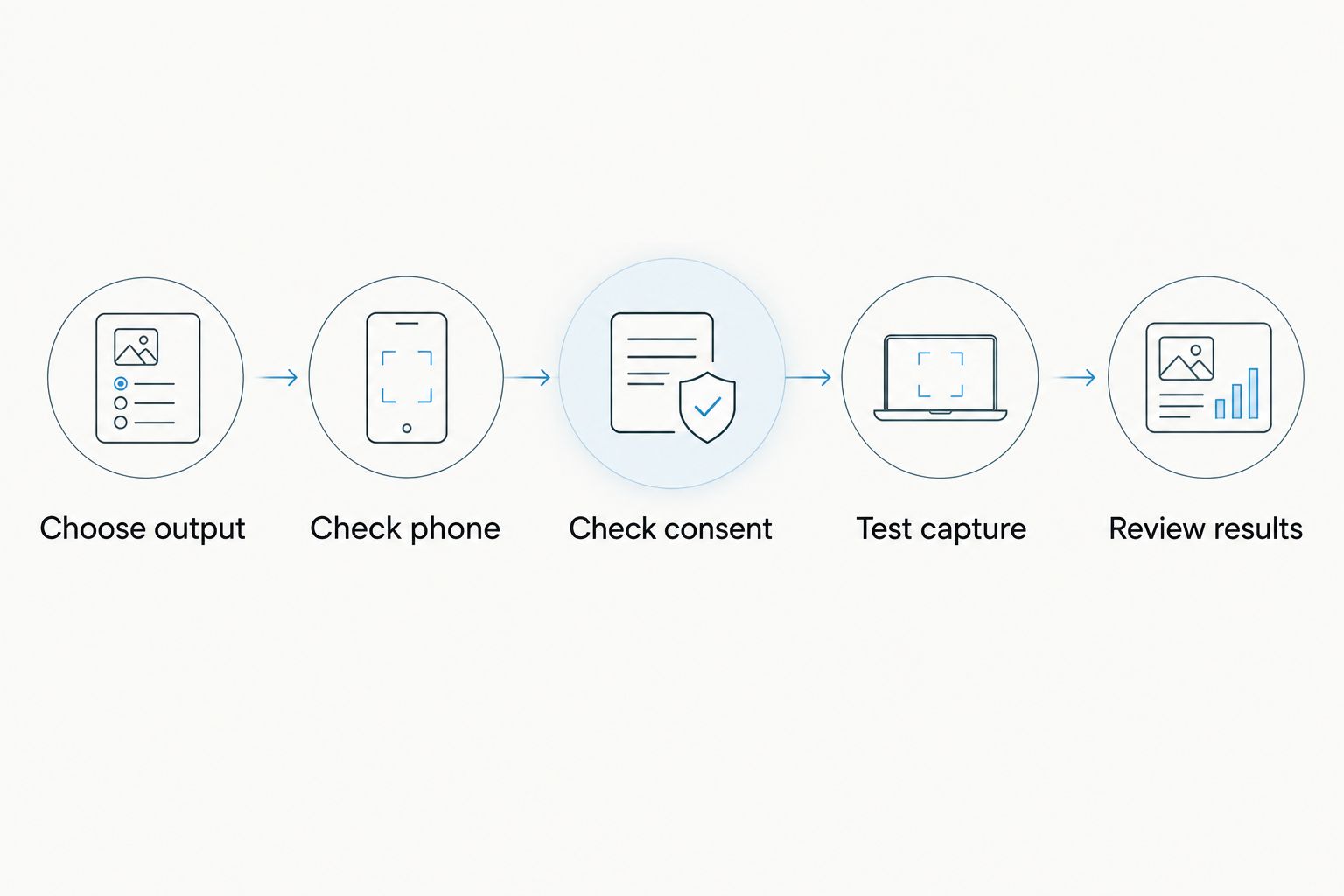
For an undecided reader in 2026, use this sequence before committing to a workflow:
- Choose output: Decide whether you need audio, searchable text, or follow-up tasks.
- Check phone: Confirm device compatibility and the features available on your handset.
- Check consent: Confirm permission, local requirements, and workplace rules.
- Test capture: Record a representative conversation with permission and review the result.
- Review results: Check names, speaker attribution, decisions, and export before making the app your default.
The decisive test is what happens after playback. If you still spend your evening extracting promises from recordings, choose a workflow that produces structured notes. If you only need to save a thought, keep the recorder simple.
FAQ
What's the best voice memo app for Android in 2026?
Omi is the best choice in this guide for professionals who need transcripts, summaries, and follow-up tasks. Google Recorder suits supported Pixel users who mainly need searchable recordings; Samsung Voice Recorder and Easy Voice Recorder suit recording-first workflows.
Can I use Omi on Android without buying the pendant?
Yes, the Android app can record through the phone's built-in microphone without the wearable. Choose the pendant only if wearable capture fits your routine.
Does Google Recorder work on every Android phone?
No, Google Recorder is not a universal Android recommendation; check its supported-device requirements. Confirm compatibility and language support on your exact phone before relying on it.
Which Android voice memo app works offline?
Google Recorder supports offline transcription functionality on compatible Pixel devices and in supported languages. Omi also records offline, while its experimental Local Sync stores conversations on the phone and syncs them later.
Can an Android voice memo app record phone calls?
Omi's documented phone-call method is to put the call on speakerphone and record the audible conversation. Check local consent law and workplace requirements before recording anyone.
How many languages does Omi support?
Omi supports 33 languages, with English the most accurate. Select the language manually because it does not automatically switch languages during a conversation.
Should I choose a transcript app or a basic voice recorder?
Choose a transcript app when you need to search spoken details or produce usable notes. Choose a basic recorder when the audio file itself is enough and you are comfortable reviewing it manually.
One last thing
The best voice memo is the one you can use without reopening the whole conversation. After a meeting, check the names, decisions, and next actions while the context is still fresh. Keep the audio as a reference, not as an excuse to postpone the work.





