Best voice recorder apps for iPhone in 2026


In this article
Best overall: Omi for searchable conversation notes. Best built-in option: Apple Voice Memos for straightforward recordings. Best for Apple Watch capture: Just Press Record. This 2026 guide compares iPhone voice recorder apps by what you need after recording: audio, text, tasks, or an edited project.
- Omi is the best voice recorder app iPhone professionals should consider for transcripts, searchable notes, and tasks.
- Apple Voice Memos is the default choice when you mainly need an audio recording.
- Just Press Record suits Apple Watch capture; GarageBand suits layered audio; AudioShare suits audio file management.
- Choose by the output you need, and check recording consent before capturing anyone else.
Why this matters
A recording preserves a conversation. It does not automatically give you a useful follow-up. If you need decisions, commitments, or searchable notes, choose an app built around those outputs rather than a folder full of audio.
For your 2026 shortlist, separate conversation capture from audio production. The best app for remembering a client meeting is not necessarily the best app for recording a guitar part.
What makes the best iPhone voice recorder app
- Capture fit: The app should suit your phone, watch, desk, or in-person workflow.
- Useful output: Choose audio, transcripts, summaries, or tasks according to your actual work.
- Retrieval: You need a practical way to find the recording or detail later.
- Editing depth: Trimming a memo and arranging several audio tracks are different jobs.
- Data control: Check export, deletion, permissions, and where recordings are processed.
Best iPhone voice recorder apps at a glance
| App | Best for | Standout feature | Key limitation |
|---|---|---|---|
| Omi | Searchable work notes | Transcripts, summaries, tasks, and memories | Language must be selected manually |
| Apple Voice Memos | Simple voice memos | Built-in recording, trimming, and sharing | Not a multitrack production workspace |
| Just Press Record | Watch-first capture | Apple Watch recording and transcription | Not designed for layered audio production |
| GarageBand | Layered audio | Recording and arranging multiple tracks | More setup than a quick memo requires |
| AudioShare | Audio file management | Organizing, trimming, and moving audio files | File management is not automatic meeting follow-up |
The table ranks different jobs, not interchangeable feature lists. Start with the result you want to keep. Then choose the recorder that produces it with the least unnecessary work.
1. Omi: best iPhone voice recorder app for searchable work notes
This app records conversations and turns them into transcripts, summaries, action items, and memories. You can search across captured material or ask questions through its chat interface. It works with the iPhone's built-in microphone, so you do not need a pendant to start.
Omi is best for professionals who need searchable conversation notes and tasks, not just saved audio. Sales follow-ups, spoken instructions, and meeting commitments fit that use case because the useful output is the information inside the recording.
The optional wearable recorder adds another capture method. Wear it on a lanyard, on a wrist with the separate band, or under a shirt; the app remains the place to organize the resulting material.
Pros:
- Produces transcripts, summaries, tasks, and memories from captured speech.
- Offers search, Daily Recap, and a conversational way to retrieve information.
- Supports full export and deletion of individual items or everything.
- Works without the wearable through the phone or Mac microphone.
Cons:
- You must select the language manually; it does not switch languages mid-conversation.
- Speech Profile identification of the wearer's voice is English-only.
- Local Sync is experimental, so treat that offline workflow separately from routine connected use.
The Basic plan includes 300 listening minutes per month; Plus includes 1,500 listening minutes per month. Unlimited has no minute cap. Every plan has the same core features, and reaching a cap does not stop recording: audio remains available to manage and export.
The app supports 33 languages, with English identified as the most accurate. These feature details reflect product and help documentation checked September 23, 2026.
Best for: Professionals turning conversations into searchable work records.
Verdict: Buy into this workflow when you need usable notes and follow-ups; start with the app before deciding on hardware.
2. Apple Voice Memos: best iPhone voice recorder app for simple capture
Apple Voice Memos is the straightforward choice for recording speech on an iPhone. Record a thought, trim unwanted material, rename the recording, and share it. You do not need a music-production workspace to save a spoken reminder.
This is the right default when the audio itself is the deliverable. Think interview source material, rehearsal playback, or a personal memo you intend to listen to later. Keep the workflow small rather than adding features you will not use.
Apple Voice Memos pros:
- Built into the iPhone experience.
- Provides recording, playback, trimming, and sharing in a focused interface.
- Keeps quick capture separate from more complicated production tools.
- Suits personal recordings that you want to review by listening.
Apple Voice Memos cons:
- Does not provide GarageBand-style multitrack arranging.
- Saving audio still leaves you responsible for turning it into a follow-up workflow.
- Long recordings require useful names and organization if you want to retrieve them efficiently.
Do not confuse a simple interface with a complete work process. If you finish every recording by manually writing decisions and copying tasks elsewhere, your real need extends beyond capture.
For an occasional voice memo, however, that extra processing is unnecessary. Choose the simplest tool that gives you the output you will actually use, and leave production or task management to a different app when those jobs arise.
Best for: iPhone owners who mainly want to record and replay audio.
Verdict: Buy into Apple Voice Memos as your default for uncomplicated recording.
3. Just Press Record: best iPhone voice recorder app for Apple Watch capture
Just Press Record combines straightforward recording with transcription and an Apple Watch companion. Its appeal is the capture workflow: start from the device already on your wrist, then work with the recording and text afterward.
Choose it when reaching for your iPhone interrupts what you are doing. A spoken thought or short observation benefits from an accessible capture point. The watch workflow matters more here than a long checklist of editing features.
Just Press Record pros:
- Offers an Apple Watch recording workflow.
- Provides transcription alongside recorded audio.
- Supports reviewing and editing recordings rather than capture alone.
- Uses iCloud to make recordings available across supported Apple devices.
Just Press Record cons:
- Is not a multitrack audio-production tool.
- A transcript still needs review before you treat wording as an exact record.
- Watch capture does not remove the need for consent when other people are recorded.
Decide whether you want speech saved quickly or a finished work record created afterward. Transcription helps you read a recording, but text alone is not the same thing as a checked list of decisions, owners, and next actions.
Also consider where you prefer to review material. Capturing from your wrist is useful only if you regularly return to the recording or transcript. Otherwise, you have changed the recording device without fixing the retrieval problem.
Best for: Apple Watch users who prioritize quick spoken capture and transcription.
Verdict: Buy into Just Press Record when wrist-based recording is your deciding requirement.
4. GarageBand: best iPhone voice recorder app for layered audio
GarageBand is an audio-creation app rather than a meeting-notes app. You can record audio into tracks and arrange it with other material. That makes it a different choice from a recorder designed to preserve a single conversation.
Use it when the recording becomes part of a project. A voiceover with music, a spoken segment assembled with other audio, or a musical idea needs an arrangement workspace. A reminder about tomorrow's meeting does not.
GarageBand pros:
- Records audio within a multitrack project.
- Lets you arrange recorded material alongside other tracks.
- Provides editing tools for shaping a finished audio piece.
- Fits workflows where the final output is a produced recording.
GarageBand cons:
- Requires more project setup than a basic voice memo.
- Is not designed around meeting summaries or task extraction.
- Gives you production controls that add unnecessary work for simple spoken notes.
The deciding question is whether you are preserving speech or producing audio. GarageBand wins the second job. Using it for the first means managing a project when a memo would do.
Keep source recordings organized before you start arranging them. Editing becomes easier when you know which take contains the wording you want, and you can return to the original if you need to check a detail.
Best for: Creators recording voiceovers, music ideas, and layered audio projects.
Verdict: Buy into GarageBand for production; skip it as your everyday meeting recorder.
5. AudioShare: best iPhone voice recorder app for audio file management
AudioShare combines recording with tools for organizing and moving audio files between workflows. Its purpose is especially clear when you already work with audio from different sources and need a dedicated place to manage it.
Choose it for the file-handling job. Record a clip, trim it, organize it, and move it into another audio workflow. That is a different priority from generating a meeting summary or tracking a spoken commitment.
AudioShare pros:
- Combines audio recording with file organization.
- Provides trimming for preparing clips.
- Supports importing and exporting audio.
- Fits work that moves recordings between audio apps.
AudioShare cons:
- File organization does not create a checked meeting summary.
- You remain responsible for naming and grouping recordings usefully.
- It is not the same kind of multitrack arrangement workspace as GarageBand.
Pick AudioShare when your problem is scattered recordings rather than forgotten tasks. A file-oriented workflow is useful when audio remains the material you want to keep working on.
Before committing, follow a recording through your actual process: capture it, find it again, trim it, and send it to its destination. That sequence tells you more than an isolated list of supported features. A recorder that fits the destination is easier to keep using.
Best for: People managing audio clips across recording and editing workflows.
Verdict: Buy into AudioShare for audio organization; skip it if automatic work notes are the main requirement.
How we ranked these apps for 2026
The ranking follows capture fit, useful output, retrieval, editing depth, and data control. Conversation-to-notes functionality gets the default recommendation because it addresses work after recording; the remaining picks each own a distinct use case.
This is a workflow comparison, not an audio-quality laboratory test. Microphone position, room noise, speaker distance, and overlapping speech all affect the source recording. An app cannot recover words that were never captured clearly.
No app earns its place merely by having more features. A quick memo tool should stay quick. A production tool should give you editing control. A work-notes tool should help you retrieve the information and check the follow-up.
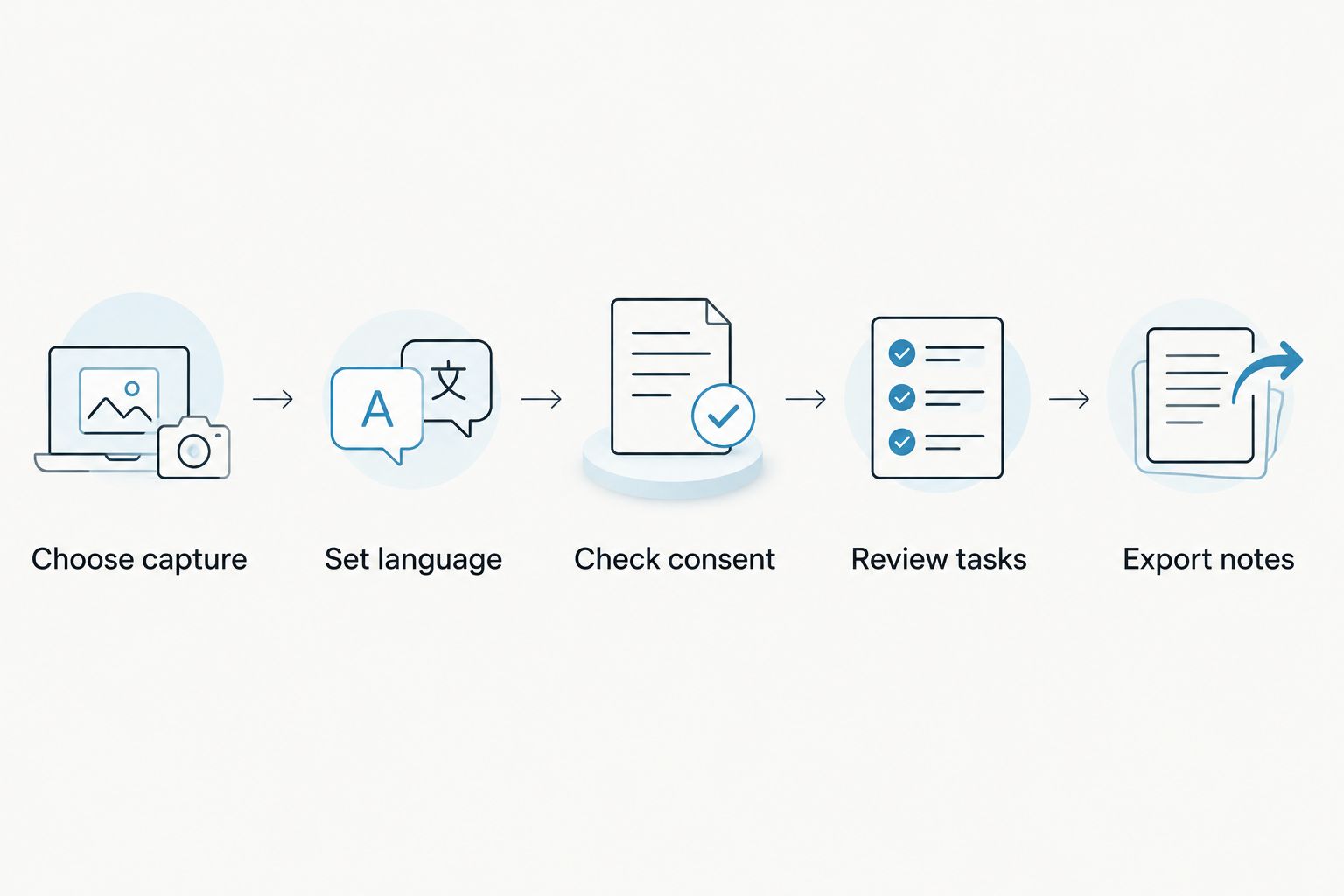
Set up a recorder you will actually use
Choose capture
Use the iPhone microphone for a simple starting point. Choose a watch or wearable workflow only when that capture method solves a real interruption in your day. For desktop meetings, use a capture method suited to the computer rather than assuming every mobile recorder joins calls automatically.
Set language
Select the conversation language wherever the app requires it. For multilingual conversations, check how your chosen app handles language changes before relying on its transcript. Do not discover that limitation during an important discussion.
Check consent
Consent rules vary by location. Check local law before recording other people, and follow the policies that apply to your workplace. This guide is not legal advice; an app's recording capability does not establish permission to use it.
Review tasks
Check names, commitments, and instructions against the recording before acting on them. Automated notes are a draft for review, not a substitute for checking consequential details. This matters especially when a task changes a customer commitment or someone's work.
Export notes
Export a sample recording or note through the route you expect to use. Confirm that the result is useful outside the app, then decide how you will organize and delete old material. Data control belongs in the setup, not just the feature comparison.
Which iPhone voice recorder app should you choose?
For 2026, choose by the work you want to avoid. Apple Voice Memos removes the need for a separate simple recorder. Just Press Record prioritizes wrist-based capture. GarageBand gives you an arrangement workspace. AudioShare helps you manage audio files.
If your recurring problem is turning conversations into usable notes, choose the conversation-to-notes workflow first. Start without extra hardware, record an appropriate conversation with consent, and check whether the transcript, summary, and tasks give you something you would otherwise create manually.
FAQ
What's the best voice recorder app for iPhone in 2026?
Omi is the best default for professionals who want transcripts, searchable notes, and tasks from conversations. Apple Voice Memos is the simpler choice when the recording itself is all you need.
Do I need a wearable to record conversations with the recommended notes app?
No, the app can record through the iPhone's built-in microphone without the wearable. The wearable adds another capture method rather than being required to start.
Is Apple Voice Memos better than GarageBand for spoken notes?
Apple Voice Memos is better for straightforward spoken notes because it focuses on recording, playback, trimming, and sharing. GarageBand is the better fit when you need to arrange several audio tracks.
Which iPhone recorder should I choose for Apple Watch use?
Just Press Record is the dedicated pick here for an Apple Watch capture workflow. Choose it when recording from your wrist is more useful than reaching for your phone.
Can an iPhone voice recorder app record phone calls?
Do not assume ordinary microphone recording captures a phone call internally. For the recommended conversation-notes app, put the call on speakerphone and let the phone or wearable record; consent rules still apply.
Can I use recordings as exact transcripts?
No, check important wording against the source audio before treating a transcript as an exact record. Names, instructions, and commitments deserve review before you act on them.
Is recording a conversation on my iPhone legal?
Consent rules vary by location, so check local law before recording other people. Workplace policies and the circumstances of the conversation also matter; this guide is not legal advice.
One last thing
Test retrieval, not just recording. After your next appropriate recording, try to find a specific commitment without replaying everything. If that is difficult, choose better organization or a different output workflow.
For your 2026 decision, Omi earns the work-notes recommendation because transcripts, search, and tasks address that retrieval problem. The right recorder is the one that leaves you with something useful after the conversation ends.






