Can Omi identify different speakers in the same conversation?


In this article
Yes. Omi identifies different speakers with speaker labels, and its English-only Speech Profile learns your voice so your lines get your name. In 2026, the distinction is simple: separating speakers is not the same as automatically knowing every participant’s identity.
- Can Omi identify different speakers? Yes: speaker labels distinguish speakers within a conversation.
- Speech Profile learns the wearer’s voice and names their lines; this feature is English-only.
- Transcription supports 33 languages, but language support does not extend Speech Profile beyond English.
- Review speaker attribution before turning a conversation into an assigned task or shared meeting record.
Why this matters
A transcript answers what was said. Speaker attribution answers who said it. You need both when a conversation includes a customer request, a promise to follow up, or a decision someone must carry out.
A speaker label is useful context, not proof of identity. Keep that distinction when you share notes, assign work, or quote someone. A correctly transcribed sentence still needs the right person attached to it.
Before recording, check the rules where the conversation takes place. Consent rules vary by location; the guide to recording conversations with a wearable pendant covers the consent questions to consider. This is not legal advice.
Can Omi identify different speakers in the same conversation?
Yes. The app provides speaker labels, while Speech Profile adds a separate capability: it learns the wearer’s voice and gives the wearer’s lines their name. Speech Profile works in English only.
These features solve different problems. Use the distinction below when deciding what you can take from a transcript and what you should verify before sharing it.
| Feature | What it does | Best for | Limitation to remember |
|---|---|---|---|
| Speaker labels | Distinguish speakers in the transcript | Following who said what | A label is not independent confirmation of someone’s identity |
| Speech Profile | Learns the wearer’s voice so their lines get their name | Finding your own contributions | English only; its stated role is recognizing the wearer |
| Transcription | Converts speech into text | Reviewing the actual wording | Text alone does not establish who made a statement |
| Summaries and tasks | Turn captured conversations into condensed notes and action items | Preparing follow-up work | Check the underlying statement before assigning responsibility |
For a meeting record, read these outputs together. Start with the summary, inspect the relevant transcript passage, and check the speaker before sending a commitment to someone else.
Omi is best for professionals who want searchable conversation notes with speaker labels and English-language recognition of their own voice. It fits that need without making every speaker label a verified personal identity.
Speaker labels: follow the conversation
Speaker labels help you follow a conversation as speech moves between people. They give you a way to distinguish contributions instead of reading the entire exchange as one person’s monologue.
That matters when the same subject appears in different contexts. A customer asking whether a deadline is possible is different from a colleague accepting that deadline. Preserve that distinction in your notes.
The benefit is a more readable conversation record. The limit is equally important: do not convert an unfamiliar speaker label into a person’s name based on a guess. Check the conversation context before putting a name beside a quote or commitment.
For your own review, a separated exchange is useful even before you attach names. You can revisit the question, response, and follow-up as distinct contributions rather than flattening them into a single statement.
Speech Profile: recognize your own voice
Speech Profile learns the wearer’s voice so the wearer’s lines receive their name. It addresses a narrower question than general speaker separation: which parts of this conversation are yours?
That is useful when you review what you promised, what you asked, or what you need to clarify. Your own contributions become easier to distinguish from the surrounding conversation.
The language restriction matters. Speech Profile is English-only in 2026. Do not assume that choosing another transcription language gives you the same wearer-recognition capability in that language.
Keep your expectations focused on the stated feature. Recognizing your voice does not establish the identity of every customer, teammate, or guest who speaks nearby. For shared records, review the other participants’ attribution separately.
Transcription: 33 languages, with a separate recognition limit
The app supports 33 languages, including English, Spanish, French, German, Portuguese, Chinese, Japanese, Korean, Hindi, Russian, and Ukrainian. English is the most accurate supported language.
Set the conversation language manually. The app does not automatically switch languages mid-conversation, so a discussion that moves between languages needs particular care during review.
Transcription coverage and voice recognition are separate capabilities. The availability of a language for transcription does not make Speech Profile available in that language.
For a multilingual meeting, decide which language to select before recording. Then inspect the passages you intend to quote or use for follow-up, rather than treating a readable summary as confirmation that every line and speaker is correct.
Why speaker attribution needs review
Keep these distinctions in view when checking a conversation record. Each affects what you should infer from the output, even when the notes look ready to share.
- Feature used: Speaker labels distinguish speakers; Speech Profile learns the wearer’s voice. Do not treat the features as interchangeable.
- Selected language: Choose the transcription language manually. Automatic mid-conversation language switching is not supported.
- Recognition language: Speech Profile is English-only. Other transcription languages do not remove that restriction.
- Capture route: For online meetings, use the Mac app or capture the room through a phone or wearable. The app does not join as a meeting bot.
- Output type: A summary condenses a discussion. Check the transcript when exact wording or responsibility matters.
The practical rule is straightforward: review the part of the record that supports your next action. A casual personal reminder and a named commitment in shared meeting minutes deserve different levels of scrutiny.
How should you check who said what?
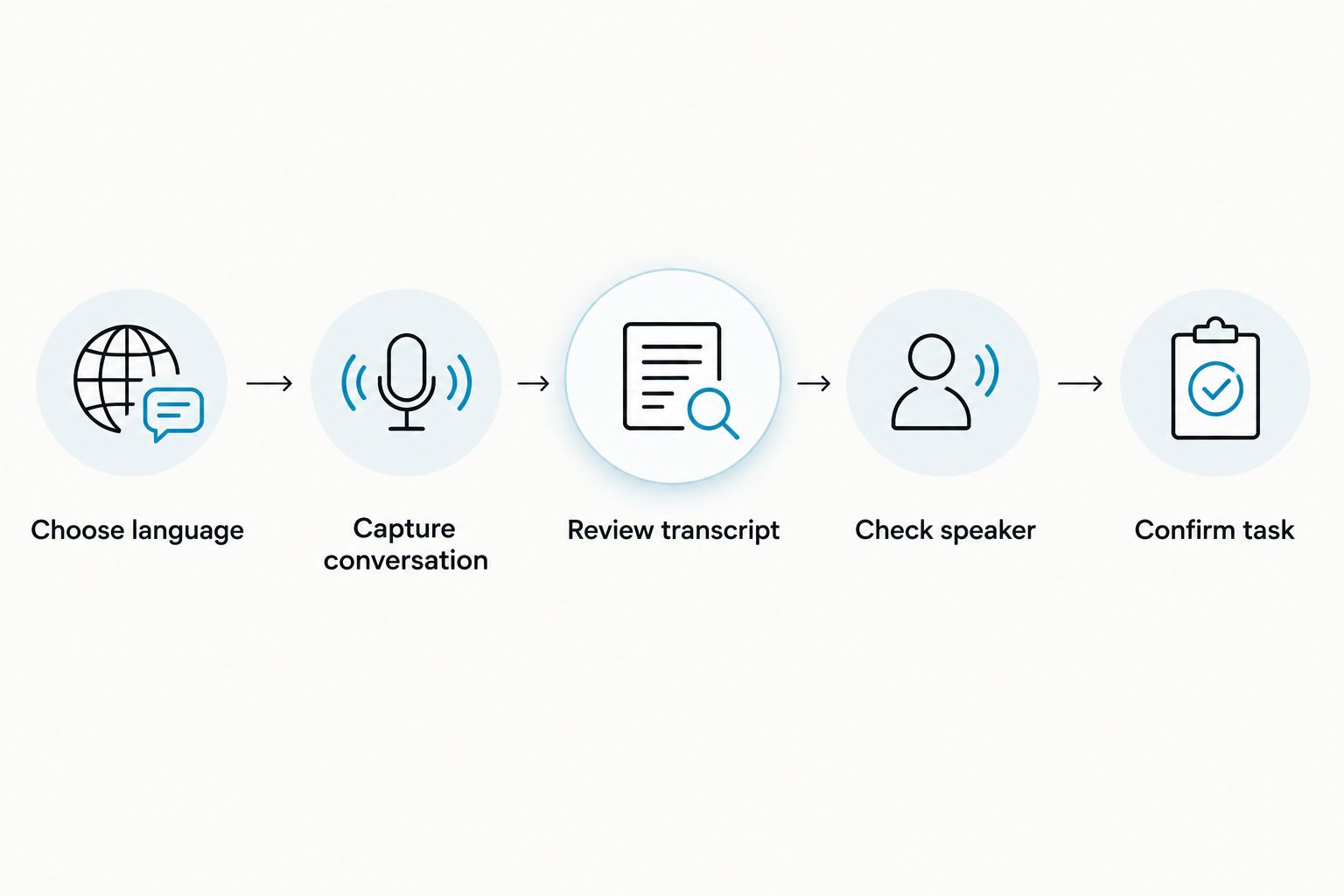
Use a short review sequence before turning recorded speech into a shared record. This is a recommended workflow, not a claim that every conversation needs extensive editing.
- Choose language. Set the language manually before capture. Remember that English transcription and English-only Speech Profile are separate settings and capabilities.
- Capture conversation. Use the phone or Mac microphone, or the wearable. For a phone call, put the call on speakerphone so the conversation can be recorded.
- Review transcript. Find the passage behind the summary, decision, or task. Read enough surrounding text to understand the statement.
- Check speaker. Confirm that the person attached to the statement matches the conversation. Give named commitments particular attention.
- Confirm task. Check the owner, wording, and any deadline before sharing the action item.
This sequence keeps capture separate from approval. You still get transcripts, summaries, tasks, memories, and search, while retaining a deliberate check before the output becomes someone else’s responsibility.
A useful final check is to read the proposed follow-up beside its source passage. If your follow-up is stronger or more definite than the original statement, revise it before sending.
Do you need the pendant for speaker-aware notes?
You can record without the wearable. The phone and Mac apps record through their built-in microphones, so you can try the conversation-to-notes workflow without making a wearable your capture method.
The Omi wearable is relevant when you want to capture spoken interactions using a device worn on your neck, wrist, or under your shirt. The wrist band is sold separately; the charger is included with the device.
Choose the capture method around the conversation. Use the Mac app for an online meeting, or record through a phone or wearable in the room. For Zoom, Meet, and Teams, recording does not require a bot to join the call.
The benefit of the wearable is its worn capture format. The trade-off is that wearing a recorder does not remove your responsibility to check consent, language selection, and the resulting notes.
Do listening plans change the core features in 2026?
Every listening plan has the same core features. The plan distinction is the listening allowance, not a separate tier of speaker-label functionality.
Basic includes 300 listening minutes per month. Plus includes 1,500 listening minutes per month. Unlimited has no minute cap.
| Plan | Listening allowance | Best for | Limit to consider |
|---|---|---|---|
| Basic | 300 listening minutes per month | Usage that fits the smaller allowance | Track your monthly listening use |
| Plus | 1,500 listening minutes per month | Usage above Basic’s allowance but within Plus | A monthly minute cap still applies |
| Unlimited | No minute cap | Usage that needs no monthly listening ceiling | Review and consent responsibilities remain unchanged |
Hitting a minute cap does not stop recording. Audio stays available to manage and export, so do not confuse the listening allowance with a recording shutoff.
Choose a plan around your actual listening use. A larger allowance is not a reason to skip checking speaker attribution, and it does not change Speech Profile’s English-only scope.
Can it recognize everyone’s name automatically?
Speaker labels distinguish speakers, while Speech Profile names the wearer’s lines after learning their voice. Treat other participants’ identities as something to confirm, not something established merely because the transcript contains separate labels.
For shared notes, use names only when you can connect them to the right contributions. This is especially important when a statement becomes a quote, an approval, or an assigned task.
Can it handle a conversation that switches languages?
The app supports 33 languages, but you must select the language manually; it does not automatically switch languages mid-conversation. Speech Profile remains English-only.
For a mixed-language discussion, check the transcript passages you plan to reuse. Keep the original wording and speaker context in view rather than relying only on the condensed summary.
What should you check before sharing a named transcript?
In 2026, the sharing decision still starts with consent and purpose. Check local law, your organization’s recording rules, and whether the recipient needs the full transcript or just an approved summary.
You can export your data and delete individual items or everything. Local, cloud-free operation is also supported, while experimental Local Sync stores conversations on the phone without internet and syncs them later.
Those controls help you manage captured information. They do not replace consent or make an unreviewed speaker attribution suitable for a sensitive record.
FAQ
Can Omi identify different speakers in one conversation?
Yes. Omi provides speaker labels to distinguish speakers, and its English-only Speech Profile learns the wearer’s voice so their lines get their name. Separating speakers is not the same as verifying every participant’s identity.
Will it automatically know every participant’s name?
Do not treat speaker labels as automatic verification of every participant’s name. Speech Profile’s stated role is learning the wearer’s voice and naming the wearer’s lines.
Does Speech Profile work in Spanish or French?
Speech Profile is English-only in 2026. Spanish and French are supported transcription languages, but transcription support is separate from wearer voice recognition.
Do I need the wearable to record a conversation?
No. The phone and Mac apps can record through their built-in microphones without the wearable.
Does it join Zoom or Teams as a recording bot?
No. Record online meetings through the Mac app, or through a phone or wearable in the room; it does not join calls as a bot.
Do different plans have different core features?
Every plan has the same core features. Basic includes 300 listening minutes per month, Plus includes 1,500 listening minutes per month, and Unlimited has no minute cap.
Can I export or delete a transcript with speaker labels?
You have full export and deletion controls. You can delete individual items or everything; check the content and speaker attribution before sharing exported conversation records.
One last thing
Check the promise, not just the speaker. A correctly attributed sentence can still be a question, a suggestion, or a conditional offer rather than a firm commitment.
Before you assign a follow-up, read the words around it. Confirm that the person agreed to the action, not merely discussed it. Speaker labels help you find responsibility; the conversation tells you whether responsibility was accepted.






