Can Omi work without an internet connection?


In this article
Yes, Omi can work offline: it records without an internet connection, and its experimental Local Sync feature stores conversations on your phone and syncs them later. Offline recording is not the same promise as getting every transcript, summary, and task immediately without internet. This 2026 guide separates capture, later syncing, and cloud-free operation so you can choose the right workflow.
- Can Omi work offline? Yes: offline recording captures conversations without internet.
- Local Sync is experimental; it stores conversations on your phone and syncs them later.
- Offline recording and cloud-free operation are different workflows. Choose deliberately.
- Test capture and later syncing before relying on offline note-taking for important conversations.
Why this matters
A recording and a finished set of notes are different things. You need the conversation captured first; you also need to know when you can review, search, and act on it.
The Omi wearable captures what you say and hear, while the companion app turns conversations into transcripts, summaries, action items, and memories. For offline use, the practical question is which part of that workflow you need before your connection returns.
Omi is best for professionals who want conversation capture now and can sync later. If you need finished notes during the conversation, test that exact requirement rather than treating offline recording as a guarantee of immediate processing.
Can Omi work without an internet connection?
Yes. The confirmed offline workflow is recording without internet, with experimental Local Sync storing conversations on the phone and syncing them later. The product also supports running locally without the cloud, but that is a separate consideration from temporarily losing your connection.
These are the distinctions that matter in 2026:
| Workflow | Best for | What it does | Limitation to plan around |
|---|---|---|---|
| Offline recording with Local Sync | Capturing conversations during an internet outage | Stores conversations on your phone without internet and syncs them later | Local Sync is experimental; test your actual setup |
| Local, cloud-free operation | A workflow designed to avoid cloud processing | Supports running locally without the cloud | Treat this as a separate setup, not an automatic result of disconnecting |
| Connected app workflow | Organizing conversations into usable notes | Provides transcripts, summaries, tasks, memories, search, and chat | Do not assume the complete connected experience is available while offline |
Choose based on the outcome you need, not just whether recording starts. A successful test includes finding the saved conversation afterward and checking the output you intend to use.
For example, capturing an interview and reviewing it later is a different requirement from needing a searchable transcript before the interview ends. Write down that distinction before choosing your workflow.
Offline recording: capture now, sync later
Local Sync stores conversations on your phone without internet and syncs them later. Its experimental status is the main caveat, not a detail to bury after a recommendation.
The strongest use case is straightforward: you need to preserve a conversation while disconnected, and you can review the organized output afterward. Keep that expectation separate from instant summaries, immediate task generation, or live answers about the conversation.
Use the following acceptance checks:
- Capture: Make a short, non-sensitive test recording without internet.
- Local storage: Check that the conversation is available on the phone before reconnecting.
- Later sync: Restore internet access and confirm that the conversation syncs.
- Review: Inspect the transcript, summary, and action items you expect to use.
A recording indicator alone does not complete the test. You need to establish that the whole route from spoken conversation to usable notes works for your setup.
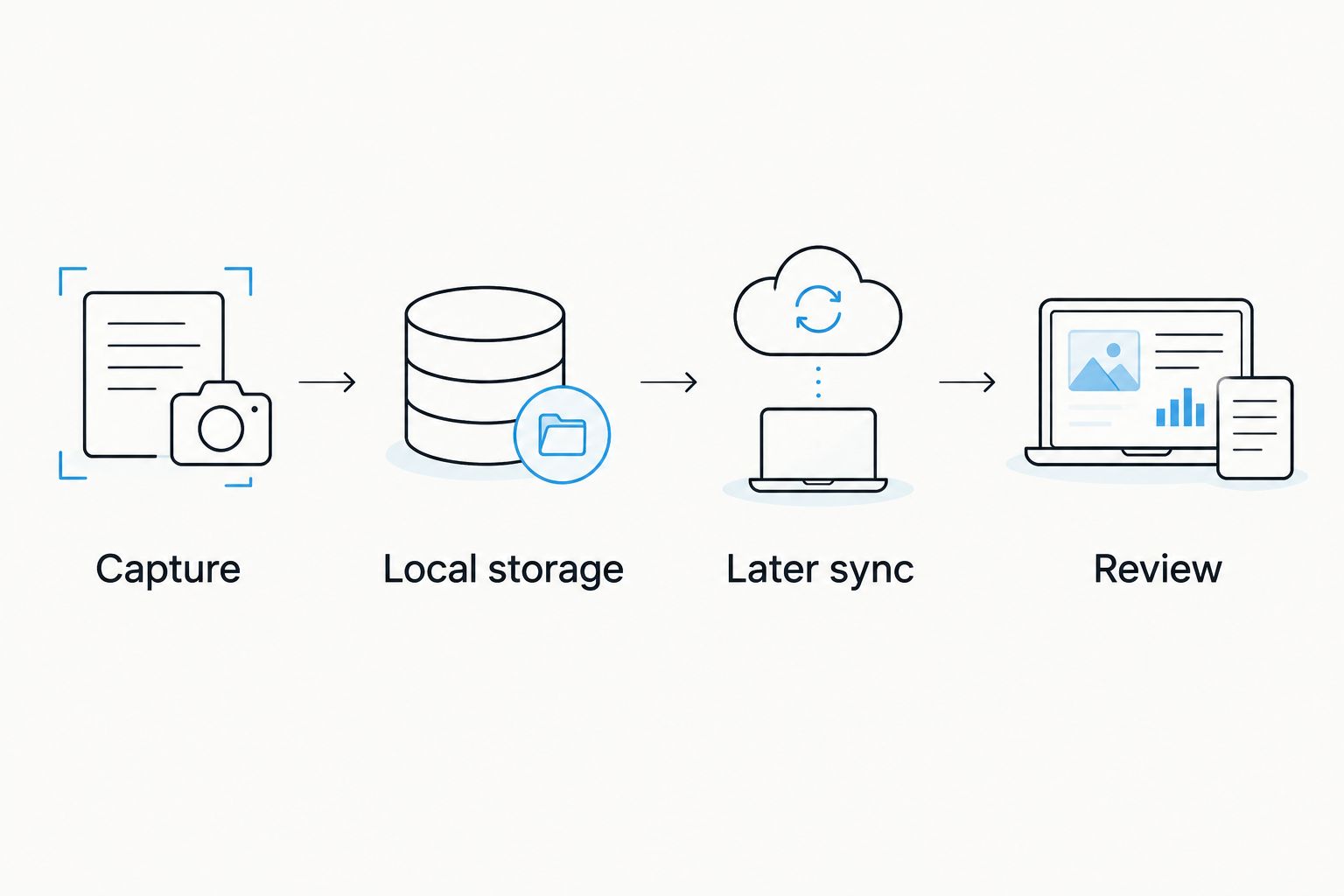
For your 2026 setup, repeat the test before making an offline workflow part of an important interview, site visit, or customer conversation. Experimental functionality deserves a practical check under the conditions where you will use it.
Cloud-free operation: a separate choice
The product can run locally without the cloud. That makes cloud-free operation relevant when your requirement concerns where processing happens, rather than simply whether an internet connection is available.
Offline is a connection condition. Cloud-free is an operating choice. A conversation stored on your phone and synced later is not the same workflow as keeping the operation local.
Decide which requirement you actually have:
- If you need to capture through a temporary outage, focus on offline recording and later syncing.
- If you need to avoid cloud processing, assess the local, cloud-free setup.
- If you need both, test the combined requirement rather than assuming one feature establishes the other.
Full export and deletion controls are also supported. You can export your data and delete individual items or everything, but those controls answer a different question from whether a particular workflow uses the cloud.
Before recording sensitive material, decide where the conversation should be stored, whether it should sync, and who should retain the resulting notes. Make those decisions before capture, not after the conversation has already happened.
How to test your offline workflow before you rely on it
Use a non-sensitive sample that resembles your actual work. A spoken reminder is useful for checking capture, but it does not exercise the same review process as a conversation with decisions and follow-up tasks.
- Choose your capture route. Use the wearable or the phone app, depending on how you intend to record. The phone and Mac apps can record through their built-in microphones without the wearable.
- Set the language manually. The app supports 33 languages, and English is the most accurate. It does not automatically switch languages mid-conversation.
- Remove internet access for the test. Keep the test focused on internet availability; do not treat it as proof of every other disconnected scenario.
- Record a representative sample. Include the sort of spoken detail you need later, such as a decision, a name, or a follow-up request.
- Check the saved conversation. Verify that the conversation is available on the phone before you restore internet access.
- Reconnect and inspect the result. Confirm later syncing, then review the transcript and any summary or tasks against what was actually said.
Pass the test only when the result supports your real job. If your workflow depends on a correctly captured commitment, inspect the commitment—not just whether a transcript exists.
For a team, turn this into a repeatable acceptance check. Each person should understand what is captured offline, what happens later, and what they must verify before using the notes.
Why the offline experience varies
The offline experience depends on the workflow you choose and the result you expect. These supported distinctions explain why a successful recording is only part of the answer:
- Capture route: The wearable, phone microphone, and Mac microphone are different ways to capture conversations. Test the route you will actually use.
- Local Sync status: Local Sync remains experimental in 2026. Treat it as a feature to validate before an important recording.
- Required output: Audio capture, transcripts, summaries, tasks, and search are different outputs. Check the specific one your work depends on.
- Processing choice: Temporary offline storage followed by syncing differs from local, cloud-free operation.
- Language setting: Support covers 33 languages, but English is the most accurate and language selection is manual.
- Listening allowance: Basic includes 300 listening minutes per month; Plus includes 1,500 listening minutes per month; Unlimited has no minute cap.
Hitting a plan's minute cap does not stop recording. Audio remains available to manage and export, and every plan has the same core features.
That makes your listening allowance and your internet connection separate checks. Do not diagnose every recording or processing question as an offline problem; first establish which part of the workflow needs attention.
Can I record without buying the wearable?
Yes. The phone and Mac apps record using their built-in microphones, so the wearable is not required for those capture routes.
This gives you a way to evaluate the conversation-to-notes workflow before choosing how to wear a device. The trade-off is practical: an app-based recording uses the phone or Mac microphone rather than a device worn on your body.
For the offline question, test the exact device and capture route you intend to use. A successful phone-based test does not, by itself, establish every detail of a different setup.
Will recording stop when I reach my listening limit?
No. The 300 listening minutes per month on Basic and 1,500 listening minutes per month on Plus are listening allowances; reaching the cap does not stop recording.
Audio stays available to manage and export. Unlimited has no minute cap, but a plan choice does not replace the need to test experimental Local Sync.
Keep your checks separate: confirm the listening allowance that fits your use, then verify capture and later syncing under your expected connection conditions.
Does offline recording remove the need for consent?
No. Recording without internet does not remove consent requirements. Consent rules vary by location, so check local law before recording; this is not legal advice.
For the recording-specific questions, read the guide to recording conversations with a wearable pendant. Discuss recording with participants before starting, and follow your organization's requirements for sensitive conversations.
FAQ
Can Omi work offline in 2026?
Yes. It records offline, and experimental Local Sync stores conversations on your phone without internet and syncs them later. Test capture and later syncing before relying on the workflow for important conversations.
Where are conversations stored when I use Local Sync without internet?
Local Sync stores conversations on your phone without internet and syncs them later. It is experimental, so verify that your test conversation is available before reconnecting.
Does offline recording mean I get summaries immediately?
No—offline recording is not a guarantee of immediate summaries or every other connected feature. Test the specific output you need, including when it becomes available.
Is offline recording the same as running without the cloud?
No. Offline recording describes capture without internet, while cloud-free operation describes a local operating setup. Decide whether you need temporary offline capture, local operation, or both.
Can I use the app without wearing a pendant?
Yes. The phone and Mac apps can record through their built-in microphones without the wearable. Test offline use on the capture route you intend to rely on.
Does reaching my monthly listening cap stop recording?
No. Reaching the listening cap does not stop recording, and audio remains available to manage and export. Basic includes 300 listening minutes per month, Plus includes 1,500 listening minutes per month, and Unlimited has no minute cap.
Will the app automatically switch languages during a conversation?
No. Set the language manually; the app does not automatically switch languages mid-conversation. It supports 33 languages, with English the most accurate.
Do I still need consent if I record without internet?
Yes, applicable consent requirements still matter when recording offline. Rules vary by location, so check local law and follow your organization's recording requirements.
One last thing
The most useful offline test ends after you reconnect. Capture a non-sensitive conversation, confirm local storage, restore internet access, and inspect what you can actually use afterward.
For Omi offline recording in 2026, judge the complete workflow—not the recording indicator. If the conversation contains a commitment, check the wording before turning it into an instruction or follow-up. Capturing speech preserves the source; reviewing it makes the notes useful.






