
Cornell note taking: A useful method in 2026


In this article
Cornell note taking divides a page into notes, cues, and a summary: capture details during a conversation or lesson, turn the important points into questions afterward, then summarize the main takeaway at the bottom. The method helps you review what you learned instead of rereading a transcript or a page of unstructured notes. In 2026, it works on paper or in a digital document; a recording can help you check details, but it does not do the thinking for you.
- Cornell note taking works best when you need to review and recall what a conversation or lesson covered.
- Write details in the notes column, add questions in the cue column, then summarize the page.
- A transcript helps recover missed details; it does not replace choosing useful cues and a clear summary.
Why this matters
Ordinary notes preserve information. Cornell notes give you a way to use it: cover the notes column, read a cue, and try to answer from memory. If you are choosing between formats, the guide to note-taking methods shows how other layouts handle the same material.
The distinction matters in 2026 because capturing a meeting is easy to confuse with understanding it. A complete record can tell you what was said. A useful cue tells you what you should be able to explain, decide, or do later.
How does the Cornell note-taking method work?
Start with a page split into 2 columns: a narrower cue column on the left and a wider notes column on the right. Reserve a separate area at the bottom for the summary. Those are different jobs, not decorative labels.
| Page area | What you put there | What it helps you do |
|---|---|---|
| Notes column | Facts, examples, decisions, open questions, and relevant wording | Preserve the substance while you listen |
| Cue column | Questions or short prompts linked to the notes beside them | Test recall without looking at the answer |
| Bottom summary | A brief account of the page’s central point and any outcome | Identify what the page means as a whole |
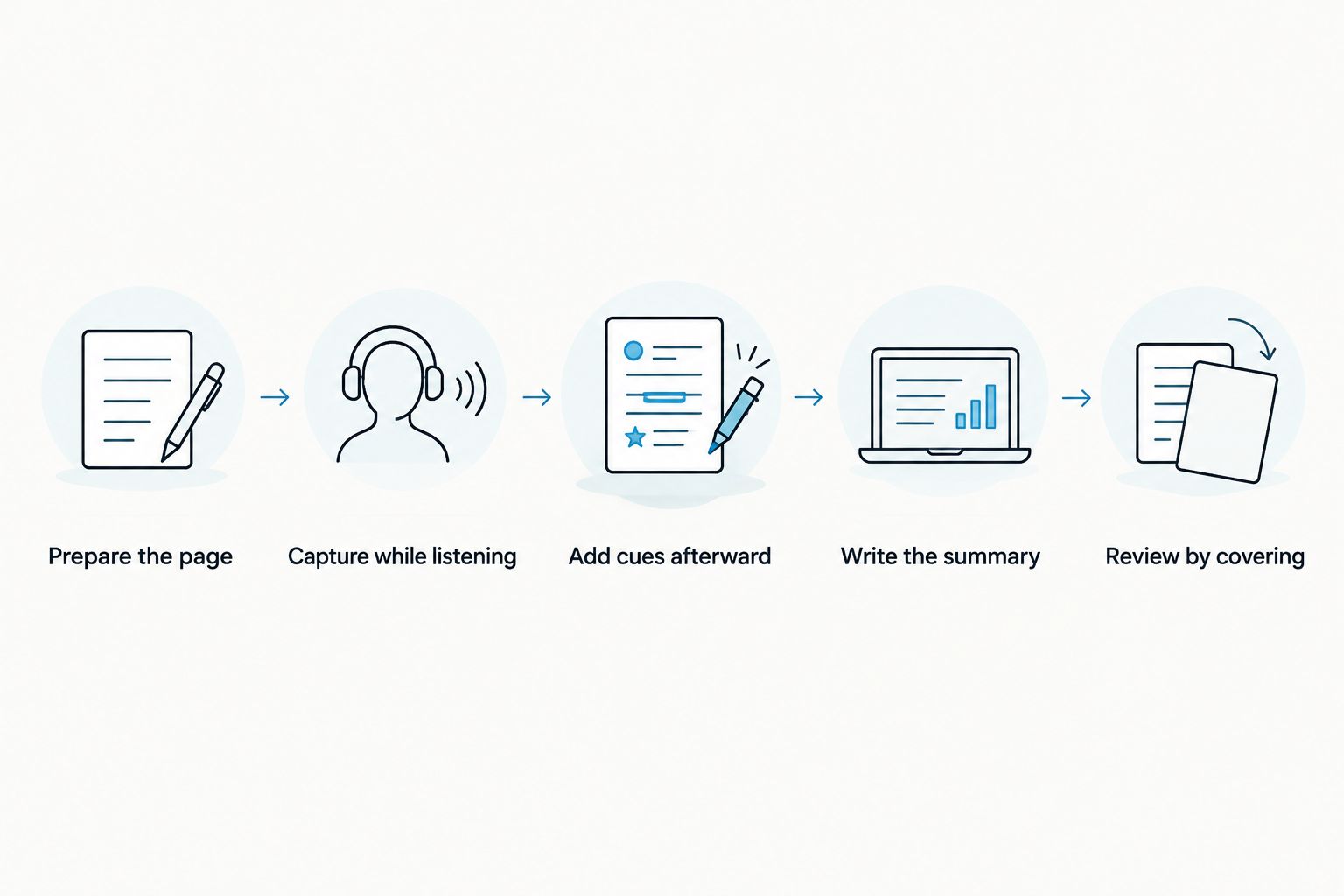
Use this sequence:
- Prepare the page. Add a topic and date, divide the main area into cue and notes columns, and leave space below for a summary.
- Capture while listening. Put the substance in the notes column. Record decisions and unresolved questions distinctly so you can find them later.
- Add cues afterward. Read each group of notes and write a question in the left column that those notes answer.
- Write the summary. State the main takeaway in your own words. If an action was agreed, name the action separately from the explanation.
- Review by covering the notes. Read each cue, answer it without looking, then uncover the notes and check what you missed.
Do not try to complete all 3 areas while someone is still speaking. During the conversation, your priority is accurate capture. Cues and the summary require a second pass, when you can separate important points from incidental detail.
Copyable Cornell notes template
Make the right column large enough for working notes and keep the left column available for questions. The bottom area needs room for a summary you can understand without rereading the page. You can copy this structure into a document or draw it on paper:
Topic: ____________________ Date: ____________________
| Cues: questions to test | Notes: details that answer the cues |
|---|---|
| What was the main point? | |
| What evidence or example supports it? | |
| What was decided or remains unresolved? | |
| What needs to happen next? |
Summary: ________________________________________________
The prompts are starters, not fixed categories. For a lesson, you might ask how a process works. For a client call, you might ask what the client requested and which commitments were made. Change the questions to match what you need to remember in 2026.
What does a completed Cornell page look like?
Imagine a project meeting about a delayed handoff. During the meeting, the notes column records what is blocked, what the team agreed to change, and what still needs an answer. Afterward, the cue column turns those points into questions you can use at the next check-in.
| Cues | Notes |
|---|---|
| What is blocking the handoff? | The receiving team needs a confirmed owner for the final review. |
| What did the group decide? | Assign an owner before sending the next draft. |
| What remains open? | Confirm who approves the handoff and how the decision is shared. |
Summary: The handoff is blocked by unclear review ownership. The next draft needs an assigned owner, and the approval path still needs confirmation.
This example separates a decision from an open question. If both were buried in a long paragraph, you would have to reconstruct the meeting before acting. In 2026, that distinction still matters whether your source is handwritten notes, an audio recording, or a transcript.
A cue should make you retrieve an answer, not merely point at a topic. “Handoff” is a label. “What is blocking the handoff?” is a question you can test. If you cannot answer it after covering the notes column, read the notes again and tighten the cue or clarify the underlying detail.
When should you use Cornell notes instead of a transcript?
Use Cornell notes when your goal is to understand and revisit a discussion. Keep a transcript when you need to check the wording or recover details you did not capture in the moment. These are complementary options, not interchangeable records.
| Option | Best for | Strength | Limitation |
|---|---|---|---|
| Cornell notes | Reviewing lessons, decisions, and recurring discussions | Cues make important points easier to test from memory | Your page reflects what you noticed and selected |
| Transcript | Checking exactly what was said | Preserves spoken detail for later review | Reading it does not identify what matters to you |
| Cornell notes alongside a transcript | Reviewing a conversation while retaining a source to check | Combines focused questions with a fuller record | Requires a separate pass to write good cues and a summary |
Omi is best for professionals who want a record of spoken conversations before making their own Cornell notes. The Omi wearable and companion app capture conversations and produce transcripts, summaries, and tasks. That helps you check what you missed; it does not automatically turn a transcript into a Cornell page, select your study questions, or verify that your interpretation is correct.
If you record other people, check the consent rules that apply where you are. Requirements vary by location. For a closer look at recording and consent, read the guide to AI note-taking, consent, and risks only if that page is available to you; do not treat a recording as permission to share it.
Why the quality of Cornell notes varies
The layout stays the same. The value of the finished page depends on what you capture and what you do with it afterward:
- The purpose of the conversation. A lesson calls for concepts and examples; a meeting calls for decisions, owners, and unresolved questions.
- The quality of the notes column. A vague phrase cannot support a precise cue. Write enough context to understand the point later.
- The wording of the cues. Questions that require an answer are more useful for review than headings that merely repeat a topic.
- The accuracy of the source. If you are unsure what was said, check your recording or transcript before turning a detail into a conclusion.
- The summary. A useful summary states the central takeaway. Copying the longest line of notes does not show what the page means.
- The review step. Covering the answers shows what you can recall; looking at them while reading the cues does not.
In 2026, a recording can reduce the pressure to write down every sentence, but it cannot decide which ideas deserve a cue. That judgment belongs to the person who needs to use the notes.
Can you use Cornell notes for meetings?
Yes: Cornell notes work for meetings when your cues focus on decisions, open questions, and next actions. Write discussion details in the notes column during the meeting. Afterward, turn the details into questions such as “What was decided?” and “Who needs an answer?”
Do not confuse a personal Cornell page with formal meeting minutes. Your page is organized for your own recall; minutes serve a different record-keeping purpose. If you need the latter, use the guide to writing meeting minutes.
Can you make Cornell notes from a recording?
Yes: use the recording or transcript as source material, then write the cues and summary yourself. Listen for decisions, explanations, and unanswered questions instead of transferring every sentence into the notes column. Check the source when wording matters.
This approach helps when a conversation moves faster than you can write. It also adds work after the conversation: you still need to choose what belongs on the page. In 2026, automated summaries are a starting point to inspect, not a substitute for checking the record and deciding what you need to remember.
Do Cornell notes have to be handwritten?
No: the method depends on the separation between notes, cues, and summary, not on paper. A document, tablet page, or notebook can hold the same structure. Choose the format you will actually revisit.
A digital page makes it easy to revise a cue after you realize it does not test the right idea. Paper makes it straightforward to cover the notes column with another sheet. Neither format fixes a weak question or an unclear summary.
FAQ
What is the Cornell note-taking method?
The Cornell note-taking method organizes a page into a notes column, a cue column, and a bottom summary. You capture details first, write review questions afterward, and use those questions to test recall.
How do I set up a Cornell notes page?
Divide the main page into 2 columns, with cues on the left and notes on the right, then reserve a summary area at the bottom. Add a topic and date so you can identify the discussion later.
When do I write the questions in Cornell notes?
Write the questions after you have captured the main details. You can then turn each useful group of notes into a cue that asks for its key point.
What should go in the summary of Cornell notes?
Put the page’s central takeaway in the summary. For a meeting, distinguish the decision from any open question or next action.
Are Cornell notes useful for work meetings?
Yes, Cornell notes are useful for reviewing meeting decisions and unresolved questions. They are personal review notes, not automatically a formal set of meeting minutes.
Can I use a transcript to make Cornell notes?
Yes, a transcript can supply details for the notes column. You still need to check the source, choose useful questions, and write a summary that reflects the discussion.
Does Omi automatically create Cornell notes?
Omi provides transcripts, summaries, and tasks from captured conversations, but the stated features do not include automatic Cornell-page creation. Build the cue column yourself and verify important details against the conversation record.
One last thing
The most useful part of a Cornell page is often what you leave unanswered. When a cue exposes a gap in your notes, mark the question and return to the source instead of writing a confident summary from an uncertain detail. That habit makes the page useful for the next conversation, not just the last one.





