
Brain Dump: Turn Thoughts Into Tasks in 2026


In this article
To do a brain dump, write or speak everything competing for your attention, then separate actions from reference notes, worries, and ideas. Turn each actionable item into a specific next step, keep only genuine deadlines, and choose what to do next. This 2026 guide takes you from an unfiltered capture to a to-do list you can actually use.
- A brain dump captures thoughts; a to-do list contains actions. Keep the two separate.
- Write each task as a verb plus a clear finish line, not a vague project name.
- Omi fits professionals who prefer spoken brain dumps and want transcripts, summaries, and generated tasks.
- Review generated action items before treating them as commitments or deadlines.
How do you do a brain dump and turn it into a to-do list?
Capture first. Decide second. Use paper, a text document, or a voice recording to collect unfinished tasks, reminders, decisions, ideas, and concerns without organizing them as you go. The capture is your raw material, not your final task list.
If you need a structure for the notes you keep afterward, compare these note-taking methods. For the initial brain dump, use the format that lets you keep moving without editing every thought.
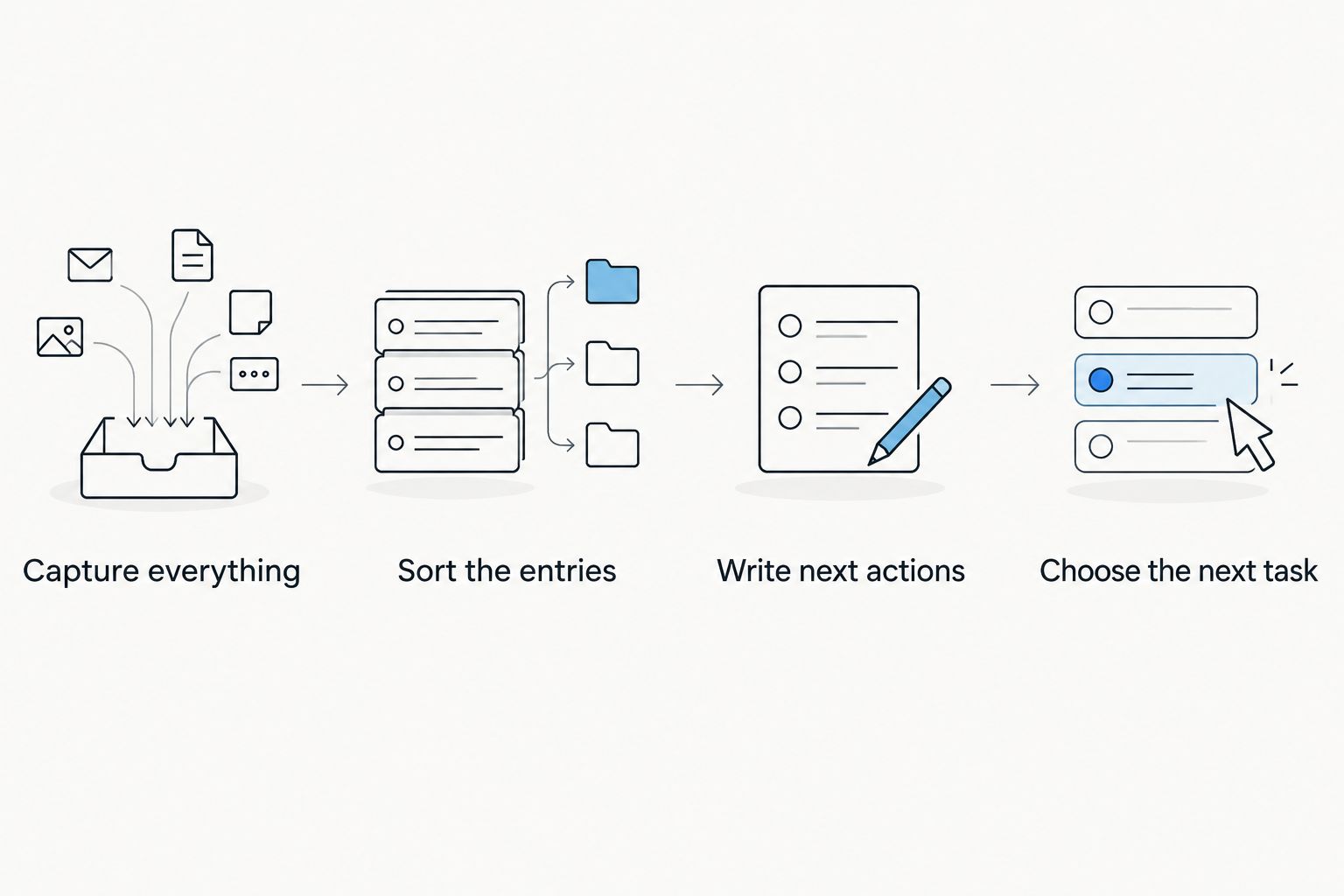
Capture everything
Write or say whatever is taking up attention. Include the unfinished email, the appointment you need to arrange, the project you keep avoiding, and the question you cannot answer yet. Fragments are fine.
Don't force every entry to sound productive. A concern such as feeling unprepared for a client discussion belongs in the capture even if it isn't a task yet. You will decide what it means later.
When you get stuck, use prompts rather than polishing what you've already written:
- What have I promised someone?
- What am I waiting for?
- What am I avoiding?
- What do I need to decide?
- What do I want to remember without acting on it now?
- What keeps interrupting my attention?
Stop when you're circling the same material rather than adding something useful. There is no required session length or minimum number of entries.
Sort the entries
Read or listen back to the capture and assign each entry a destination. Keep the original available so you can check context when a shortened task becomes unclear.
Use these categories:
- Action: Something you can do.
- Project: An outcome that needs several actions.
- Waiting: Something another person needs to provide or decide.
- Reference: Information you want to keep.
- Concern: A worry or feeling that needs clarification, not automatic scheduling.
An entry can contain several categories. A note about an unfinished proposal might include a project, a missing document, and a concern about scope. Split those pieces instead of dragging the whole paragraph into your task manager.
Write next actions
For each action or project, ask: What would I physically do next? Start the task with a verb and name the result that tells you it is finished.
A project label such as website update is not enough. Review the homepage draft and mark required changes gives you a place to start and a finish line.
Don't turn every thought into a task. If an entry has no action, save it as reference, clarify it as a concern, or remove it from the working list.
Choose the next task
Compare the actionable entries against real commitments, dependencies, and consequences. Choose the task that needs attention now, then leave the remaining work visible without pretending it all belongs today.
Your to-do list should tell you what to do, not repeat everything on your mind. If you cannot tell which task comes next, finish the prioritization before adding more entries.
Why this matters
A brain dump and a task list serve different purposes. The brain dump preserves what you are thinking; the task list directs what you do. Combining them leaves reminders, worries, and unfinished decisions competing with executable work.
For a practical 2026 workflow, keep the raw capture and the working list separate. That distinction matters whether you use a notebook or an app that generates action items: a captured sentence is not automatically a commitment.
What should a finished brain dump look like?
A finished brain dump does not need tidy prose. It needs enough context for you to understand each entry when you return to it.
The table below shows illustrative entries and how to process them. These are examples, not prescribed tasks or deadlines.
| Raw entry | Destination | Processed version | What stays off the to-do list |
|---|---|---|---|
| The client proposal is hanging over me | Project | Open the proposal draft and identify missing sections | The broad project label alone |
| I need the technician's inspection notes | Waiting | Ask the technician for the inspection notes | An assumption that the notes have arrived |
| I promised to send the meeting recap | Action | Draft and send the meeting recap | Extra tasks nobody agreed to |
| That conversation included a useful idea | Reference | Save the idea with its conversation context | A deadline to implement it without a decision |
| I'm worried the project scope is unclear | Concern | Identify the unresolved scope question | A vague task called fix project |
The useful change is not prettier wording. Each processed entry now has a destination, and each task names something you can do.
For waiting items, distinguish your action from someone else's responsibility. Sending a request is your task; receiving an answer is a dependency you track.
Which brain dump format should you use?
Choose the format that lets you capture thoughts without constant editing. Paper, typing, and speaking all support the same process, but each puts a different burden on you afterward.
| Format | Best for | Advantage | Limitation |
|---|---|---|---|
| Paper | People who prefer handwriting | You can capture fragments without configuring an app | You must manually move selected tasks into another system |
| Typed note | People already working at a keyboard | You can edit and reorganize entries directly | Formatting and rewriting can interrupt capture |
| Voice recording | People who prefer speaking | You can explain context in your own words | You need to review the recording or transcript before finalizing tasks |
Do not choose a format because it looks like someone else's productivity system. If handwriting leaves out context you would naturally explain aloud, speak. If recording makes you self-conscious, type.
Keep the capture in a place you can find again. A workflow with several disconnected inboxes gives you several places to check before you know whether you have processed everything.
Why does turning a brain dump into tasks vary?
The same sorting process produces different lists because the underlying entries differ. Check these factors before copying everything into your task manager:
- Actionability: Some entries describe actions; others describe information, feelings, or unresolved questions.
- Project size: A broad outcome needs a next action, not just a shorter label.
- Dependencies: Work that requires someone else's input needs a waiting entry or a request.
- Capture format: Spoken entries need playback or transcript review; handwritten entries need manual processing.
- Commitment status: An idea you mentioned is not the same as work you agreed to deliver.
- Deadline source: A real appointment or agreed delivery date differs from a date added to make the list look organized.
These factors explain why automatic task extraction still needs review. Software can identify a possible action in a sentence; you must decide whether that action belongs on your list.
How do you prioritize without making everything urgent?
Start with commitments that have a real deadline or block other work. Then compare the consequences of leaving the remaining tasks unfinished.
A useful task list distinguishes urgency from discomfort. The task you least want to do is not automatically the most important, and the task that is easiest to finish is not automatically the right starting point.
Ask these questions:
- Is there an actual deadline, and where did it come from?
- Is another person waiting on my output?
- Does this action allow other work to start?
- What happens if I leave it unfinished?
- Can I complete it with the information and tools I have?
If a task cannot start, record what is missing. Replace a blocked action with the request, clarification, or decision that makes it possible.
Don't assign dates to every entry just to fill a calendar. A made-up deadline does not clarify a commitment. Keep undated work on the task list until there is a reason to schedule it.
Can a spoken brain dump become a to-do list?
Yes. Record your thoughts, review the transcript, and extract the actions you actually intend to take. Speaking preserves the explanation around a task, but you still need to distinguish a commitment from an idea or a concern.
Omi is best for professionals who prefer spoken brain dumps and want transcripts and generated action items. The Omi wearable captures what you say and hear, while the companion app produces transcripts, summaries, tasks, and memories. You can also record through the phone or Mac app without the wearable.
The advantage is having spoken context alongside generated tasks. The limitation is that generated output still needs checking: confirm names, commitments, and what the next action means before using it as your working list.
In 2026, the Basic plan includes 300 listening minutes per month, and Plus includes 1,500 listening minutes per month. Every plan has the same core features; reaching a minute cap does not stop recording, and audio remains available to manage and export.
The app supports 33 languages. Set the language manually before capture; it does not automatically switch languages mid-conversation, and English is the most accurate.
For a solo brain dump, speak about your own work. When recording other people, consent rules vary by location; check local law before recording. Avoid capturing unnecessary sensitive information just because recording is convenient.
What should you check before accepting generated tasks?
Treat a generated task list as a draft. Check it against the original capture rather than assuming every extracted action belongs to you.
Use this review:
- Owner: Did you agree to do it, or were you describing someone else's work?
- Meaning: Does the task preserve the original intent?
- Finish line: Can you tell when it is complete?
- Deadline: Was a date actually stated or agreed?
- Duplication: Does the same task already exist in your working list?
- Context: Is there a detail you need to retain outside the task title?
Keep reference material out of task names. A long explanation belongs in an attached note; the task title should identify the action.
If a generated item is wrong, correct or remove it. Do not let the software's wording become a new obligation.
How do you keep a brain dump from becoming another backlog?
Process the capture before starting another collection of the same concerns. Move actions into your working list, save reference material, and make waiting items easy to check.
When you return to an unfinished item, ask why it stayed unfinished. It might need a clearer action, missing information, a decision to defer it, or a decision not to do it at all.
Repeated capture is not the same as progress. Rewriting a vague entry does not make it executable; changing it into a concrete action does.
FAQ
What's the easiest way to do a brain dump?
Write or speak everything competing for your attention without organizing it during capture. Then sort the entries and move only specific actions into your to-do list.
How long should a brain dump take?
A brain dump has no required duration. Stop when you are repeating material rather than adding useful entries, then spend your attention on processing what you captured.
Should I put every brain dump entry on my to-do list?
No. Reference notes, ideas, worries, and other people's responsibilities need different destinations; your to-do list should contain actions you intend to take.
Is speaking a brain dump better than writing it?
Speaking is better when you express thoughts more naturally aloud; writing is better when you prefer direct editing. Both require a separate sorting and task-review stage.
Can Omi turn a spoken brain dump into tasks?
Omi produces transcripts, summaries, and generated action items from captured speech. Review those items against the original context before treating them as commitments.
Do I need the Omi wearable to record a brain dump?
No. Omi's phone and Mac apps can record through the built-in microphone without the wearable.
What's a useful brain dump routine for 2026?
Capture your thoughts, separate actions from reference and concerns, and choose the next executable task. Keep the raw capture available so you can check context later.
One last thing
An entry that keeps returning might need a decision, not another reminder. Before adding it again, ask whether you intend to act, defer it, delegate it, or drop it.
For your next brain dump in 2026, finish by choosing an executable action rather than admiring the length of the list. The useful output is a clear next move.





