How to remember everything you hear in meetings


In this article
You cannot guarantee that you will remember everything you hear in meetings; you can capture what matters, check your understanding, and keep a searchable record for everything else. The catch is that a recording still needs review: confirm decisions, assign owners, and verify deadlines before treating notes as final.
- How to remember everything: combine active listening, selective meeting notes, and a searchable record—not perfect recall.
- Omi suits professionals who want searchable conversation transcripts and action items, but generated notes still need review.
- Confirm decisions, owners, and deadlines aloud before the meeting ends.
- Get permission before recording; consent rules vary by location.
How to remember everything you hear in meetings
Stop trying to memorize the meeting. Build a way to recover its meaning. Listen for decisions and commitments, capture the supporting detail, then test whether you can explain the outcome without looking at your notes.
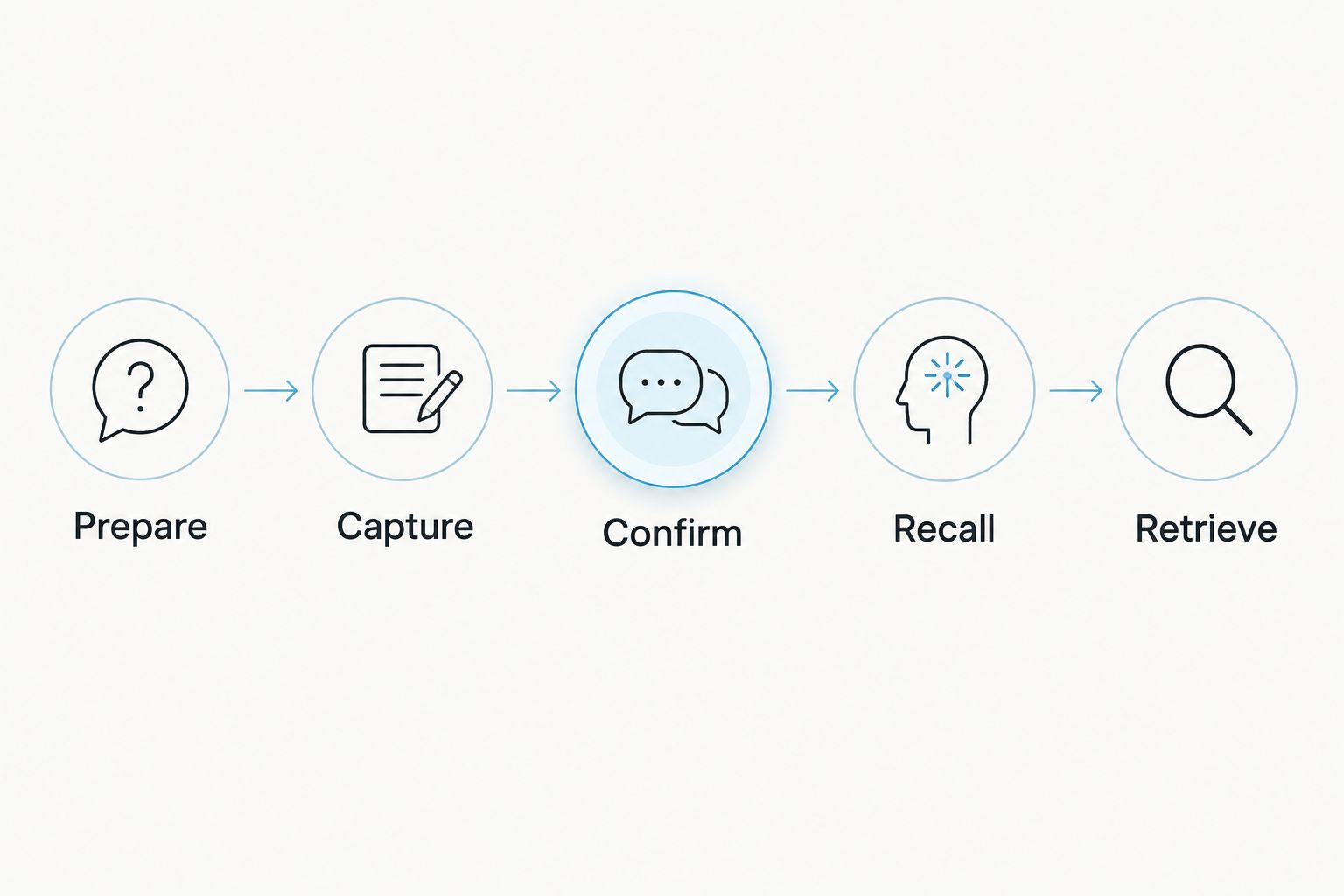
Use this sequence for your next meeting in 2026:
- Prepare. Write the question the meeting must answer and the decisions you need from it.
- Capture. Take selective notes or record with permission, keeping proposals separate from agreed decisions.
- Confirm. Repeat the outcome aloud and ask who owns the next action and when it is due.
- Recall. Close your notes and explain what changed, what remains unresolved, and what you must do.
- Retrieve. Store the checked summary with the source material so you can find the context later.
Different note-taking methods give you different page layouts. The essential requirement is the same: your record must distinguish what people discussed from what they actually agreed to do.
Prepare: give your attention a job
Before joining, write the outcome you need in plain language. Instead of a broad topic such as project update, write the question you need answered: what is blocking approval, and who can resolve it?
Keep unfamiliar names, project terms, and open questions nearby. You are not predicting the conversation; you are giving yourself a reference that makes important details easier to recognize when they appear.
Capture: write the change, not the speech
Record decisions, reasons, objections, and commitments rather than trying to transcribe every sentence manually. Use separate labels for a proposal, a decision, and an open question so your notes do not accidentally turn suggestions into promises.
If you record with permission, keep listening instead of assuming the recording has replaced your attention. A transcript preserves spoken words, but you still need to notice when an answer contradicts an earlier commitment or leaves something unresolved.
Confirm: make vague commitments explicit
Before the conversation moves on, repeat the decision in your own words. Ask whether the group has agreed or is still considering the option, then name the action owner and ask for a deadline.
Do not invent certainty. If no owner or date was agreed, mark that field as unresolved rather than filling it with your best guess.
Recall: explain the meeting without looking
After the meeting, put your notes aside and explain the outcome aloud or in writing. Cover what was decided, why it was decided, what you owe, and what still needs an answer.
Then compare that account with your notes or recording. The purpose is to expose gaps while you can still ask a focused follow-up question, not to prove that your memory is flawless.
Retrieve: keep evidence beside the summary
Use a descriptive title containing the project, subject, and meeting date. Keep the checked summary connected to the transcript or original notes rather than leaving each in a separate, unlabelled location.
Searchability starts with the words you preserve. Include the actual project name and decision language, not just a generic heading such as weekly catch-up.
Why this matters
Remembering an interesting comment is not the same as remembering a commitment. Your working record needs to tell you what changed, who must act, and which details still require confirmation.
A useful 2026 meeting workflow separates understanding from storage. You understand the conversation by listening and questioning; you preserve its detail through notes or a permitted recording. Neither task replaces the other.
Which meeting-memory method should you use?
Choose the lightest method that preserves the evidence you need. A short planning conversation and a detailed requirements discussion do not need identical records, but both need checked outcomes.
| Method | Best for | Strength | Limitation |
|---|---|---|---|
| Selective written notes | Decision-focused discussions | Lets you organize outcomes as you listen | Leaves out wording you did not capture |
| Audio recording | Conversations where exact wording matters | Preserves spoken detail for review | Requires permission and time to review |
| Transcript and summary | Searching across recurring conversations | Gives you searchable text and a condensed account | Requires checking names, decisions, and assignments |
| Written recap without recording | Meetings where recording is not permitted | Gives participants a record they can correct | Cannot recover speech nobody documented |
These methods can work together. Use selective notes to flag uncertainty, then check the source recording or transcript before sending a recap. When recording is off limits, confirm the outcome aloud and ask participants to correct your written account.
Do not choose a method solely because it captures more material. Choose it because you can review, protect, and retrieve the resulting record.
Why meeting recall varies
Check these factors before blaming yourself for forgetting a conversation:
- Unclear purpose. Without a question to answer, your notes have no clear priority. Write the intended outcome before joining.
- Divided attention. If you are replying to messages while listening, stop the competing task and return to the speaker.
- Unfamiliar language. Ask people to explain acronyms, names, and specialist terms before relying on your interpretation.
- Ambiguous commitments. Separate ideas from decisions, then confirm who is responsible for each agreed action.
- Missing review. Compare your recollection with the source material before sending a summary or starting consequential work.
- Poor organization. Keep related conversations and checked summaries under names you will recognize when searching later.
Each factor points to a practical change, not a promise of perfect memory. Start with the failure you actually encounter: missing an action requires a different fix from being unable to find an old decision.
Where a searchable meeting recorder fits
Omi captures conversations and turns them into searchable transcripts, summaries, action items, and memories. You can use the wearable or record through the phone or Mac app without the wearable.
Omi is best for professionals who want searchable conversation records and action items. The benefit is access to spoken detail after the meeting; the limit is that you must still check the generated account against what was actually agreed.
For online meetings in 2026, use the Mac app or capture room audio through the phone or wearable. The recorder does not join calls as a bot. Check your capture setup before relying on it for an important discussion.
Match listening minutes to your workload
The published plan allowances, checked in September 2026, differ by listening minutes rather than core features. Use your actual meeting workload to choose an allowance instead of assuming that a different plan changes the basic note-taking workflow.
| Plan | Listening allowance | Best for | Trade-off |
|---|---|---|---|
| Basic | 300 listening minutes per month | Professionals with occasional capture needs | Has a monthly minute cap |
| Plus | 1,500 listening minutes per month | Professionals whose workload fits this allowance | Still has a monthly minute cap |
| Unlimited | No minute cap | Professionals who want uncapped listening | Does not remove the need to review outputs |
All plans have the same core features. Reaching a minute cap does not stop recording; audio remains available to manage and export. Keep that distinction in mind when planning how you will capture and review conversations.
Check language and speaker settings
Omi supports 33 languages, with English identified as the most accurate. Set the language manually before the conversation; the app does not automatically switch languages mid-conversation.
Speaker labels help organize the transcript. Speech Profile learns the wearer's voice in English, but a name on a line is still something to verify when the assignment matters. Never treat a speaker label alone as proof that someone accepted responsibility.
Can I remember a meeting without recording it?
Yes—you can use selective notes, spoken confirmation, and a written recap without recording. Write the decision while it is being discussed, repeat it aloud, and ask the group to correct your understanding before moving on.
When you send the recap, separate agreed actions from unresolved questions. Invite corrections explicitly so silence does not become your only evidence that everyone interpreted the conversation the same way.
Should I trust a transcript more than my memory?
Use the transcript to check your memory, not to avoid checking anything. Compare consequential wording with the audio when available, especially names, negation, deadlines, and statements assigning responsibility.
A transcript also needs context. Someone saying they can investigate an option has not necessarily promised to deliver it, and a summary should preserve that distinction.
Keep consent and data handling inside the workflow
Recording permission belongs before capture, not after a disagreement. Consent rules vary by location; check local law and your organization's policies. This is not legal advice, and a recorder's features do not establish permission to record a particular conversation.
Use the guide to recording conversations with a wearable pendant when planning your process. If recording is not permitted, switch to agreed written notes rather than trying to capture the conversation discreetly.
For a 2026 team workflow, decide who can access the record, what belongs in a shared recap, and when source material should be removed. Apply the same discipline to exported files; a copy outside the original app still needs appropriate handling.
FAQ
What's the best way to remember everything someone says in a meeting?
Combine active listening, selective notes, spoken confirmation, and a searchable record when recording is permitted. You cannot guarantee perfect recall, so preserve the source and verify important decisions.
Can Omi help me remember meetings without buying a pendant?
Omi works without the wearable: the phone or Mac app can record through its built-in microphone. You still need permission to record and should review the resulting notes.
How many listening minutes do the plans include?
Basic includes 300 listening minutes per month, Plus includes 1,500 listening minutes per month, and Unlimited has no minute cap. All plans have the same core features, and reaching a cap does not stop recording.
Should I write down everything during a meeting?
Write down decisions, reasons, action owners, deadlines, and unresolved questions rather than attempting a manual transcript. If exact wording matters, use a permitted recording or ask the speaker to confirm the wording in writing.
Can I use Omi for meetings in different languages?
Omi supports 33 languages, with English identified as the most accurate. Set the language manually; it does not automatically switch languages mid-conversation.
What should I do when I forget what was agreed?
Check the meeting notes, transcript, or recording before acting, then ask participants to confirm anything unresolved. Do not turn an uncertain recollection into an assigned task or a promised deadline.
One last thing
Do not let a tidy summary hide an unresolved decision. Before sharing your notes, look specifically for commitments that have no named owner, no agreed date, or no clear acceptance.
Leave those gaps visible and ask the relevant person to resolve them. A useful meeting record does not pretend everything is settled; it makes the next necessary conversation obvious.






