How to transcribe an interview


In this article
To transcribe an interview, record it with permission, choose a transcript style, convert the speech into text, and check every line against the audio before sharing it. For a 2026 interview workflow, automated transcription can produce the draft, but you still need to verify speaker names, quotations, technical terms, and anything unclear.
- How to transcribe an interview: record with permission, draft the text, verify against audio, and label speakers.
- Choose full verbatim for speech analysis or clean verbatim for a readable interview transcript.
- Omi suits professionals who want interview transcripts, summaries, and tasks in one app.
- Keep the original recording; never turn an uncertain phrase into a confident quotation.
Why this matters
A readable transcript is not automatically an accurate transcript. Removing a hesitation can improve readability; removing a qualification can change what someone meant. Your job is to preserve the interviewee’s meaning, not make the interviewee sound more certain.
Before recording, explain what you will capture, how you will use it, and who will receive it. Consent rules vary by location; check local law and your organization’s requirements. Start with this guide to recording consent for wearable devices, not an assumption that permission to attend means permission to record.
For interviews conducted in 2026, settle the recording and sharing rules before opening the recorder. This is general workflow guidance, not legal advice.
How to transcribe an interview
Use the following sequence whether you are transcribing a customer interview, a research conversation, or a recorded discussion for publication. Choose the final format before you start editing: changing the rules halfway through creates inconsistent text.
1. Confirm permission and recording boundaries
Tell the interviewee whether the recording is for private reference, internal analysis, or publication. Clarify whether their name will appear and whether anyone outside your team will receive the audio or transcript.
Agree on what happens when someone goes off the record. Stop recording when required, and do not assume that deleting a sentence from the transcript removes it from the original audio.
2. Record clear audio
Choose a quiet space and place the recording device where both speakers are audible. Capture a short sample, play it back, and check the actual sound rather than trusting the recording indicator.
Ask people to avoid speaking over each other. For remote interviews, confirm that your recording method captures the interviewee’s voice as well as your own; a working microphone does not prove that remote audio is being captured.
3. Choose the transcript style
Decide whether you need full verbatim, clean verbatim, or an edited transcript. Write that choice at the top of your working document so another editor knows what changes are allowed.
Choose the style according to the intended use, not whichever version looks shortest. Research into speech patterns needs different treatment from a customer interview prepared for internal reading.
4. Create the first draft
Either type while listening or use a transcription application that supports your recording method. If you already have an audio file, check that the application accepts its format before beginning.
Add speaker labels as you work. Mark uncertain words instead of guessing, and keep a separate note of names, organizations, abbreviations, and specialist terms that need verification.
5. Verify the text
Listen to the recording again while reading the draft. Correct words, speaker changes, punctuation, and missing passages; do not check only the sections that look suspicious.
Pay particular attention to negatives, amounts, dates, and commitments. A missing “not” changes the meaning even when the rest of the sentence reads perfectly.
6. Export and protect the final version
Save the reviewed transcript separately from the working draft. Label its status clearly so an unverified draft does not become the version someone quotes.
Check access permissions before sharing the transcript or its audio. Keep or delete the recording according to your agreed purpose, consent arrangements, and organizational policy.
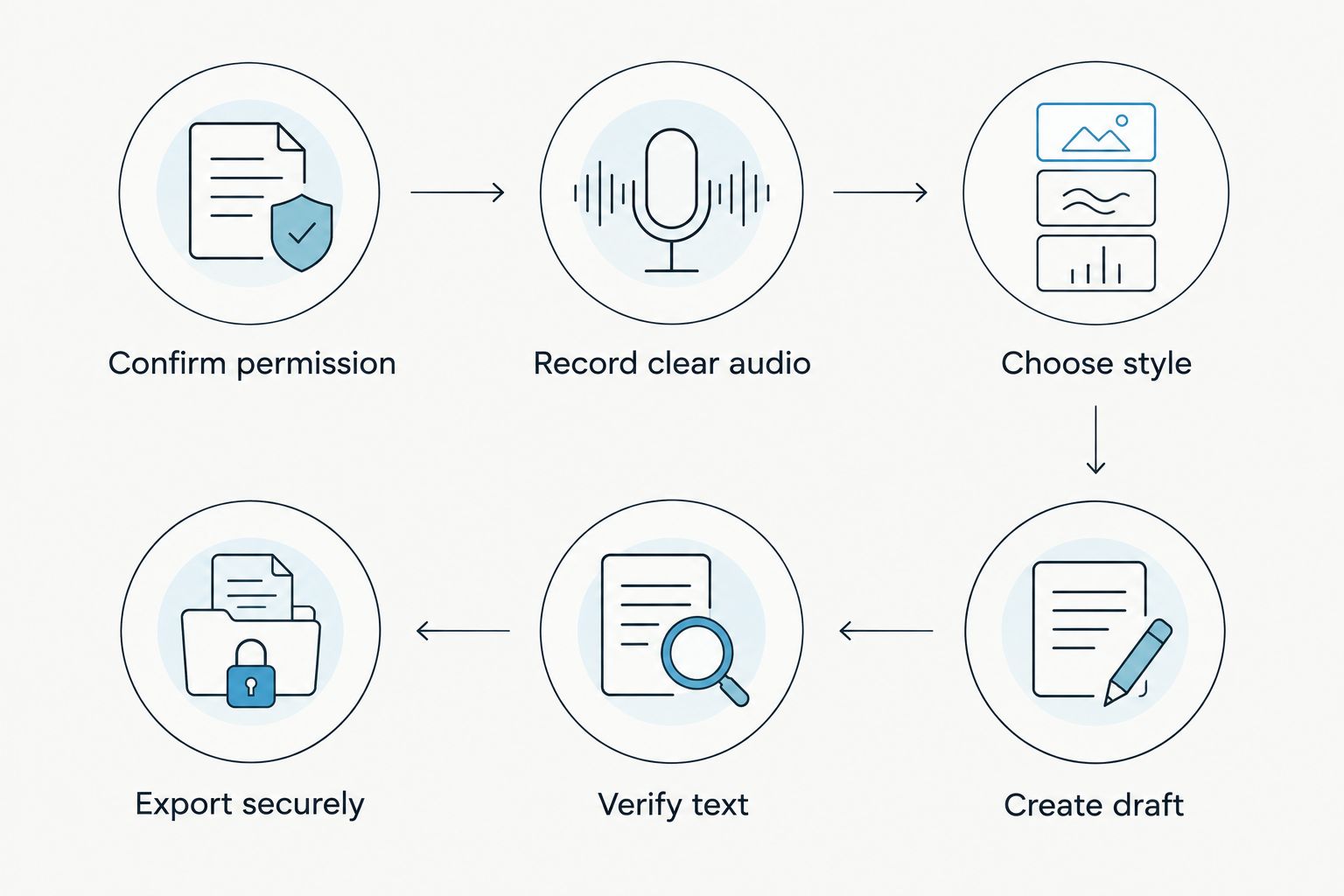
The sequence matters. Editing before you choose a style leads to inconsistent omissions; sharing before verification turns transcription errors into source material.
Full verbatim: best for speech analysis
Full verbatim preserves the spoken wording, including fillers, repetitions, and false starts. Depending on your transcription rules, it can also mark relevant pauses, laughter, or overlapping speech.
Best for: work where how someone speaks is part of the evidence. Its strength is detail; its drawback is a harder reading experience. Define how you will mark nonverbal sounds before starting, then use the same convention throughout.
Do not treat every background sound as relevant. Include what the project requires, and distinguish your annotations from words the interviewee actually said.
Clean verbatim: best for readable interview records
Clean verbatim removes speech clutter while preserving the speaker’s wording and meaning. It is a practical choice when readers need the substance of an interview without every repeated syllable.
Best for: internal interview records and readable source transcripts. Its advantage is clarity; its risk is overediting. Keep qualifications, uncertainty, emphasis, and unusual phrasing when they affect meaning.
For your 2026 transcription template, define exactly which fillers and false starts you remove. “Clean” is an editing rule, not permission to rewrite the answer.
Edited transcript: best for publication preparation
An edited transcript reshapes speech for reading through changes such as sentence restructuring or shortened answers. That makes it a different deliverable from a faithful source transcript.
Best for: preparing a publication draft under an agreed editorial process. Its strength is readability; its drawback is distance from the original wording. Keep the verified source transcript so readers or editors can trace changes.
| Format | Best for | What stays | Main drawback |
|---|---|---|---|
| Full verbatim | Speech analysis | Fillers, repetitions, false starts, and required annotations | Slower to read |
| Clean verbatim | Readable interview records | Original wording and meaning without agreed speech clutter | Overediting can remove nuance |
| Edited transcript | Publication preparation | Selected substance shaped for readers | No longer a word-for-word record |
Choose clean verbatim when you need readability without rewriting the speaker. Choose full verbatim when the speech itself matters, and label edited material honestly.
Manual transcription or automated transcription?
Manual transcription means listening and typing the text yourself. Automated transcription produces a draft from speech, which you then review. Neither workflow removes the need to check the recording.
| Method | Best for | Main advantage | Main drawback |
|---|---|---|---|
| Manual transcription | Interviews needing close editorial attention | You make wording and annotation decisions while listening | You must type and review the conversation yourself |
| Automated transcription | Producing a draft for subsequent review | Converts speech into an editable starting point | Incorrect words and speaker assignments still need correction |
Choose according to the recording, confidentiality requirements, and output you need. Do not choose solely because an application produces fluent paragraphs: fluency is not proof that the words match the audio.
Where Omi fits
Omi is best for professionals who want interview transcripts, summaries, and tasks in one app. The Omi wearable captures what you say and hear; the phone or Mac app can also record from its built-in microphone without the wearable.
Omi interview transcription supports 33 languages, with English the most accurate. Set the language manually because it does not automatically switch languages mid-conversation; its English-only Speech Profile learns the wearer’s voice for personalized speaker labels.
As of September 2026, Basic includes 300 listening minutes per month and Plus includes 1,500 listening minutes per month. Every plan has the same core features, and reaching a minute cap does not stop recording; audio remains available to manage and export.
The limitation is the same one that matters throughout this workflow: a generated transcript still needs checking against the recording. Language settings and speaker labels also need attention before the output becomes a reliable interview record.
Why interview transcription difficulty varies
The recording determines how much correction your transcript needs. Inspect these factors before deciding whether to type manually or start with an automated draft:
- Background noise: Competing sound makes quiet words harder to distinguish. Improve the recording environment before relying on cleanup afterward.
- Overlapping speech: Simultaneous answers complicate both wording and speaker attribution. Ask participants to take turns when possible.
- Specialist vocabulary: Product names, abbreviations, and technical terms need deliberate verification. Prepare a spelling list from reliable interview materials.
- Language changes: Check your application’s language settings and capabilities before a multilingual interview. Do not assume automatic switching.
- Required detail: Full verbatim requires attention to repetitions and annotations that clean verbatim omits. Agree on that scope before editing.
- Speaker identification: Similar voices and unclear introductions make attribution harder. Ask speakers to identify themselves at the beginning.
How do you check an interview transcript for accuracy?
Check the entire transcript against the audio, then separately review high-consequence details. Names, quotations, figures, negatives, and promises deserve deliberate attention because a plausible-looking error is easy to miss.
Use a consistent review checklist:
- Confirm that each speaker label belongs to the right person.
- Verify names and technical spellings against reliable reference material.
- Preserve uncertainty rather than turning tentative statements into facts.
- Check any quotation you plan to publish directly against the recording.
- Confirm that redactions appear in the version you will actually share.
Do not silently repair a speaker’s factual mistake. Transcription records what was said; fact-checking evaluates whether it was true. Keep editorial corrections distinct from the source wording.
What should you do when you cannot hear a word?
Mark the passage as unclear instead of inventing the missing word. Replay the surrounding audio and use an elapsed-time reference so another reviewer can find it.
Use consistent annotations such as [inaudible] or [unclear], and explain them in your transcript key. If you later confirm the wording, update the text; if you cannot confirm it, preserve the uncertainty.
Context can suggest a word without proving it was spoken. Never place a guessed phrase inside a publishable quotation as though the recording established it.
FAQ
What is the easiest way to transcribe an interview?
Create an automated draft, then check the entire transcript against the recording. Choose your transcript style first so corrections follow consistent rules.
Can I transcribe an interview without a wearable recorder?
Yes, you can record with a phone or computer and use a compatible transcription workflow. Omi interview transcription also works through the phone or Mac app’s built-in microphone without the wearable.
Should an interview transcript include every filler word?
Include filler words in full verbatim transcription; remove only the agreed speech clutter in clean verbatim. Keep hesitation or repetition when it changes the meaning or matters to the research.
How do I label speakers in an interview transcript?
Use consistent names or neutral labels, and verify every speaker change against the recording. Do not assign an identity when you cannot confirm who spoke.
Is an interview summary the same as a transcript?
No, a summary selects the main points while a transcript records the spoken exchange under defined editing rules. Keep the verified transcript when you need to check quotations or context.
Can I record an interview without asking permission?
Consent rules vary by location, so check local law before recording. Explain the recording, intended use, and sharing arrangements to the interviewee; this is not legal advice.
Should I delete the audio after transcribing an interview?
Follow the retention arrangement agreed for the interview and your organization’s policy. Do not delete the source before completing any required verification, and do not retain it beyond the permitted purpose.
One last thing
Verify the sentence before and after every quotation you plan to use. The quoted words can be accurate while the excerpt leaves out a condition, correction, or limitation that changes their meaning.
Make that your final checkpoint for every interview you publish in 2026. A transcript should preserve what the person meant—not just produce text that looks finished.






