Is the Plaud Note Pro worth it in 2026?


In this article
The Plaud Note Pro is worth buying in 2026 only if it solves a recording or note-taking problem your current setup leaves unresolved. Hold until you can verify the complete workflow—not just the recording. Before committing, check how you will capture conversations, correct transcripts, retrieve decisions, export records, and manage recurring plan limits.
- Plaud Note Pro review verdict: hold until capture, retrieval, and export fit your actual work.
- Omi suits professionals who want conversation capture, searchable memories, and generated tasks.
- Compare an AI note taker with phone-based recording before choosing dedicated hardware.
- Check consent, language handling, and plan limits before recording work conversations.
Is the Plaud Note Pro worth it in 2026?
Buy for a demonstrated workflow advantage, not the word Pro. A convincing demonstration should follow a conversation from capture to the moment you use its notes. A polished summary alone does not establish that the device belongs in your working day.
Use this comparison to define what each route must prove. The Plaud column is a buying checklist, not a claim about its specifications or performance.
| Option | Best for | Reason to consider it | Trade-off or purchase condition |
|---|---|---|---|
| Plaud Note Pro | Buyers evaluating this specific device | A dedicated device deserves consideration when it solves a defined capture problem | Require a demonstration of recording, retrieval, corrections, and export before buying |
| Omi wearable and app | Professionals connecting spoken interactions to notes and tasks | Captures conversations and produces transcripts, summaries, tasks, and searchable memories | Phone calls require speakerphone capture; language selection is manual |
| Phone or Mac app capture | People checking whether they need another device | The companion app records through the built-in microphone without the wearable | You must position and use the phone or computer for capture |
The right question is not whether a dedicated recorder is impressive. It is whether carrying it creates a useful record you would otherwise miss. For a separate look at the two named devices, see the Omi vs Plaud Note Pro comparison.
Why this matters
Recording is the beginning of the job. You still need to find the decision, identify who owns the follow-up, and distinguish an actual commitment from a suggestion.
That distinction matters when evaluating a note taker in 2026. If you finish each meeting by rebuilding the notes manually, the workflow has not delivered the outcome you bought it for. Judge the result where you use it: in preparation, follow-up, and handoffs.
Start with your most frustrating recurring conversation. A customer visit, project discussion, or internal meeting gives you a better buying test than a feature checklist detached from your work.
Plaud Note Pro: Hold until the workflow is proven
Best for: buyers who can name the specific capture problem they need this device to solve. Write that problem down before comparing features. Otherwise, an attractive demonstration can distract you from the reason you started shopping.
Examples of useful requirements include capturing an in-person discussion without typing, locating a past decision, or turning spoken commitments into a reviewable task list. These are evaluation criteria, not promises about the device.
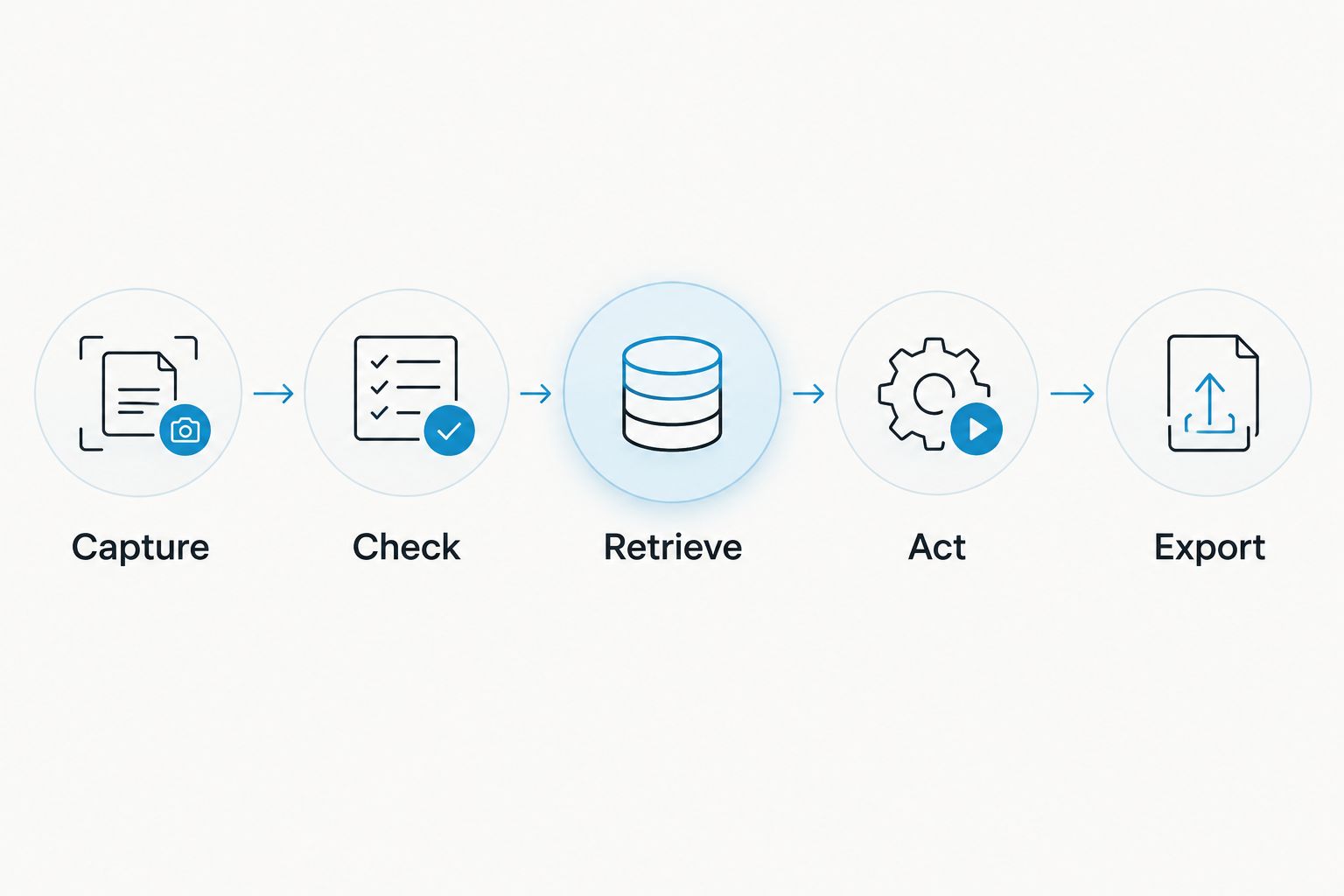
Run the same sequence during a demonstration:
- Capture: Record a permitted conversation in a setting that resembles your work.
- Check: Compare important names, decisions, and commitments against what was said.
- Retrieve: Find a specific detail without rereading the entire transcript.
- Act: Turn an agreed next step into something you can review and complete.
- Export: Confirm that you can take the relevant records out of the system.
Pay particular attention to retrieval. A summary can look convincing immediately after a meeting because you still remember the discussion. Searching for a detail later tests a different requirement: whether the record remains useful without your memory filling the gaps.
Do not accept a clean demonstration as proof of every setting. Bring the vocabulary, speaking style, and conversation format that matter to you. Verdict: Hold until the full sequence works for your use case.
An alternative for conversation-to-task workflows
Omi is best for professionals who want conversation capture, searchable memories, and tasks in one workflow. Its outputs include transcripts, summaries, action items, memories, Daily Recap, search, and a chat interface for asking about captured information.
The wearable captures what you say and hear. You can wear it around your neck, on a separately sold wrist band, or under a shirt. The companion apps also support recording from a phone or Mac microphone without the wearable.
The limitations belong in the decision, too:
- Phone calls use speakerphone capture rather than a call-joining bot.
- Online meetings can be recorded through the Mac app or through a phone or wearable in the room.
- You select the conversation language manually; it does not switch languages automatically during a conversation.
- Speech Profile learns the wearer's voice in English only.
- Local Sync is experimental, so evaluate that workflow before depending on it.
This is a reason to compare workflows, not to assume that every capture method is interchangeable. A person who primarily takes calls through headphones has a different requirement from someone documenting face-to-face conversations.
Recommendation: test app-based capture first if your main goal is searchable notes and tasks. Add hardware when wearing a recorder addresses a specific problem with carrying or positioning your phone.
Why the value of a dedicated recorder varies
The value of a note-taking device depends on how you use its recordings. These five factors give your 2026 buying decision a practical structure.
- Capture setting: Separate in-person conversations, computer meetings, and phone calls. Confirm the recording method for each rather than assuming one method covers everything.
- Listening allowance: Check how your conversation load fits the plan and what happens at its limit. Recording access and processing allowances deserve separate questions.
- Language handling: Test the language you actually speak, including the terms used in your work. Check whether language selection requires manual action.
- Retrieval and follow-up: Decide whether you need transcripts alone or summaries, tasks, memories, and search. Demonstrate the output you intend to use.
- Data control: Examine export, deletion, local operation, and workplace requirements before recording sensitive discussions. A feature list is not a substitute for an approved workflow.
Avoid scoring every feature equally. If your essential requirement fails, unrelated features do not repair it. A strong task list does not help when the capture method conflicts with how you conduct calls.
How much recording capacity do you need?
Estimate your actual listening load before selecting a plan. Use your calendar and recurring conversations, then check the allowance against that pattern rather than choosing a tier by its name.
Omi's plan allowances, documented in August 2026, provide a concrete example of what to compare:
| Plan | Listening allowance | Best for | Main trade-off |
|---|---|---|---|
| Basic | 300 listening minutes per month | Checking a lighter listening workload | A defined monthly allowance |
| Plus | 1,500 listening minutes per month | A larger workload that fits the allowance | A defined monthly allowance remains |
| Unlimited | No minute cap | Workflows that require no listening-minute ceiling | Confirm that the broader workflow fits before choosing it |
All plans have the same core features. Reaching the minute cap does not stop recording; audio remains available to manage and export.
Separate capacity from capability. An allowance of 1,500 listening minutes per month describes capacity, not transcription accuracy, recording suitability, or the usefulness of generated notes. Apply that distinction to any plan you evaluate.
Will it work with your languages and meeting setup?
A note taker's language list is only part of the decision. You also need to understand language selection, speaker identification, and how the recording reaches the app.
The alternative described here supports 33 languages, including English, Spanish, French, German, Portuguese, Chinese, Japanese, Korean, Hindi, Russian, and Ukrainian. English is the most accurate, language selection is manual, and the app does not switch languages automatically mid-conversation.
For your 2026 evaluation, use the language pattern of your real meetings. If participants switch languages, ask for a demonstration of that exact situation rather than treating a supported-language list as an answer.
Check speaker labels separately. Identifying the wearer through an English Speech Profile and identifying every participant are different requirements. Ask to see how the resulting transcript handles the people in your conversation.
Should you buy a wearable instead of using your phone?
Use your phone first when you have not established a hardware-specific need. App-based recording lets you assess whether captured conversations, summaries, and tasks are useful before you add a wearable to your routine.
A wearable addresses a different question: how you want to carry the capture device. Test the wearing position during an ordinary permitted conversation, then inspect the resulting record. Do not choose a form factor solely from how it looks in a product image.
The decision becomes clearer when you name the obstacle. If the obstacle is finding decisions after meetings, start by testing search. If it is generating follow-up tasks, inspect those tasks. Hardware should answer a capture problem, not substitute for evaluating the software.
What should you check before recording work conversations?
Check consent and workplace requirements before you press record. Consent rules vary by location; check local law. For a focused starting point, read the guide to recording conversations with a wearable.
For sensitive conversations, ask where audio and transcripts are stored, who can access them, how deletion works, and whether your organization permits the proposed setup. Keep those questions separate from whether a device records clearly.
Omi supports full export, deletion of individual items or everything, and local, cloud-free operation. Its hardware, firmware, and software are open source. Those are concrete controls to examine, not permission to bypass your organization's approval process.
FAQ
Is the Plaud Note Pro worth buying in 2026?
Buy only after it demonstrates a workflow advantage over your current setup. Verify capture, transcript checking, retrieval, follow-up, and export using a conversation that resembles your work.
What should I look for in a Plaud Note Pro review?
Look for demonstrated outcomes rather than a repeated feature list. A useful review explains the recording setup and shows how the resulting notes support retrieval and follow-up.
Is Omi better for turning conversations into tasks?
Omi generates action items and tasks alongside transcripts, summaries, and memories. That makes it relevant to conversation-to-task workflows, but it does not establish comparative performance against Plaud Note Pro.
Do I need a wearable to start recording conversations?
No, the companion phone and Mac apps can record through their built-in microphones without the wearable. Test that route before deciding that dedicated hardware is necessary.
What happens when I reach the Basic listening allowance?
The Basic allowance is 300 listening minutes per month, and reaching the cap does not stop recording. Audio remains available to manage and export.
Can I assume a note taker handles multilingual meetings automatically?
No, verify language handling directly rather than relying on a supported-language list. Check manual selection, language switching, and the terminology used in your meetings.
Is it legal to record conversations with a wearable?
Consent rules vary by location, so check local law before recording. Workplace requirements also need a separate check before you capture work conversations.
One last thing
Test retrieval after the conversation, not just the summary immediately afterward. Write down a decision you expect to need later, close the transcript, and return when the discussion is no longer fresh.
Then try to find that decision without reconstructing the meeting from memory. For a 2026 purchase, that is a more useful final check than another pass through the specification sheet. Buy the workflow that helps you use what was said.






