Omi vs Fireflies.ai: which is better in 2026


In this article
Choose Omi if your important conversations happen across rooms, calls, and everyday work; choose Fireflies.ai if your priority is automatically documenting scheduled online meetings. In 2026, the real difference is personal conversation capture versus a meeting-centered workflow—not which tool can produce a summary.
- Omi vs Fireflies comes down to conversation capture versus meeting automation.
- Choose Omi for wearable note-taking, in-person conversations, searchable memories, and tasks.
- Choose Fireflies.ai for scheduled online meetings and a shared meeting-record workflow.
- Both produce transcripts and summaries; evaluate the capture method before comparing the output.
Why this matters
Your notes are only as useful as the conversations you capture. A meeting assistant solves a different problem from a wearable recorder: one starts with the meeting, while the other travels with you.
For a 2026 buying decision, start with where information escapes. If you lose commitments during site visits or hallway conversations, calendar automation is not the answer. If your team loses decisions across scheduled calls, a pendant alone does not solve the shared-record problem.
Omi is best for professionals who need searchable notes from conversations beyond scheduled meetings. Fireflies.ai is the stronger fit when the meeting itself is the center of your documentation process.
At a glance
| Dimension | Omi | Fireflies.ai |
|---|---|---|
| Best for | Professionals capturing conversations throughout the day | Teams documenting scheduled online meetings |
| Capture method | Wearable, phone, Mac, and Apple Watch recording | Meeting assistant, meeting recordings, and uploaded audio |
| Online meeting workflow | Mac capture without a meeting bot | Bot-based meeting capture with scheduling automation |
| Standout feature | Conversations become searchable memories and tasks | Automated meeting capture and a shared meeting library |
| Notes and follow-up | Transcripts, summaries, action items, search, and chat | Transcripts, summaries, action items, search, and conversation queries |
| Team workflow | Personal capture with integrations through apps, automation tools, or API | Meeting-centered sharing and collaboration |
| Data control | Local operation, full export, deletion, and open-source software | Cloud-based meeting workspace; assess organizational policies before deployment |
| Pricing model | Optional hardware purchase plus listening plans | Software subscriptions organized around users and features |
The table compares workflow fit, not transcription accuracy. Do not treat a longer feature list as evidence that either product will capture your terminology correctly.
Wearable capture wins for conversations outside the calendar
A wearable note-taking device makes sense when you cannot keep reaching for a recorder. You can wear the pendant around your neck, on your wrist with the separately sold band, or under your shirt. The app turns captured conversations into transcripts, summaries, tasks, and memories.
That fits a salesperson leaving an in-person discussion, a technician explaining a repair, or a professional talking through a problem while moving between locations. You are capturing spoken context rather than reconstructing it afterward.
Fireflies.ai is the better match when the conversation already has a meeting link and a defined place in your team's workflow. You do not need wearable capture to solve a problem that starts and ends inside scheduled calls.
The tradeoff: a wearable expands where you can record, but you still need a deliberate recording and consent routine. Wearing a device does not make every conversation appropriate to capture.
Fireflies.ai wins for automated scheduled-meeting capture
Fireflies.ai's meeting assistant can join supported online meetings and create a record for later review. Calendar-connected automation is the attraction: the recording workflow follows scheduled meetings rather than relying on you to start a separate recorder each time.
That is a practical advantage for a manager whose day consists of customer calls, interviews, and internal reviews. The meeting record belongs to an established process instead of a personal capture habit.
The alternative works differently. For Zoom, Google Meet, or Microsoft Teams, you can record through the Mac app, or capture the room's audio with the phone or wearable. No bot joins the call.
Choose Fireflies.ai for scheduled automation; choose bot-free capture when you want direct control over recording. Bot-free does not mean permission-free. Check meeting policies and tell participants what you are recording.
Both create useful notes; review the follow-up before trusting it
Both products turn recorded speech into transcripts and summaries. Both also support extracting action items and finding information without manually rereading an entire conversation.
That makes basic note production an honest tie. The more useful test is whether the output preserves the decisions you actually need: the commitment, its owner, the condition attached to it, and the unresolved question.
For the wearable system, searchable memories, Daily Recap, and Ask Omi AI chat extend that record beyond an individual meeting. Fireflies.ai keeps the meeting record central to its search and review experience.
Use these checks on a representative conversation:
- Decision: Does the summary distinguish a final decision from a suggestion?
- Owner: Does the action item identify the person responsible?
- Context: Can you return to the transcript to verify what was said?
- Correction: Can you fix an important misunderstanding before sharing the notes?
Neither a polished summary nor an automatic task should replace checking a consequential commitment. Review names, dates, and responsibilities before sending follow-up.
Fireflies.ai wins when the meeting record belongs to a team
A shared meeting library suits teams that need colleagues to review the same call after it ends. Fireflies.ai is built around that meeting-centered collaboration, making it the clearer starting point for a manager standardizing how scheduled conversations are documented.
Personal capture answers a different question: what did you hear, promise, or learn across your day? That is valuable, but it does not automatically define who should receive each record or what belongs in a shared workspace.
The wearable system supports integrations through its apps, automation tools such as Zapier, n8n, and Make, webhooks, or the API. Treat those as workflow-building routes, not proof of a native one-click connection to every business application.
Fireflies.ai is best for meeting-centered teams; personal capture is best for the individual collecting context. Before choosing, decide whether the primary destination is your own searchable memory or a shared meeting record.
Local operation and export make personal control a clear strength
Omi supports full export, deletion of individual items or everything, and local operation without the cloud. Its hardware, firmware, and software are open source. Those are concrete controls for users who want more than a searchable account inside a hosted service.
The documented security features include TLS in transit and AES-256 encryption at rest. The product also lists SOC 2 and HIPAA. None of those labels removes your responsibility to configure the workflow appropriately.
Fireflies.ai's cloud-based meeting workspace serves a different operating model. For a team deployment, assess retention, access, sharing, and organizational requirements before connecting calendars or inviting a meeting assistant.
Choose local operation when cloud-free capture is a requirement. Do not infer that a hosted tool lacks security, or that open-source software makes a recording automatically compliant.
For recording permissions, use the guide to recording conversations with a wearable pendant. Consent rules vary by location; check local law and your organization's rules. This is not legal advice.
Language support needs a conversation test, not a headline winner
The wearable app supports 33 languages, including English, Spanish, French, German, Portuguese, Chinese, Japanese, Korean, Hindi, Russian, and Ukrainian. English is its most accurate language. Set the language manually; it does not automatically switch languages mid-conversation.
Fireflies.ai also supports multilingual transcription. For either product, a language appearing on a support list does not establish how well your accents, specialist vocabulary, or mixed-language conversations will transcribe.
The practical limitation is especially clear if you switch languages during a discussion. Test that exact behavior rather than assuming that broad language support means automatic handling of every transition.
For your 2026 evaluation, use a conversation that sounds like your work. Include the names and terminology you repeatedly need to retrieve. Treat language fit as a test result, not a winner declared from a feature table.
Pricing: compare listening allowances with team subscriptions
The hardware-and-plan model separates the capture device from the amount of listening included in your account. You can also use the phone or Mac app without buying the wearable, recording through the device's built-in microphone.
The documented plans, checked in August 2026, use these listening allowances:
- Basic: 300 listening minutes per month.
- Plus: 1,500 listening minutes per month.
- Unlimited: no listening-minute cap.
All plans include the same core features. Reaching a minute cap does not stop recording; the audio remains available to manage and export. Choose the allowance around your recording routine rather than assuming you need a different plan to get basic summaries or tasks.
Fireflies.ai uses a software subscription model organized around users and feature tiers. For a team, evaluate the required plan for everyone who needs to create, manage, or collaborate on meeting records.
The tradeoff is personal listening volume versus team software access. Check current plan terms before subscribing, and compare the workflow you will actually use—not just the subscription label.
Put the capture workflow through a real workday
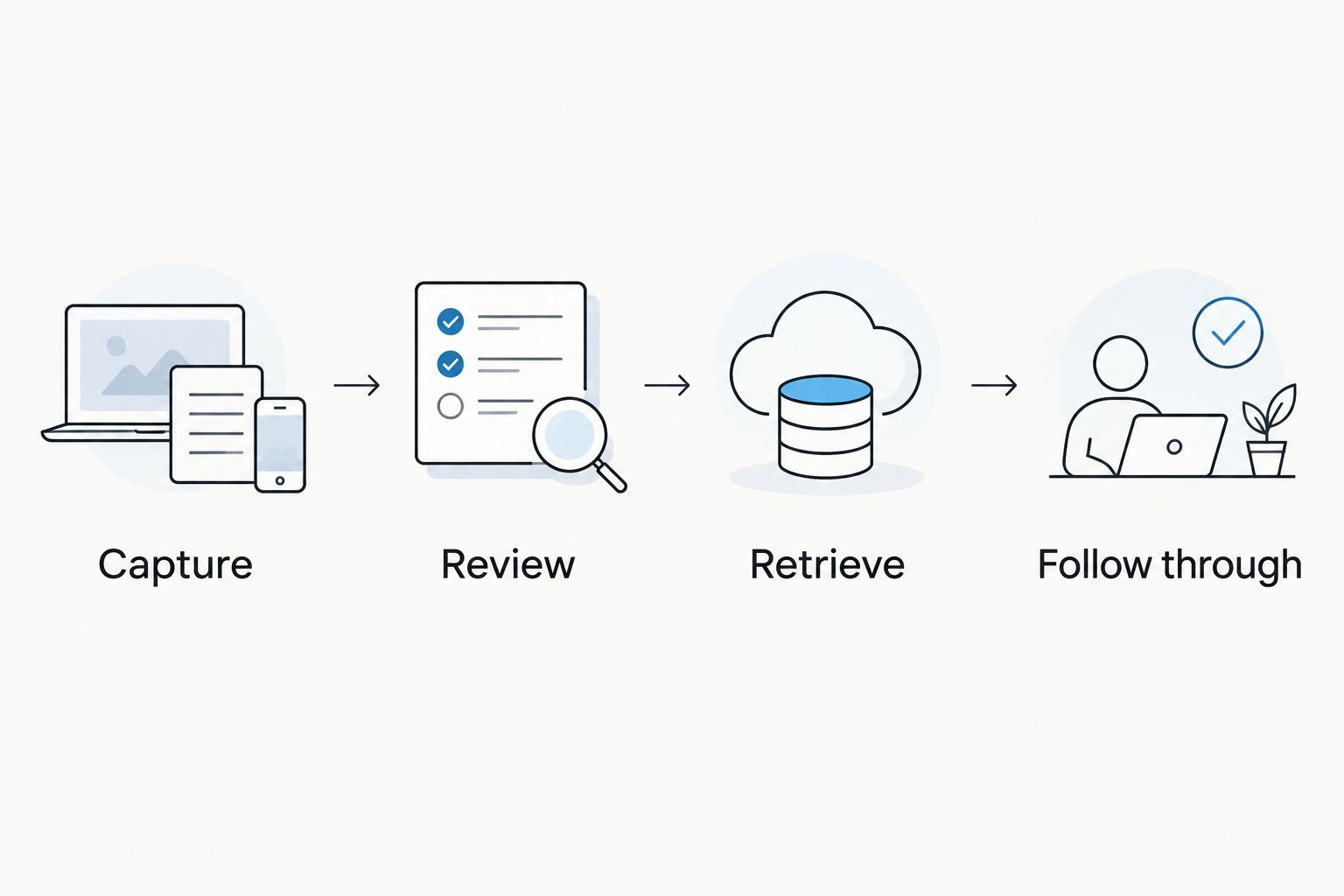
A useful 2026 comparison includes the moments between meetings. Start with a scheduled call, then an in-person conversation, then the follow-up work. That sequence reveals whether your problem is recording coverage or shared meeting administration.
Use this process for both options:
- Capture: Record a permitted conversation using the method you intend to use at work.
- Review: Check the transcript and summary against the decisions made.
- Retrieve: Search for a specific commitment without browsing the whole record.
- Follow through: Confirm the task and move it into your working process.
Judge the handoffs. If capturing the conversation requires a step you repeatedly forget, the summary feature will not rescue the workflow. If retrieving a decision requires asking the person who recorded it, your team-sharing process still needs work.
Your winning tool is the one that gets the right conversation into the right hands. Keep the evaluation focused on that outcome rather than collecting features you will not use.
Final verdict: choose the workflow, not the longest feature list
Choose Omi if you are a mobile professional
Omi wins for professionals whose useful conversations happen beyond scheduled calls. Choose the wearable-and-app approach when you want in-person capture, searchable personal memories, and tasks across your day. Accept that you must manage recording habits, permissions, and downstream sharing.
Choose Fireflies.ai if you manage a meeting-centered team
Fireflies.ai wins for teams that want scheduled online meetings captured and organized for shared review. Choose the meeting-assistant approach when calendar automation and a shared meeting record matter more than wearable capture. Accept that a meeting-centered workflow does not replace a deliberate process for conversations outside those meetings.
| Dimension | Winner |
|---|---|
| Conversations outside scheduled meetings | Wearable-and-app capture |
| Automated scheduled-meeting capture | Fireflies.ai |
| Transcripts, summaries, and action items | Tie on core output categories |
| Shared meeting-centered workflow | Fireflies.ai |
| Documented local operation and full export | Omi for users requiring these controls |
| Language accuracy for your conversations | Decide through a representative test |
| Plan fit | Personal listening allowance or team subscription, according to use |
FAQ
Is Omi better than Fireflies.ai for in-person conversations?
Omi is the better fit for wearable capture of in-person conversations. Its pendant and companion app turn captured speech into transcripts, summaries, tasks, and searchable memories.
Which is better for automatically recording scheduled meetings?
Fireflies.ai is the better fit for automated scheduled-meeting capture. Its meeting-assistant workflow suits teams that want meeting records organized for shared review.
Does the wearable app join Zoom or Teams calls as a bot?
No, it does not join calls as a bot. Record online meetings through the Mac app, or capture the room's audio with the phone or wearable, with appropriate permission.
Can I use the app without buying a pendant?
Yes, you can record through the phone or Mac app using the built-in microphone. The wearable is an additional capture option, not a requirement for app recording.
What happens when I reach the listening-minute limit?
Reaching the listening-minute cap does not stop recording. Audio remains available to manage and export, and all plans include the same core features.
Can I record phone calls with the pendant?
You can put a phone call on speakerphone and let the device record the audible conversation. Consent rules vary by location, so check local law and workplace policies first.
How should I compare the subscriptions in 2026?
Compare your listening volume with the number of team members and meeting features you need. The wearable app uses listening allowances, while Fireflies.ai organizes software access around users and plan features.
One last thing
Offline recording and cloud-free operation are different requirements. Local Sync is currently experimental: it stores conversations on your phone without internet and syncs them later. Decide whether you need temporary offline capture or an ongoing local-only setup before choosing your workflow.






