Omi vs Granola: which is better in 2026


In this article
Choose Omi if you want a wearable notetaker that captures conversations beyond scheduled meetings; choose Granola if you want a meeting notepad that builds on the notes you type. In 2026, the useful distinction is conversation capture versus meeting-led note-taking—not simply which app produces a summary.
- Omi vs Granola comes down to wearable conversation capture versus a meeting-focused notepad.
- Choose Omi for spoken interactions, searchable memories, and tasks across your day.
- Choose Granola when your own typed meeting notes should guide the finished notes.
- Both support meeting notes without a bot joining the call.
Why this matters
A useful notetaker fits where your conversations happen. A desk-based meeting workflow and a conversation on a customer visit create different capture problems, even when both end with an action item.
For your 2026 decision, start with the interaction you regularly lose track of. Is it a discussion you already attend with a notepad open, or a spoken commitment made while your hands are busy? That answer matters more than a long feature checklist.
Omi is the better wearable notetaker for professionals who need to capture conversations away from a meeting window. Granola is the better fit when your own written observations should shape the meeting record.
At a glance
| Dimension | Omi | Granola |
|---|---|---|
| Best for | Professionals capturing spoken interactions across the day | Professionals who actively take notes during meetings |
| Capture options | Wearable, phone microphone, Mac microphone, and Apple Watch recording | Meeting-focused software capture |
| Standout feature | Conversation capture feeding tasks and memories | Enhancing your typed notes with meeting context |
| Recall | Search, memories, Daily Recap, and Ask Omi chat | Reviewing and working with meeting notes |
| Meeting outputs | Transcripts, summaries, and action items | Enhanced meeting notes and summaries |
| Call presence | No meeting bot | No meeting bot |
| Data control | Full export, deletion, local operation, and open-source software | Assess against your organization's required controls |
| Pricing model | Optional hardware purchase plus listening plans | Software subscription tiers |
The table separates workflow fit from feature overlap. Both help you leave a meeting with a usable record; the bigger difference is what you want to capture before and after that meeting.
Granola fits an active meeting-note workflow better
Choose Granola when taking notes is already part of how you think. Its notepad approach gives your typed observations a central role rather than treating the conversation transcript as the only starting point.
That suits a project lead who writes down decisions during a discussion, flags an objection, and adds context that was never spoken aloud. Your notes communicate what mattered to you; the meeting audio supplies supporting context.
The tradeoff is workflow fit. A meeting-centered notepad is a deliberate activity: you attend, listen, and write. If your main problem is remembering conversations that happen while moving between jobs or speaking face-to-face, start with capture rather than note formatting.
For a meeting-heavy professional in 2026, that distinction is practical. Choose the workflow you will actually use during the conversation, not the one whose finished summary looks best in isolation.
Omi offers more ways to capture away from your desk
The wearable records what you say and hear. You can wear it around your neck, on your wrist with the separately sold wrist band, or under a shirt; the phone and Mac apps also record through their built-in microphones without the wearable.
That makes the device optional, not a prerequisite for trying the workflow. A technician can use wearable capture during a discussion, while a desk-based colleague can use phone recording or the Mac app.
Think about these distinct starting points:
- Wearable capture: for spoken interactions when you do not want to hold a phone.
- Phone recording: for conversations captured through the phone microphone.
- Meeting notes: for a deliberate record of a scheduled discussion.
- Typed notes: for observations and judgments you add yourself.
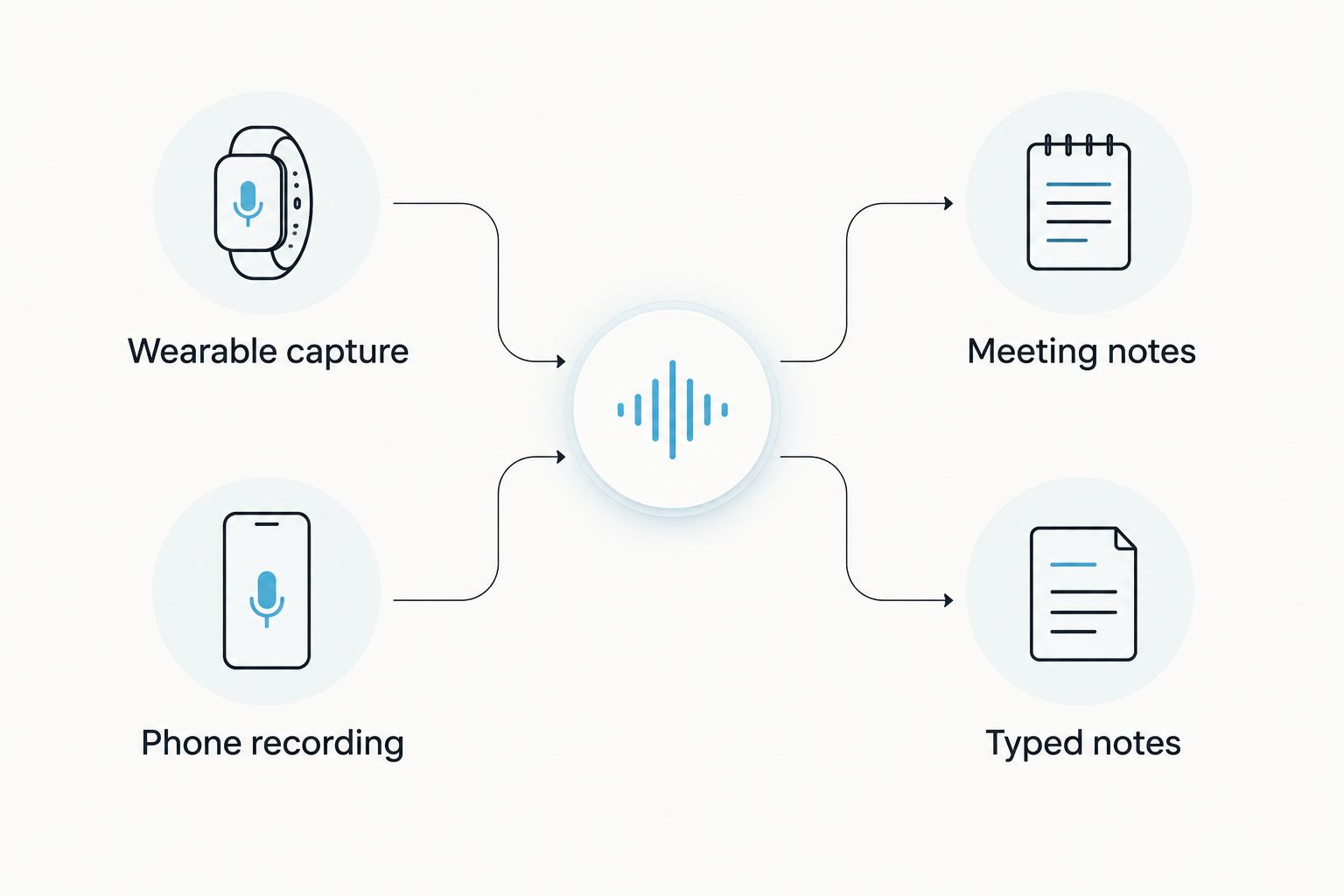
For online meetings, use the Mac app or record from the phone or wearable in the room. The guide to recording audio on Mac covers that capture route in more detail.
There are limits to plan around. Phone calls require speakerphone recording. Local Sync supports offline conversations on the phone and later synchronization, but it is experimental; do not treat that workflow as a substitute for checking a critical recording.
Granola gives your typed notes a bigger role
Granola's standout feature is the relationship between what you write and what the meeting contains. Choose Granola when your notes should provide the editorial direction.
Consider a manager who writes down a concern about a proposed launch. The concern might be an interpretation rather than a sentence anyone said. A notepad-centered workflow lets that observation sit alongside the meeting discussion instead of relying on transcription to infer it.
The benefit is control over emphasis. The limitation is that you still need to contribute those observations when they matter; a polished summary cannot know every unspoken judgment you made.
By contrast, the wearable-led approach starts with spoken material and turns it into transcripts, summaries, tasks, and memories. That is a better starting point when capturing the discussion is the difficult part. It is not a reason to stop adding your own judgment afterward.
Omi is better suited to recall beyond a single meeting
Search across captured material, memories, Daily Recap, and Ask Omi chat extend the workflow beyond a finished meeting document. Choose this approach when you want to retrieve commitments and context from multiple spoken interactions.
A sales professional might need to recover a customer's request after several conversations. A technician might need to revisit an explanation given on-site. In both cases, the useful output is not merely a tidy meeting summary; it is an accessible record of the interaction.
Granola fits a different starting point: opening the notes from a meeting and working with that record. Choose that structure when the meeting itself is your main unit of work.
Neither approach removes the review step. Check names, responsibilities, and consequential details against the captured discussion before acting. Search makes information easier to find; it does not make an unchecked interpretation authoritative.
Both turn meeting content into useful notes
There is no useful winner on the broad promise of producing meeting notes. Both products support that goal, so judge the finished output against your work rather than rewarding a longer feature list.
For the wearable-and-app workflow, the documented outputs include transcripts, summaries, action items, and memories. Speaker labels help distinguish speakers, while Speech Profile learns the wearer's voice in English so their lines receive their name.
Granola's appeal is the enhanced meeting record built around your notes. If that record captures decisions clearly and preserves your observations, it serves its purpose without needing to resemble a day-long memory system.
Compare a normal discussion using the same review questions:
- Did the notes preserve the decision rather than just the topic?
- Is the action item assigned to the correct person?
- Can you distinguish a proposal from an agreed commitment?
- Did your own context survive the summarization?
Those checks produce a more useful decision than judging which summary sounds more polished.
Both avoid a bot joining your meeting
Both products support meeting capture without a bot appearing as a participant. That makes this dimension a tie—not a reason to declare either product the winner.
The important distinction is between technical presence and permission. No bot does not mean no recording, and it does not remove your responsibility to inform participants.
Consent rules vary by location. Check local law and your organization's policies before recording, particularly when a discussion includes customer, employee, patient, or otherwise sensitive information.
Also check the actual capture path before the meeting starts. A computer microphone, room recording, and speakerphone call place different demands on audio quality. Review the resulting record before relying on a consequential detail.
Omi is the stronger fit for explicit ownership controls
Full export, deletion of individual items or everything, local cloud-free operation, and open-source hardware, firmware, and software provide concrete control options. Choose this model when inspecting, moving, or removing your captured data is a buying requirement.
The documented security measures include TLS in transit and AES-256 encryption at rest. Product and help guidance checked September 23, 2026 also lists SOC 2 and HIPAA; those statements do not replace a review of your organization's intended configuration and obligations.
For Granola, make data governance an acceptance test rather than assuming a meeting notepad meets every requirement. Ask your organization to assess retention, export, deletion, access, and processing against its own policy before adopting it.
Open source also creates a tradeoff: access to code is useful, but it is not the same as a managed deployment. Local operation and custom workflows need an owner who can validate the setup and maintain it.
Pricing: compare listening plans with software subscriptions
In 2026, the wearable-and-app model combines an optional hardware purchase with listening plans. Granola uses software subscription tiers, so the comparison is not simply device versus app: you can also use the former's phone or Mac app without buying the wearable.
The documented listening allowances are:
- Basic: 300 listening minutes per month.
- Plus: 1,500 listening minutes per month.
- Unlimited: no listening-minute cap.
All plans share the same core features. Reaching a minute cap does not stop recording; audio remains available to manage and export. Choose around your actual listening needs rather than assuming a higher tier is required for the core workflow.
For Granola, evaluate the subscription tier against the meeting and organizational features you need. Check current plan terms before choosing either product; a subscription label alone does not tell you whether the plan fits your use.
Language also affects the decision. The wearable-and-app system supports 33 languages, with English documented as the most accurate. Set the language manually; it does not automatically switch languages mid-conversation. Include your real language mix in any evaluation.
Final verdict: choose around the conversation you lose
Choose Omi if you capture work as it happens
Best for: sales professionals, field technicians, and other professionals whose important conversations extend beyond scheduled calls. Choose the wearable notetaker when hands-free capture, searchable memories, tasks, and explicit data controls solve your main problem.
Accept the practical constraints: speakerphone for phone calls, manual language selection, and an experimental offline synchronization option. Start with the app if you want to assess the workflow before adding hardware.
Choose Granola if you think through your meeting notes
Best for: managers, project leads, and meeting-heavy professionals who actively type observations during discussions. Choose Granola when enhancing those notes is more valuable than adding wearable capture to your day.
Accept the workflow tradeoff: your own writing remains part of what makes the record useful. Do not choose a meeting-centered notepad solely because you want to stop thinking about notes altogether.
The 2026 scorecard
| Dimension | Winner |
|---|---|
| Active meeting-note workflow | Granola |
| Capture away from a desk | Omi |
| Typed-note emphasis | Granola |
| Recall across spoken interactions | Omi |
| Useful meeting outputs | Tie |
| No meeting bot | Tie |
| Explicit ownership controls | Omi |
| Pricing model | Choose by listening needs and required features |
FAQ
Is Omi better than Granola in 2026?
Omi is better suited to wearable conversation capture, while Granola is better suited to enhancing notes you type during meetings. Choose around where your important conversations happen and how actively you want to write.
Can I use Omi without buying the pendant?
Yes. The phone and Mac apps record through their built-in microphones without the wearable, so you can assess the capture-and-recall workflow before adding hardware.
Does Granola need a bot to join my meeting?
Granola supports meeting note-taking without a meeting bot joining the call. You still need to follow applicable consent rules and organizational recording policies.
Can Omi record a phone call?
Yes, through speakerphone recording. Put the call on speakerphone and let the device or app capture the audible conversation, subject to applicable consent requirements.
Which is better if I already take detailed meeting notes?
Granola is the better fit when your typed observations should guide the finished meeting notes. Its notepad-centered approach matches an active writing workflow.
Does Omi stop recording when I reach my plan limit?
No. Reaching the listening-minute cap does not stop recording; audio remains available to manage and export. Choose a plan based on your listening needs.
Can I record multilingual conversations with Omi?
Omi supports 33 languages, but you must set the language manually. It does not automatically switch languages mid-conversation, and English is documented as the most accurate.
One last thing
Test retrieval, not just recording. After a normal conversation, try to recover a decision, its owner, and the context behind it without rereading the entire record.
That is the real purchase test. A notetaker earns its place when you can use what it captured—not when it merely proves that a conversation happened.






