Omi vs Otter.ai: which is better in 2026


In this article
Choose Omi if your important conversations happen across desks, client visits, and everyday work; choose Otter.ai if you want a meeting-first app that can join scheduled online calls and produce shared notes. The omi vs otter decision in 2026 is about where you need capture to happen—not which transcript looks better in a demo.
- Omi vs Otter: choose wearable capture for in-person work; choose Otter.ai for scheduled online meetings.
- Omi turns conversations into transcripts, tasks, memories, and a searchable personal record.
- Otter.ai suits teams that want a meeting assistant to join calls and organize shared notes.
- Both support transcription without requiring you to buy a wearable.
Why this matters
A meeting recorder solves only part of the problem when your work happens away from a calendar invitation. A customer explains a requirement in person. A colleague changes a deadline after the call. Those conversations still need a record. Small shop owners feel this most: a supplier call on the floor, a customer request at the counter, an order note typed later into whatever small business ecommerce platform runs the store.
The reverse matters too. If nearly everything you need to document happens in scheduled video meetings, wearing a device adds another decision without necessarily improving your workflow. Match the capture method to your working day before comparing summaries.
This 2026 comparison separates wearable capture, online meeting attendance, follow-up, and data control. It also distinguishes recording a conversation from having a meeting assistant join it: those are different workflows, even when both end with searchable text.
At a glance
| Dimension | Omi | Otter.ai |
|---|---|---|
| Best for | Professionals capturing spoken interactions throughout the day | Teams documenting scheduled meetings |
| In-person capture | Wearable, phone, or Mac microphone | App-based recording |
| Online meetings | Mac recording; no meeting bot | Meeting assistant that joins supported online calls |
| Follow-up | Tasks, memories, Daily Recap, and Ask Omi | Meeting summaries, action items, and meeting chat |
| Shared review | Searchable personal record with full export | Shared transcripts, comments, and collaborative review |
| Transcription | Transcripts, summaries, and speaker labels | Transcripts, summaries, and speaker identification |
| Data control | Local operation, export, deletion, and open-source code | Cloud-based meeting workspace |
| Hardware requirement | Wearable optional; phone and Mac capture also work | No dedicated wearable required |
| Pricing model | Optional device purchase plus listening plans | Software subscription tiers |
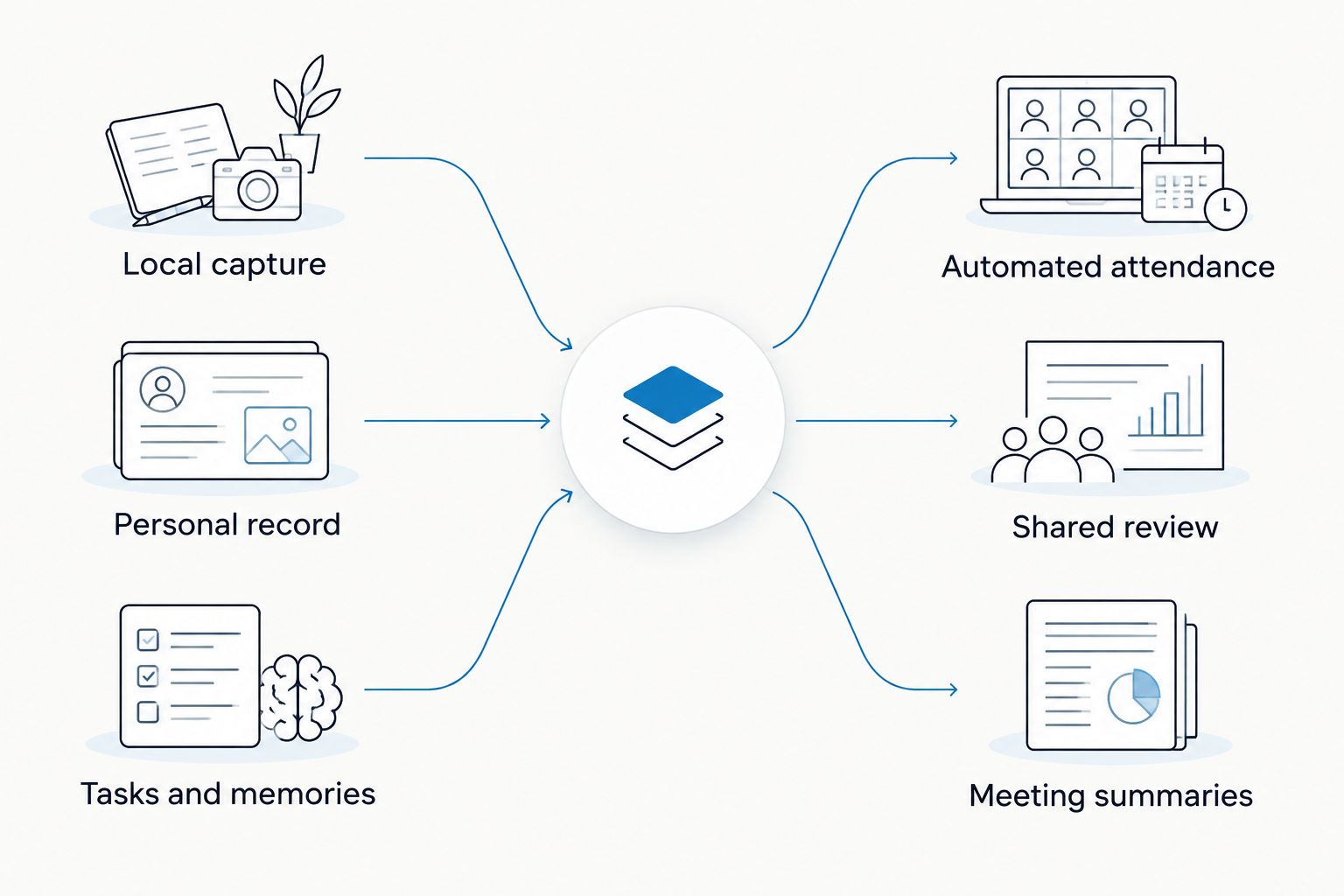
| Standout feature | Wearable capture feeding tasks and memories | Automated online meeting attendance |
Omi wins for conversations that happen away from your desk
Omi is the better wearable note-taking choice for professionals whose important conversations happen in person. You can wear the device around your neck, on your wrist with a separately sold band, or under a shirt. The companion app turns captured speech into transcripts, summaries, tasks, and memories.
That fits a salesperson moving between customer conversations or a technician explaining work while away from a laptop. You do not need to turn every exchange into a scheduled online meeting before it can become a useful record.
Otter.ai also records in-person speech through its app. Its strength here is simplicity: use software on a device you already carry, without adding a dedicated wearable. That is a genuine advantage when you only need to record selected conversations.
The trade-off is physical versus deliberate capture. A wearable gives you another place to record; an app keeps the hardware decision out of the process. Neither choice removes the need to tell people when you are recording.
Choose wearable capture for a working day built around spoken interactions. Choose app-based capture for occasional, intentional recordings.
Otter.ai wins for automated online meeting attendance
Otter.ai is the better fit when you want an assistant to join scheduled online meetings. Its meeting assistant can join supported calls and create a transcript and meeting notes. That makes the meeting itself the organizing unit.
The alternative works differently. Record Zoom, Google Meet, or Microsoft Teams conversations through the Mac app, or use a phone or wearable in the room. The wearable system does not join calls as a bot.
This distinction matters more than the shared promise of automatic notes. One workflow brings an assistant into the call; the other records through an app or microphone you control. In 2026, decide which behavior your team actually wants before choosing a product.
- Automated attendance: choose Otter.ai when assistant participation fits your meeting process.
- Local capture: choose the Mac or microphone workflow when you want recording without a meeting bot.
- Meeting review: decide who needs access to the transcript before recording starts.
A bot-free workflow is not automatically permission-free. Consent rules vary by location; check local law and your organization’s recording policy. The one-party vs two-party consent states guide explains the distinction without turning a product comparison into legal advice.
Omi wins for tasks and memories across your working day
The wearable-and-app approach is built to do more than file a meeting transcript. Its outputs include action items, tasks, memories, Daily Recap, search across captured material, and Ask Omi chat.
That makes it useful when follow-up stretches across separate conversations. A requirement comes from a client visit; a clarification comes later; your own spoken idea adds context. You want those interactions searchable, not just stored as separate meeting documents.
Otter.ai provides meeting summaries, action items, and chat about recorded meetings. That is a strong fit when your follow-up belongs to a recognizable meeting: decisions, responsibilities, and points the team needs to revisit.
Choose tasks and memories when you need a personal record across contexts. Choose meeting-centered notes when the meeting is the record. The distinction is organization, not a claim that one system always produces more accurate action items.
Automatic tasks still need review. Check the owner, deadline, and wording against what was actually agreed before you act on them. A useful summary should shorten that check, not replace it.
Otter.ai wins for shared meeting review
Otter.ai is the better fit for teams whose main job is reviewing the same meeting together. Shared transcripts, comments, and collaborative review keep discussion close to the record instead of scattering corrections across separate messages.
That matters when several people need to inspect wording, find a decision, or clarify a summary. The workspace is centered on a shared meeting rather than on one person’s wider stream of captured conversations.
The wearable alternative gives you searchable transcripts and full export. Those are useful when you need to retrieve a detail or move a record into another workflow. Export, however, is not the same thing as collaborative review inside a meeting workspace.
Do not confuse access with accountability. Whichever product you choose, assign someone to confirm the final decisions and distribute the agreed follow-up. A transcript is a record of speech; approved minutes are a record your team has accepted.
For your 2026 evaluation, ask colleagues to review a real meeting record. Check whether they can find the decision, flag an error, and identify the next action without needing a separate explanation.
Both handle searchable transcription; neither earns an accuracy crown here
Both products turn speech into text and summaries. Both identify speakers and help you revisit recorded conversations. There is no supported accuracy winner in this comparison.
The wearable app supports 33 languages, including English, Spanish, French, German, Portuguese, Chinese, Japanese, Korean, Hindi, Russian, and Ukrainian. English is its most accurate language. Set the language manually; it does not automatically switch languages mid-conversation.
Its Speech Profile learns the wearer’s voice so their lines receive their name, and that feature is English-only. Speaker labeling and personal voice recognition are related, but they are not interchangeable.
Evaluate transcription with your actual vocabulary and recording environment. Use an approved conversation containing names, specialist terms, interruptions, and explicit follow-up. Compare the transcript with what was said, then inspect the summary separately.
- Check whether names and technical terms survive transcription.
- Check whether speaker labels stay attached to the right statements.
- Check whether the summary preserves qualifications and disagreements.
- Check whether action items describe commitments rather than suggestions.
Do not treat a polished summary as proof of a correct transcript. Read the source passage before relying on a consequential detail.
Omi wins for an open-source, locally configurable approach
Omi is the stronger choice when open-source access and local operation are requirements. Its hardware, firmware, and software are open source. It supports full export, deletion of individual items or everything, an API, and an MCP server.
The system can run locally without the cloud. Its published security facts include SOC 2, HIPAA, TLS in transit, and AES-256 encryption at rest. Those facts describe controls and capabilities; they do not make every recording appropriate for every workplace.
Offline capture is also supported. Local Sync stores conversations on the phone without internet and synchronizes them later, but it remains experimental. Do not confuse that feature with a blanket claim that every workflow is local by default.
Otter.ai’s cloud-based meeting workspace fits a different priority: organizing and reviewing meeting records in a shared software environment. Choose that model when it matches your organization’s approved process rather than assuming a wearable architecture is inherently safer.
For confidential work, inspect the actual configuration. Decide where recordings will live, who receives access, how exports are handled, and when records are deleted. Product-level security statements do not replace your organization’s approval.
Both let you start without buying a wearable
You do not need a pendant to test either workflow. The wearable companion app records through the built-in microphone on a phone or Mac, so you can evaluate transcripts and follow-up before deciding how you want to capture speech.
That removes an unnecessary first step. Start with a device you already use, then consider wearable capture if reaching for a phone or staying near a computer interrupts your work.
Otter.ai likewise requires no dedicated wearable. That is a straightforward fit for someone who wants meeting software rather than another physical device to wear and manage.
For phone calls, the wearable system’s documented method is speakerphone capture. Put the call on speakerphone and let the device or app record it. Do not mistake this for direct access to the phone’s internal call audio.
Keep hardware optional during your evaluation. Buy into the capture method only after the notes prove useful for your work.
Pricing models: listening allowance versus meeting software
Compare the models rather than a price snapshot. In 2026, the wearable system separates an optional device purchase from listening plans, while Otter.ai offers software subscription tiers.
The listening plans use the same core features. According to the August 2026 plan documentation, Basic includes 300 listening minutes per month, Plus includes 1,500 listening minutes per month, and Unlimited has no minute cap. Monthly and annual billing options exist for the paid plans.
Reaching a listening cap does not stop recording. Audio remains available to manage and export. That distinction matters when estimating how much of your working day you want processed into notes.
For Otter.ai, compare the current subscription’s transcription allowances, meeting-assistant features, and collaboration access against your team’s needs. Do not assume the same plan covers every workflow just because the product offers the feature somewhere.
The trade-off is scope. A personal listening plan suits an individual’s capture volume; meeting software needs to fit the people who record, share, and review. Check current plan details before committing, and separate hardware decisions from subscription decisions.
Final verdict: choose the record you actually need
Choose Omi if your job happens in spoken interactions
Winner for the mobile professional: Omi. Choose the wearable note-taking approach if client visits, field conversations, and spoken follow-up form a meaningful part of your work.
You get multiple capture methods and outputs that include tasks, memories, and a searchable personal record. Accept the trade-offs: online calls use a recording workflow rather than a joining bot, language selection is manual, and experimental Local Sync needs separate evaluation.
Choose Otter.ai if your team works through scheduled meetings
Winner for the meeting-centered team: Otter.ai. Choose it if you want automated attendance on supported online calls and collaborative review of the resulting meeting record.
Its advantage is the meeting workflow, not a proven transcription accuracy lead. Accept the trade-off: it does not provide the dedicated wearable capture model that makes the other approach useful away from a desk.
| Dimension | Winner |
|---|---|
| In-person wearable capture | Omi |
| Automated online meeting attendance | Otter.ai |
| Tasks and memories across contexts | Omi |
| Shared meeting review | Otter.ai |
| Transcription accuracy | No demonstrated winner |
| Open-source and local configuration | Omi |
| Starting without dedicated hardware | Tie |
| Pricing model | Match the plan to your workflow |
FAQ
Is Omi better than Otter.ai in 2026?
Omi is better for wearable capture across in-person conversations; Otter.ai is better for automated online meeting attendance and shared meeting review. Choose based on where your conversations happen and who needs the record.
Can I use the wearable companion app without buying the device?
Yes. The phone and Mac apps record through their built-in microphones, so you can evaluate transcription, summaries, and follow-up without wearing a pendant.
Does the wearable system join Zoom meetings as a bot?
No. Record online meetings through the Mac app, or use a phone or wearable in the room; Otter.ai offers a meeting assistant that joins supported online calls.
Which product has more accurate transcription?
This comparison does not establish a transcription accuracy winner. Evaluate both with your actual vocabulary, speakers, and recording environment, and check summaries separately from transcripts.
What happens when I reach the listening plan’s minute cap?
Recording does not stop when the listening cap is reached. Audio remains available to manage and export; the plans differ in listening allowance rather than their core feature set.
Which product should I choose for shared meeting notes?
Choose Otter.ai when shared transcripts, comments, and collaborative meeting review are your main requirements. The wearable alternative focuses on capture across contexts, searchable records, tasks, and memories.
Do I need consent to record a conversation?
Consent rules vary by location, so check local law before recording. Also follow your organization’s recording policy; a wearable or meeting bot does not remove those obligations.
One last thing
A better transcript is not always a better workflow. Before choosing in 2026, take an approved conversation through the whole process: capture it, find a detail, verify a task, and share the useful result.
Judge the handoff, not just the recording. If the notes never reach the person responsible for the next action, you have saved the conversation without improving the work.






