
What happened to the Humane AI Pin?


In this article
The Humane AI Pin was discontinued in February 2025 after HP bought Humane’s assets. In 2026, treat it as a discontinued device, not a current wearable option; HP’s purchase of the assets did not keep the Pin alive as a consumer product.
- The Humane AI Pin was discontinued in February 2025 after HP bought Humane’s assets.
- HP’s asset purchase and the continuation of the consumer device are different things.
- Skip the discontinued Pin when choosing a wearable for everyday work in 2026.
- Omi is best for professionals who want conversation transcripts, summaries, and tasks rather than a phone replacement.
What happened to the Humane AI Pin?
Humane’s consumer device ended; HP bought assets from the company. Those are the two facts that answer the question. An asset acquisition is not a promise to maintain the product that customers bought.
The distinction matters when you read old reviews, watch launch videos, or encounter a secondhand device. Those materials describe a product at a particular point in its life. They do not establish that the product remains supported in 2026.
| Event | What happened | What it means for you |
|---|---|---|
| HP asset purchase | HP bought Humane’s assets | Do not interpret the transaction as continued support for the Pin |
| Consumer device discontinuation | The Humane AI Pin was discontinued in February 2025 | Exclude it from a shortlist for a new everyday wearable |
| Your next purchase | You need to evaluate a current product and its actual workflow | Compare capture, useful output, export, and dependence on services |
If your reason for researching the Pin is finding a way to remember conversations, start with the narrower category of AI note takers in apps and wearables. Decide what you need the device to do before choosing its shape.
Why this matters
A wearable sits close to your everyday life. You wear it, speak around it, and expect the resulting information to remain useful after the conversation ends. The purchase decision therefore includes more than the physical object.
For a 2026 purchase, separate three questions: does the device capture the interaction you care about, does the software produce useful output, and can you take that output elsewhere? A good answer to the first question does not answer the other two.
The Pin’s discontinuation makes that distinction concrete. Buying hardware and retaining a useful workflow are separate decisions. Evaluate both before you commit your meetings, notes, or follow-up process to a wearable.
What does HP buying Humane’s assets actually mean?
HP bought Humane’s assets; the Humane AI Pin was discontinued. Keep those statements separate rather than turning the acquisition into a claim that the device continued under another owner.
An asset purchase concerns the assets involved in the transaction. Continued support for a consumer device is a different commitment. You should not infer that commitment from the acquisition headline alone.
This also limits what the headline tells you about your next purchase. It does not demonstrate that every wearable will fail, that every acquisition ends a product, or that another device solves the same problem. Those are different claims requiring different evidence.
When evaluating a company announcement, read for the practical consequences:
- Does it explicitly say the consumer device will continue?
- Does it explain what happens to the companion software?
- Does it describe how customers retain or export their information?
- Does it distinguish existing hardware from future products?
These are purchasing questions, not assumptions about what happened inside Humane. The confirmed outcome is enough to make the present-day recommendation: do not choose a discontinued Pin for a new daily workflow.
Should you buy a Humane AI Pin in 2026?
Skip the Humane AI Pin for everyday use in 2026. Its discontinuation is the deciding fact, regardless of how compelling an old demonstration looks.
A secondhand listing proves that someone has a physical device to sell. It does not establish a supported service, maintained software, or a dependable work setup. Do not substitute the existence of the object for evidence about the experience you need.
Historical interest is a separate decision. A discontinued device can be interesting to study without being a sensible tool for recording customer conversations or remembering meeting commitments. Keep those purposes apart.
Before selecting any wearable for work, write down the result you expect after a conversation. If the answer is a transcript, a summary, and a task list, evaluate those outputs directly. A distinctive form factor does not replace that check.
Why a wearable’s long-term usefulness varies
The Humane AI Pin story gives you a reason to inspect the whole setup, not a reason to reject every wearable. Use these five factors to assess a product’s fit and the information you would entrust to it.
- Capture route: Check whether your work requires a wearable microphone, a phone microphone, a desktop app, or more than one route. Match the recording method to the actual conversation.
- Useful output: Ask whether you need raw audio, transcripts, summaries, action items, or searchable memories. Judge the result you will use, not just the recording feature.
- Service dependence: Check what works without an internet connection and distinguish recording from later processing. Do not assume an offline recording claim covers every function.
- Data control: Look for export and deletion controls. Your notes should have a clear path out of the product when you need them elsewhere.
- Plan limits: Read what a listening allowance covers and what happens when you reach it. A limit on processing and an end to recording are not automatically the same thing.
These checks are useful because they turn a broad promise into specific questions. You can evaluate an answer. You cannot evaluate a slogan about replacing everything you already use.
What should you use instead for conversation notes?
Omi is best for professionals who want conversation transcripts, summaries, and tasks rather than a phone replacement. Its wearable captures what you say and hear, while its companion app organizes spoken interactions into usable records.
That is a narrower job than asking one device to become your entire computing setup. For sales conversations, professional discussions, and spoken instructions, the relevant question is whether you can capture the exchange and recover the important information afterward.
The comparison below separates the discontinued device from two capture routes within the same note-taking system. The phone route matters because you can try the recording workflow without wearing a pendant.
| Option | Best for | What it does | Limitation or trade-off |
|---|---|---|---|
| Humane AI Pin | Historical research into discontinued wearables | Represents the discontinued Humane consumer device | Not a current choice for a new daily workflow |
| Omi wearable | Professionals capturing spoken interactions while wearing a device | Captures what you say and hear for transcripts, summaries, tasks, and memories | Adds hardware to your routine; consent and language settings still need attention |
| Omi phone or Mac app | Professionals who prefer recording without a wearable | Records through the phone or Mac’s built-in microphone | Uses a phone or computer as the capture device rather than a worn pendant |
Choose the capture route that fits the work, not the one that looks most futuristic. A pendant, a phone microphone, and a desktop recording setup are different ways to start a workflow; the notes still need to help you afterward.
Capture: check where your conversations happen
The apps support iPhone, Android, Mac, and web, with Apple Watch recording also supported. For online meetings such as Zoom, Meet, and Teams, recording can happen through the Mac app or through a phone or wearable in the room. The system does not join calls as a bot.
For phone calls, the supported method is to put the call on speakerphone and record it. That is a specific capture method, not a claim of direct call integration. Check that it suits your setting before making it part of your routine.
Recording also works offline. Local Sync is currently experimental: it stores conversations on the phone without internet and syncs them later. Treat the experimental status as part of the decision, not a detail to ignore.
Output: check what remains after the conversation
Omi’s conversation-note outputs include transcripts, summaries, action items or tasks, memories, Daily Recap, search, and Ask Omi chat. Use that list to identify the result you need rather than assuming every output deserves a place in your workday.
Start with one concrete test: can you find the commitment someone made and turn it into the right follow-up? Read the relevant transcript passage alongside the generated summary. Keep the source conversation available when checking names, instructions, or decisions.
The system supports 33 languages, with English the most accurate. Set the language manually; it does not automatically switch languages mid-conversation. For multilingual discussions, that constraint belongs in your evaluation before you rely on the resulting notes.
Plans: check the allowance, not just the feature list
Basic includes 300 listening minutes per month. Plus includes 1,500 listening minutes per month, while Unlimited has no minute cap. All plans include the same core features.
Reaching the listening cap does not stop recording. Audio remains available to manage and export. That distinction matters: assess what the allowance means for your workflow rather than treating every limit as a recording shutdown.
Use your actual conversation pattern to choose a plan. Short occasional discussions and a day built around spoken interactions are different requirements. Do not select a tier simply because its name sounds more complete.
Data control: check your exit route
The system supports full export and deletion of single items or everything. Hardware, firmware, and software are open source, and local, cloud-free operation is supported. These are concrete controls to inspect when you evaluate how your information is handled.
They are not a prediction about how long any business will operate. Export is an exit route, not a guarantee of company longevity. Test it while you are choosing a workflow, not only when you decide to leave.
How do you evaluate a replacement before committing?
Use a small, relevant workflow rather than a broad product demonstration. In 2026, a convincing test should show what you can capture, what you can recover, and what you can keep independently.
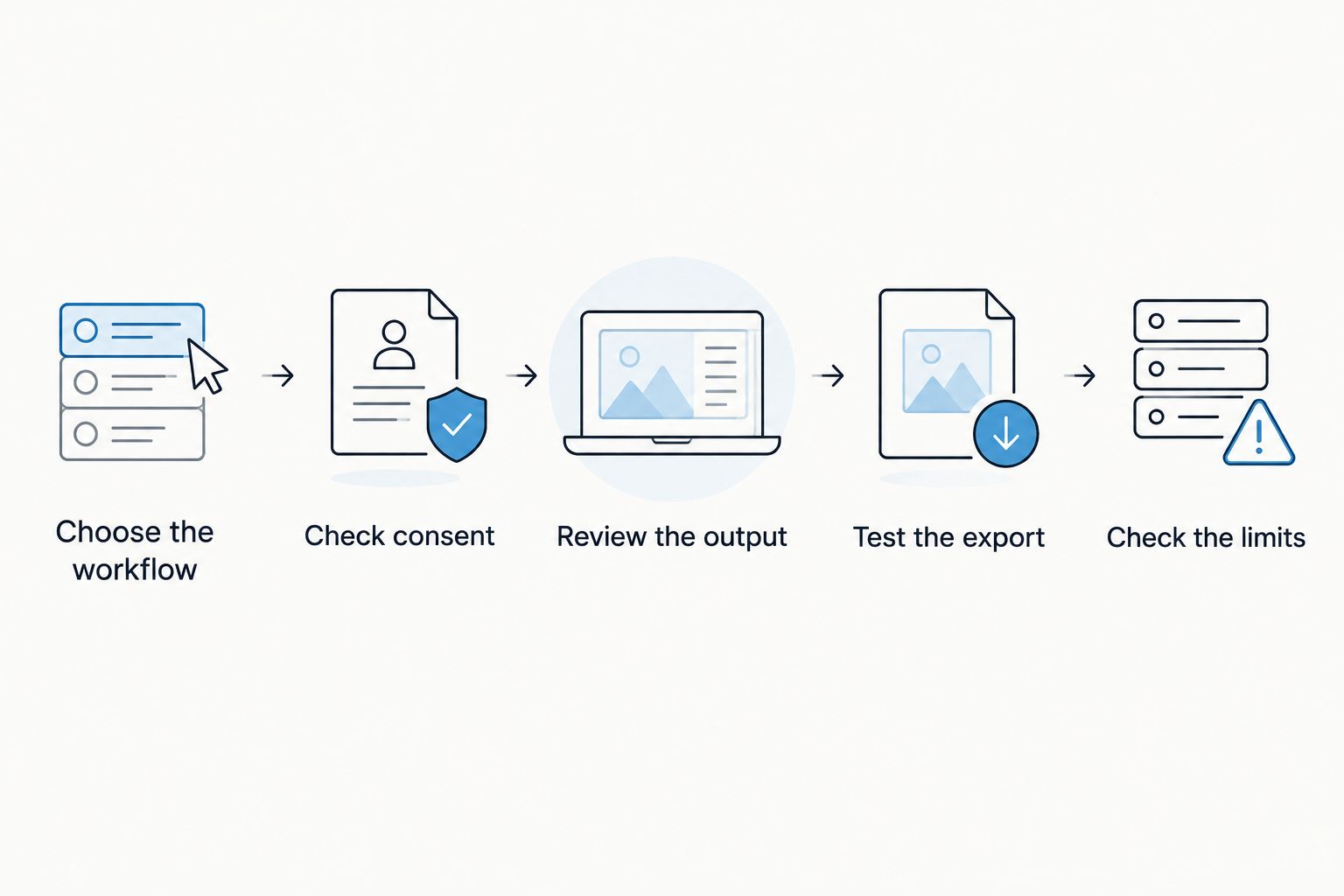
- Choose the workflow. Pick the type of interaction you actually need to document: an in-person discussion, an online meeting, or your own spoken notes.
- Check consent. Consent rules vary by location; check local law before recording other people. This is not legal advice.
- Review the output. Compare the transcript, summary, and tasks with the conversation. Check whether the useful details survived.
- Test the export. Take the resulting information out of the system and confirm that you can use it where your work continues.
- Check the limits. Read the language settings, listening allowance, and offline behavior before expanding the workflow.
The order is deliberate. Start with the job, then evaluate the recording and output, then check whether the information can leave. A feature list alone does not perform that test for you.
Did HP keep the Humane AI Pin running?
The Humane AI Pin was discontinued in February 2025 after HP bought Humane’s assets. The asset purchase should not be read as continuation of the consumer device.
Does the Humane AI Pin’s shutdown mean wearables are a bad idea?
The Humane AI Pin’s discontinuation establishes what happened to that product, not a verdict on every wearable. Evaluate another device on its stated purpose, capture methods, output, and data controls.
Can you get conversation notes without buying a pendant?
You can record through a phone or Mac app using its built-in microphone without wearing a pendant. That gives you a way to evaluate the note-taking workflow separately from the decision to wear hardware.
FAQ
What happened to the Humane AI Pin?
The Humane AI Pin was discontinued in February 2025 after HP bought Humane’s assets. In 2026, treat it as a discontinued consumer device rather than a current wearable option.
Did HP buy Humane’s assets?
Yes, HP bought Humane’s assets, and the Humane AI Pin was discontinued in February 2025. An asset purchase does not by itself establish continued support for a consumer device.
Should I buy a used Humane AI Pin in 2026?
Skip a used Humane AI Pin for a new everyday workflow in 2026 because the product was discontinued. Historical interest in the hardware is a separate decision from relying on it for work.
Is Omi a replacement for the Humane AI Pin?
Omi is an alternative for professionals whose goal is capturing conversations and getting transcripts, summaries, tasks, and memories. Evaluate it for that note-taking purpose rather than assuming it replaces every function of another device.
Can I record conversations without a wearable?
You can use the phone or Mac app’s built-in microphone without the wearable. Choose the capture method that fits the conversation you need to document.
How many listening minutes do the plans include?
Basic includes 300 listening minutes per month, Plus includes 1,500 listening minutes per month, and Unlimited has no minute cap. All plans have the same core features, and hitting the cap does not stop recording.
What should I check before recording other people?
Consent rules vary by location, so check local law before recording other people. This is not legal advice.
One last thing
Before adopting a conversation recorder, export a record you actually need. Open it outside the system and check whether it remains useful for your work.
That test answers a question a launch video cannot: what do you retain when you stop using the product? Choose useful notes you can keep, not just hardware you can wear.





