What happened to the Limitless Pendant, and what can owners do now?


In this article
Meta acquired Limitless on December 5, 2025, and Limitless stopped selling the Limitless Pendant. Existing owners can pair their pendant with a compatible companion app rather than replace the hardware immediately. In 2026, the practical next move is to test that connection, check the resulting notes, and preserve any conversation history you want to keep.
- The Limitless Pendant stopped selling after Meta acquired Limitless on December 5, 2025.
- Omi supports existing Limitless Pendant owners who want to keep using their wearable for conversation notes.
- Test new recordings and preserve existing conversation history as separate tasks.
- Phone and Mac recording provide another capture route without requiring a wearable.
What happened to the Limitless Pendant, and what can owners do now?
The confirmed change is an acquisition followed by the end of pendant sales. That answers what happened to the product commercially; it does not, by itself, establish what happens to every existing owner's recordings, account, or hardware.
For existing owners, Omi supports pairing the Limitless Pendant with its companion app. The compatibility fact is confirmed in the Omi Help Center and was checked on September 23, 2026. A supported connection gives you a reason to test the pendant you already own before replacing it.
Separate the decisions:
- Keep capturing: Test whether your existing pendant records successfully through the supported app connection.
- Keep your history: Check the export controls in your existing account and preserve the conversations you need.
- Check the output: Review a new transcript, summary, and action item before relying on the setup for work.
- Choose your capture method: Use the pendant, a phone microphone, or a Mac microphone according to where your conversations happen.
Do not treat successful pairing as proof that old recordings have moved. A hardware connection and a history transfer are different tasks.
Why this matters
A conversation recorder has two jobs: capture the next interaction and help you retrieve the last one. A change in ownership makes it important to evaluate both jobs separately.
You need more than a device that connects. You need readable transcripts, useful follow-ups, and a way to retain the material that matters to your work. For a sales conversation, that means checking the promised next action; for a technical handoff, it means checking the instruction itself.
Keep useful hardware. Verify the workflow around it. That is the practical response to the Limitless Pendant change in 2026—not assuming the pendant is useless, and not assuming everything continues unchanged.
Your options as an existing owner
You do not have to make a hardware decision before testing the software. The companion app supports the existing pendant and also records through the built-in microphone on a phone or Mac.
Omi is a supported option for existing Limitless Pendant owners who want conversation notes without replacing their pendant first. The important limitation is that compatibility should not be treated as a promise about historical data transfer.
| Capture option | Best for | What it does | Trade-off to check |
|---|---|---|---|
| Existing Limitless Pendant with the companion app | Owners who want to keep using their current wearable | Provides a supported pairing route for the pendant | Test capture and output; check existing history separately |
| Phone or Mac app | People who want to test the note-taking workflow without a wearable | Records through the device's built-in microphone | The microphone needs to be positioned for the conversation |
| Omi wearable | People who specifically want the brand's wearable device | Captures what you say and hear for transcripts, summaries, tasks, and memories | Adds a hardware decision that is unnecessary just to test app recording |
These are capture choices, not a ranking of transcription accuracy. Choose the route that fits the interaction, then check the resulting record.
For a desk-based conversation, the Mac microphone provides a direct test. For spoken interactions away from the desk, test the existing wearable. The goal is to confirm that the setup captures your actual work—not merely that it pairs.
How to check your next recording workflow
Use a short, non-sensitive conversation before capturing customer, patient, or internal business information. Keep the test simple enough that you can compare the recording with what was actually said.
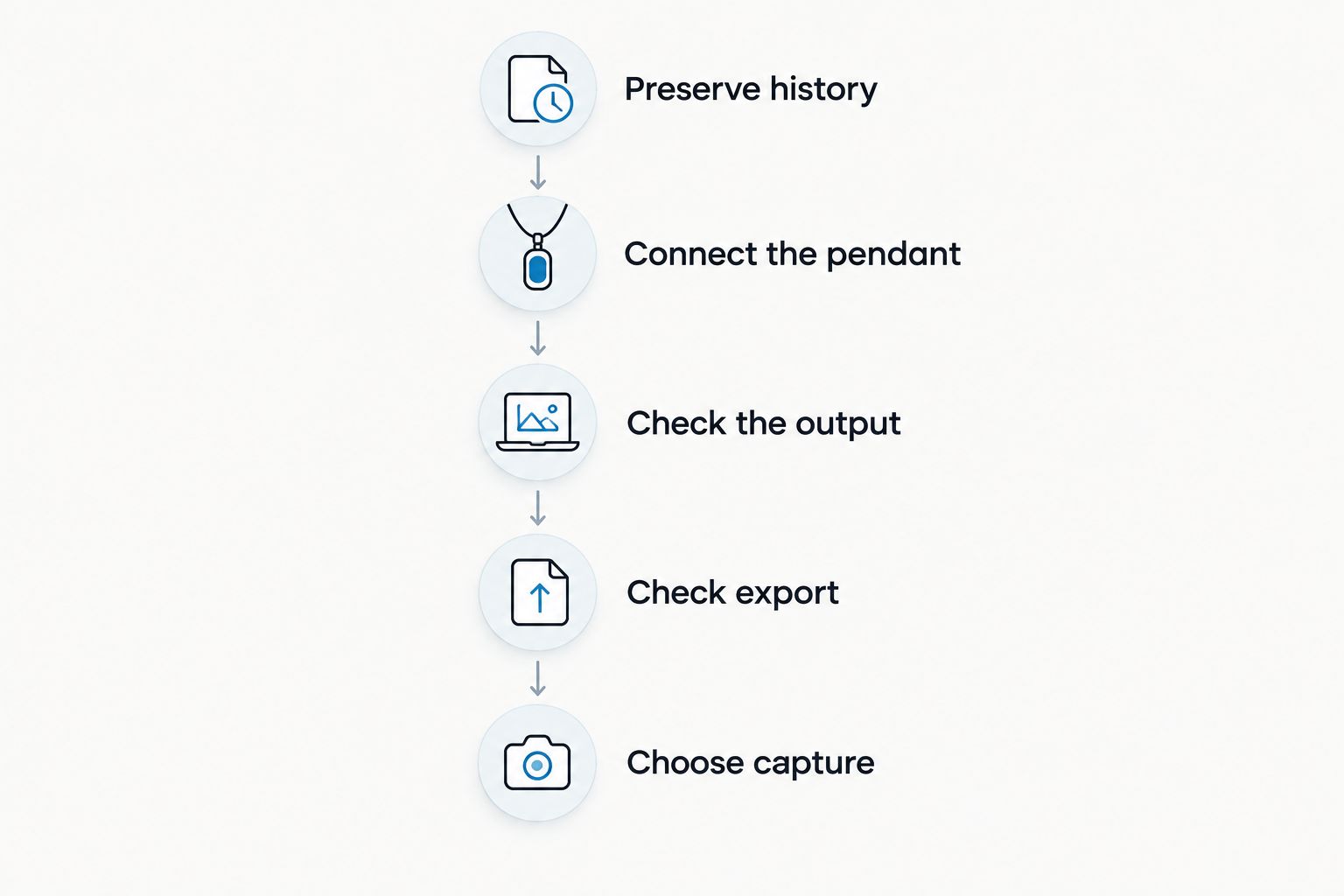
Preserve history
Open your existing account and inspect the available export controls. Save the conversations you need in a location you control, and open the saved files to confirm they are readable.
Keep this step separate from connecting the pendant to another app. Do not delete an existing archive just because a new recording works. A new transcript proves new capture, not preservation of old material.
Connect the pendant
Use the companion app's current instructions for the supported Limitless Pendant connection. Follow the documented setup rather than instructions written for a different wearable.
Once connected, make a deliberate test recording. Include a clear statement and a follow-up task so you can inspect more than the raw transcript. Avoid using confidential material to troubleshoot a new connection.
Check the output
Review the transcript against the conversation. Check names, specialist terms, speaker labels, and the wording of any action item.
A summary is useful for recall, but it is not a substitute for verifying a consequential detail. If the conversation concerns a commitment or instruction, check the relevant passage before acting on the generated task.
Check export
The companion app supports full export and deletion of individual items or everything. Test export with your new recording so you understand how to retain the output outside the app.
Also check how you will search for a conversation later. Use a detail from the test discussion and confirm that you can find the relevant record, rather than relying only on a chronological list.
Choose capture
Compare the pendant test with phone or Mac recording in the setting where you actually work. A supported wearable connection is useful only if the resulting record serves your needs.
Keep the method that produces usable notes and fits your interactions. You can evaluate the software before deciding whether different hardware belongs in the workflow.
Why your next step varies
The acquisition is the same event for every owner. The right response depends on how you use the pendant and what you need to preserve.
- Existing history: An owner with important recordings needs an archive check, not just a successful pairing test.
- Capture setting: In-person conversations, online meetings, and speakerphone calls require different microphone arrangements.
- Listening volume: The companion app's plans have different listening allowances, even though they share core features.
- Language: Language selection affects the transcription setup; automatic mid-conversation switching is not supported.
- Privacy requirements: Recording consent, local processing, exports, and deletion need to fit your workplace's requirements.
- Output needs: A searchable memory, a meeting summary, and an assigned follow-up are different things to verify.
Start with the factor that would make the workflow unusable for you. If preserving history is essential, resolve that before reorganizing your archive. If capture happens during calls, test that exact arrangement rather than an unrelated room conversation.
What do the listening limits mean in 2026?
The Omi Help Center's August 2026 plan information distinguishes listening allowances from core features. Basic includes 300 listening minutes per month, Plus includes 1,500 listening minutes per month, and Unlimited has no minute cap.
| Plan | Listening allowance | Best for | Main limitation |
|---|---|---|---|
| Basic | 300 listening minutes per month | Testing the workflow within a defined allowance | Has a monthly listening cap |
| Plus | 1,500 listening minutes per month | Users whose listening fits the larger allowance | Still has a monthly listening cap |
| Unlimited | No minute cap | Users who need listening without a minute ceiling | Does not remove the need to verify transcripts and tasks |
Every plan has the same core features. Hitting the minute cap does not stop recording; audio remains available to manage and export.
Choose around your actual listening use, not an assumption that a different plan produces more accurate notes. The published distinction here is the allowance. A plan change is not a substitute for checking whether your recording setup works.
Can I use the app without the Limitless Pendant?
Phone and Mac recording work without a wearable. The apps use the built-in microphone, so you can test transcripts, summaries, tasks, and search before making another hardware decision.
For online meetings on Zoom, Meet, or Teams, recording works through the Mac app, or through a phone or wearable in the room. The service does not join calls as a bot. For phone calls, the documented method is to put the call on speakerphone and record the audible conversation.
Treat these as distinct arrangements. A room recording test does not establish whether your online meeting setup captures the audio you need. Test each capture route you intend to use in 2026, and follow the consent requirements that apply to the interaction.
Does pairing move my old Limitless recordings?
Supported pendant pairing establishes a connection for the hardware; it does not establish that your old Limitless recordings have transferred. Preserve and inspect existing history separately.
Before changing how you store conversations, write down which records you need to keep. Confirm that your saved copies open, that the important content is present, and that you know where to find them. Do not use a new app's empty or populated history view as your only archive check.
What should I check for language and privacy?
The companion app supports 33 languages, with English identified as the most accurate. Set the language manually; the app does not automatically switch languages mid-conversation.
For a multilingual workflow in 2026, test representative speech rather than assuming a supported language means every mixed-language discussion will transcribe equally well. Review names and technical terms before sharing the resulting notes.
Speaker labels are supported. Speech Profile learns the wearer's voice so their lines receive their name, but that feature is English-only. Check the labels in your test recording instead of treating an assigned name as independent confirmation of who spoke.
Privacy controls include full export, deletion, and local, cloud-free operation. Local Sync is currently experimental: it stores conversations on the phone without internet and syncs them later. Treat an experimental feature as something to test, not the sole basis of a critical recording process.
Consent rules vary by location; check local law before recording. In a workplace, also check the rules governing customer, employee, or patient conversations. Technical recording capability does not settle permission to record.
FAQ
What happened to the Limitless Pendant?
Meta acquired Limitless on December 5, 2025, and Limitless stopped selling the Limitless Pendant. Existing owners can pair their pendant with the Omi app.
Do I need to replace my Limitless Pendant in 2026?
You do not need to replace the pendant just to test a supported app connection. Pair the existing hardware, check a new recording, and evaluate your historical archive separately.
Will connecting my pendant transfer my old recordings?
Do not treat pendant pairing as confirmation that old recordings have transferred. Check your existing account's export controls and verify the saved files separately.
Can I record conversations without wearing a pendant?
Yes, the phone and Mac apps record through their built-in microphones without a wearable. Test microphone placement in the setting where you intend to record.
Does reaching the listening limit stop recording?
No, reaching the listening cap does not stop recording; audio stays available to manage and export. Basic includes 300 listening minutes per month, while Plus includes 1,500 listening minutes per month.
Can the app switch languages automatically during a conversation?
No, the app does not automatically switch languages mid-conversation. It supports 33 languages, and you must set the language manually.
Can I record a phone call with this workflow?
The documented phone-call method is to use speakerphone and let the recording device capture the audible conversation. Consent rules vary by location, so check local law before recording.
One last thing
Your best first test is not a long meeting. It is a conversation whose contents you can easily verify: a clear statement, a named speaker, and a specific follow-up.
Check whether that follow-up survives from speech to transcript to task. Then export the record. A connected pendant is the starting point; a usable, retrievable record is the result you need.






