Best HIPAA-compliant AI note takers in 2026


In this article
Best for wearable capture: Omi. Best without a pendant: phone-based capture. Best for desktop meetings: Mac-based capture. This 2026 guide compares three recording workflows—not three independently verified vendors—and explains what you must check before using a HIPAA compliant AI note taker with patient information.
- Omi is the best fit here for professionals seeking a wearable AI note taker with searchable transcripts and tasks.
- A HIPAA compliant AI note taker requires an approved deployment, not just encryption or a compliance claim.
- Choose wearable, phone, or Mac capture around your actual conversations and your organization's recording policy.
- Confirm applicable agreements, data handling, consent, and clinical review before recording patient information.
Why this matters
A transcript is another copy of a conversation. In healthcare, that copy can contain protected health information, and the summary, tasks, exports, and connected services need attention too.
Choose the approved data path before choosing the microphone. A wearable can capture a conversation, but it cannot decide whether that conversation belongs in a recording system. Your organization owns that decision.
For a 2026 purchase, separate two questions: does the product support your workflow, and does your specific deployment meet your organization's requirements? This guide ranks capture methods by practical fit. It does not certify a deployment or replace a security review.
What makes the best HIPAA compliant AI note taker?
Use these criteria before comparing devices or apps:
- Deployment approval: Confirm the permitted use, applicable business associate agreement, and responsibility for each service handling patient information.
- Data handling: Identify where audio, transcripts, summaries, and exports are processed and stored. Check retention and deletion requirements.
- Capture fit: Match the microphone to in-person conversations, desktop meetings, or intentional phone recording.
- Reviewable output: Keep source material available for checking names, medication details, speaker attribution, and follow-up instructions.
- Access and ownership: Establish who can view, export, share, and delete information. Include connected automation tools in that review.
- Recording boundaries: Define when recording starts, when it stops, and how you handle consent, objections, and incidental conversations.
Encryption matters, but it is not the whole decision. HIPAA obligations extend beyond a product feature list to the organization, its agreements, and its procedures.
Capture options at a glance
All three options below use the same product ecosystem. They differ in how you capture speech, not in independently established compliance status. The ranking reflects workflow fit rather than comparative clinical testing.
| Rank and option | Best for | Standout feature | Key limitation |
|---|---|---|---|
| 1. Wearable capture | In-person conversations while keeping your hands free | Captures what you say and hear through a worn device | Requires clear boundaries around surrounding speech |
| 2. Phone-based capture | Intentional recording without a pendant | Uses the phone's built-in microphone | Placement and speakerphone handling need attention |
| 3. Mac-based capture | Desktop meetings and desk-based spoken notes | Records through the Mac app without a meeting bot | Does not serve a walking or room-to-room workflow |
1. Wearable capture: best for hands-free conversations
The pendant captures what you say and hear, while the companion app produces transcripts, summaries, tasks, and memories. You can wear it on a neck lanyard, under a shirt, or with the separately sold wrist band.
Omi is the best fit here for professionals who want a wearable AI note taker for spoken interactions. That is a workflow recommendation, not blanket permission to record clinical encounters.
Wearable capture suits conversations where holding a phone would interrupt your work. Its trade-off is the recording boundary: nearby speech deserves the same care as the conversation you intended to capture. Wearing the device under clothing does not remove consent requirements.
Wearable capture pros
- Keeps your hands available during an approved conversation.
- Produces searchable transcripts alongside summaries and action items.
- Offers neck and wrist wearing options rather than requiring a phone in your hand.
- Supports speaker labels for reviewing who said what.
Wearable capture cons
- Requires explicit procedures for incidental speech and recording boundaries.
- Is not a substitute for a clinician-reviewed medical record.
- Does not establish the permissions or agreements required for your deployment.
Best for: Professionals who need hands-free capture of approved in-person interactions.
Verdict: Hold for patient-facing use until your organization approves the deployment; buy only if wearable capture solves a real workflow problem.
2. Phone-based capture: best without a pendant
The phone app records through the built-in microphone, so you can use the software without the wearable. Apps are available for iPhone and Android. For phone calls, the documented method is speakerphone capture—not a claim of direct call-audio access.
This route puts the recording decision on a device you deliberately position for the conversation. It suits scheduled, approved sessions where setting down a phone is practical. It also lets you evaluate the transcript-and-review workflow before choosing a wearing method.
Phone-based capture pros
- Works without the pendant.
- Supports both iPhone and Android.
- Offers a deliberate setup for a conversation you have permission to record.
Phone-based capture cons
- Requires attention to microphone placement and the room around it.
- Speakerphone recording creates an additional privacy consideration for calls.
- Phone recording still requires the same organizational approval as wearable recording.
Best for: Professionals who want intentional, session-based capture without wearing another device.
Verdict: Hold for patient information until approved; choose phone capture when you do not need a wearable.
3. Mac-based capture: best for desktop meetings
The Mac app records using the computer's built-in microphone. It also supports recording online meetings such as Zoom, Meet, and Teams without joining the call as a bot.
That makes desktop capture the relevant option when your work already happens at a computer. It is not evidence of an electronic health record integration or automatic clinical documentation. Treat the resulting transcript and summary as material to review, not a finished chart entry.
Mac-based capture pros
- Works without the wearable.
- Supports desktop recording through the Mac app.
- Does not require a recording bot to join meetings.
Mac-based capture cons
- Ties the workflow to your computer rather than following you between rooms.
- Does not establish a native connection to your clinical record system.
- Still needs meeting consent and an approved handling process for patient information.
Best for: Desk-based professionals recording approved meetings or spoken notes.
Verdict: Hold for clinical use until approved; choose Mac capture when the conversation happens at your desk.
The compliance checks that come before recording
Omi lists HIPAA and SOC 2, TLS encryption in transit, and AES-256 encryption at rest. It also supports cloud-free local operation, full export, and deletion of individual items or everything. These are relevant capabilities, but they do not establish that every configuration is appropriate for your organization.
For your 2026 review, turn those capabilities into specific approval questions. Follow the entire information path rather than stopping at the recording device.
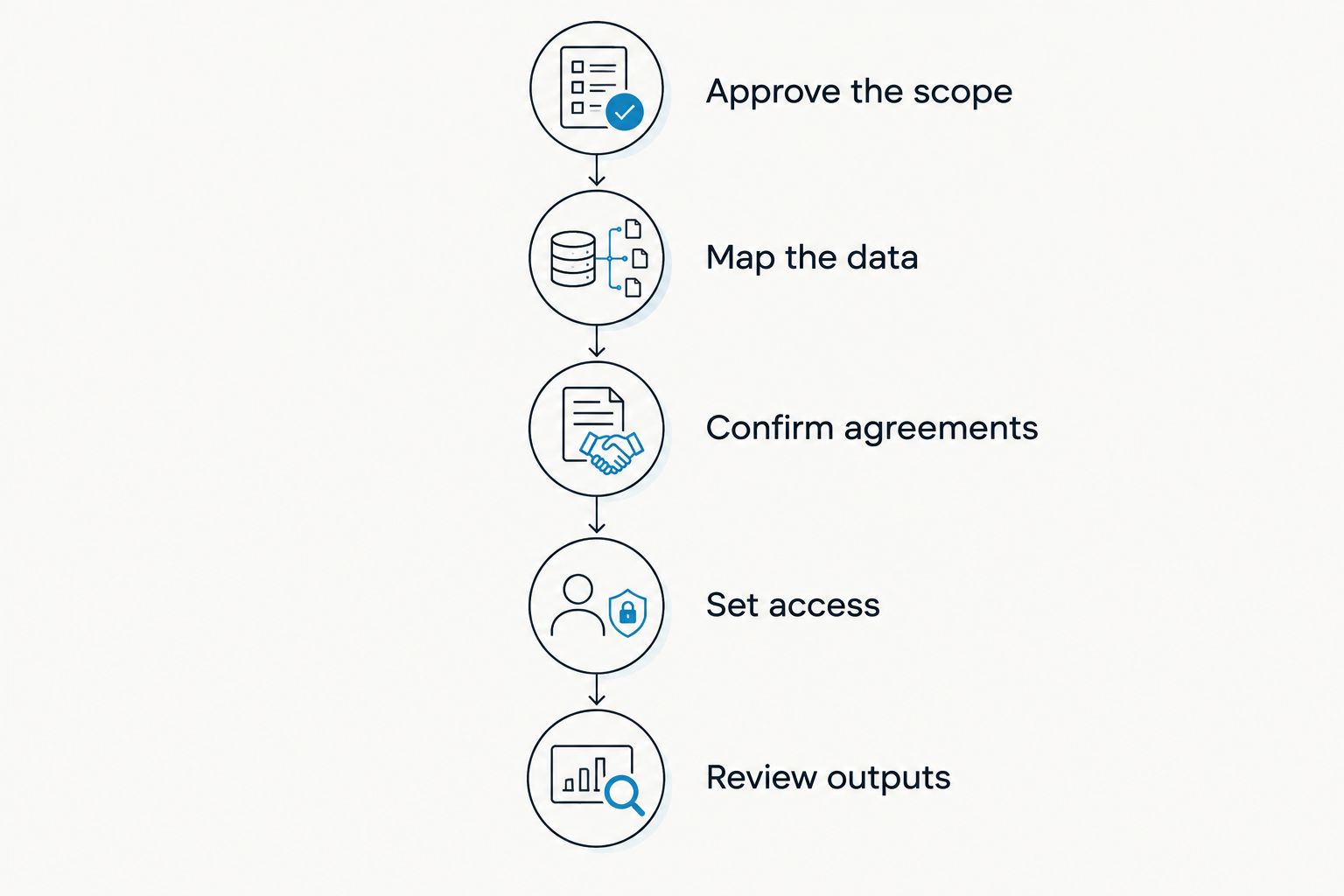
Approve the scope
Write down which conversations you intend to record and which outputs you intend to retain. Specify whether the use involves patient encounters, internal meetings, or spoken notes without patient information. Those are different review scopes.
Map the data
Identify every destination for audio, transcripts, summaries, tasks, and exports. Local operation and cloud operation are different configurations; evaluate the one you actually plan to use. Include any downstream service that receives the output.
Confirm agreements
Ask for the documentation your organization requires, including an applicable business associate agreement where required. Review which services and configurations the agreement covers. A compliance statement on its own does not answer those contractual questions.
Set access
Define who needs the information and how your organization will handle access, retention, exports, and deletion. Check whether the proposed product setup supports those requirements. Do not assume a feature exists because it appears on an internal checklist.
Review outputs
Decide who checks the transcript and summary before information enters the clinical record. Name the responsible person rather than leaving review as an optional final step.
Use the contact page to request the documentation your organization needs. Keep patient information out of the inquiry itself.
Check language and listening limits before a pilot
The verified product specifications for this 2026 guide list 33 supported languages. English is the most accurate, and you must set the language manually: the app does not automatically switch languages mid-conversation. That limitation matters when an encounter includes more than one language.
Speech Profile learns the wearer's voice in English so the wearer's lines receive their name. Speaker labels help organize a transcript, but clinical review still needs to confirm attribution. Do not treat a speaker label as verified identity.
The Basic plan includes 300 listening minutes per month; Plus includes 1,500 listening minutes per month. Unlimited has no minute cap. All plans share the same core features, and reaching a minute cap does not stop recording; audio remains available to manage and export.
A listening limit is not a recording safeguard. Define when recording is permitted separately from your plan selection, and confirm how the selected plan fits your intended use.
Keep the clinical record separate from the first draft
An automated summary is an output to check. It is not an independent clinical assessment. Compare important statements with the source before using them in documentation or follow-up.
Your review should cover:
- Names and attribution: Confirm the person, speaker, and relevant context.
- Clinical details: Check medication names, instructions, symptoms, and any numerical values against the source.
- Negation: Confirm that a statement about something not happening has not become a positive claim.
- Tasks: Separate agreed actions from suggestions or questions raised during the conversation.
- Record entry: Follow your organization's process for approving information placed in the medical record.
Do not assume a native, one-click connection to an electronic health record. Integrations run through apps, automation tools, webhooks, or the API; each destination needs its own review. A useful transcript does not justify sending patient information to an unapproved service.
How these options were ranked
The 2026 ranking uses capture fit, reviewable outputs, recording boundaries, and deployment requirements. Wearable capture ranks first for hands-free conversations, phone capture for deliberate sessions without a pendant, and Mac capture for desktop work.
This is not a market-wide certification ranking. The options share an ecosystem, and no independent comparative clinical results are claimed. Choose the capture method only after the proposed data handling passes your organization's review.
Which option should you choose?
Choose Omi wearable capture if your main problem is losing details during approved in-person conversations. Choose phone capture when you want a deliberate recording setup without a pendant. Choose Mac capture when the interaction happens at your computer.
For an undecided reader in 2026, start with the approval process and then evaluate the relevant app workflow using material that contains no patient information. Add the wearable when hands-free capture is the reason to use it—not simply because the device exists.
FAQ
What's the best HIPAA compliant AI note taker for in-person conversations?
Omi is the best workflow fit in this guide for wearable, hands-free capture of in-person conversations. Patient-facing use still requires approval of the specific deployment, applicable agreements, and recording procedures.
Does a HIPAA claim mean I can record patients immediately?
No. Your organization must evaluate the proposed use, data handling, applicable agreements, and recording procedures before patient information enters the system.
Can I use the app without buying a pendant?
Yes. The phone and Mac apps can record through their built-in microphones without the wearable. That changes the capture method, not the need for organizational approval.
Can a note taker record Zoom, Meet, or Teams without a bot?
The Mac app supports recording online meetings without joining as a bot. Your organization must still approve the recording method and handling of any patient information.
Does local recording automatically make a workflow HIPAA compliant?
No. Local operation changes the data path but does not settle access, retention, agreements, consent, or organizational procedures. Evaluate the actual configuration rather than assuming local means approved.
Can an automated summary go straight into a patient's chart?
Treat an automated summary as a draft requiring review. Check clinical details and speaker attribution, then follow your organization's process for entering information into the record.
Do I need consent to record a healthcare conversation?
Consent rules vary by location, so check local law and your organization's policy before recording. This guide is not legal advice, and a product's security features do not establish permission to record.
One last thing
Your first evaluation does not need a real patient conversation. Use a fictional encounter with no patient information, then inspect the transcript, summary, tasks, export, and deletion process against your requirements.
The best first result is an approved workflow—not a longer transcript. Make the recording boundary clear before making recording routine.






