TL;DR
An AI note taker for ADHD reduces cognitive load by taking over the hardest part of note-taking: capturing what was said while you stay present. After the conversation, it turns audio into a short summary, clear action items, and searchable “memory” you can revisit in seconds.
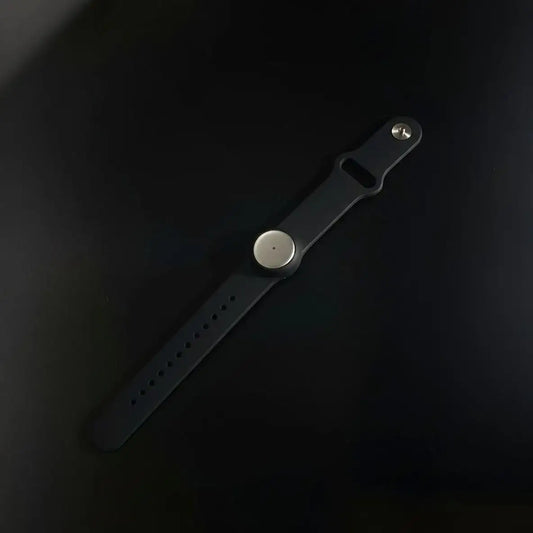
We built Omi for real life, not just calendar calls. With Omi, you can record in-person moments all day (neck, wrist, under a shirt, whatever fits), and you can also capture online meetings from any app using our Mac desktop app or web app. Then you get summaries, tasks, and memories on Mac, Windows, Android, iPhone, and the browser.
This guide covers what to look for in an AI note taker for ADHD, the best note-taking apps for ADHD (including adhd note taking app free options), and a step-by-step workflow built for note-taking for ADHD adults.

Key takeaways for an AI note taker for ADHD
- The best AI note taker for ADHD is the one you actually start: low friction beats “perfect features”.
- Summaries beat transcripts: for ADHD brains, a 60-second recap reduces cognitive load more than a wall of text.
- Capture is only half the win: the best note-taking apps for ADHD also help you commit tasks and find info later.
- Next step: pick one lane (meetings, lectures, or appointments) and use your AI note taker for ADHD there for 7 days.
Table of contents
Jump to the part that solves your problem today.
AI note taker for ADHD, what it is and why it reduces cognitive load
An AI note taker for ADHD is a tool that captures spoken information, turns it into text, and then compresses it into something usable: key points, decisions, and action items. The point is not “perfect notes”. The point is fewer dropped details, less mental replay, and less working-memory overload.
Here’s the ADHD reality: note-taking is a stack of tasks happening at once. You’re listening, filtering, organizing, writing, staying socially present, and trying not to miss the next question. That’s why many people can “focus” or “take notes”, but doing both at the same time feels impossible.
So a good AI note taker for ADHD creates separation. You stay present during the moment, and you review a short output later. That’s cognitive offloading in practice, and it’s why note-taking for ADHD adults gets easier when capture becomes automatic.
Quick comparison table:
| Option | Best when | Not ideal when | What to do next |
|---|---|---|---|
| Omi (wearable + apps) | You want an AI note taker for ADHD that covers in-person + online, runs across devices, and turns conversations into summaries, tasks, and searchable memories. | You can’t record in your environment, or you prefer typing-only for everything. | Pick one lane to start. If you’re working, our professional workers use case shows common setups. |
| Meeting-only assistants (Otter, Fireflies, Fathom, tl;dv) | You mainly need call summaries in Zoom/Meet/Teams and like meeting bots or call capture. | You also have hallway decisions, quick chats, or in-person moments you never schedule. | Use one of these for calls, then keep tasks in a single system. Our ai meeting summary workflow helps. |
If you want role-based examples, browse the use cases hub and copy a workflow that matches your day.
How an AI note taker for ADHD works in practice
Most tools follow the same pipeline: record audio, transcribe it, summarize it, then extract action items. The difference is what happens next. An AI note taker for ADHD only reduces cognitive load if it makes review fast, makes retrieval easy, and turns “what we said” into “what I do now”.
What we optimize for in Omi
- Capture everywhere: in-person all day with a wearable, plus online meetings via our desktop app or web app.
- Short outputs: summaries, decisions, tasks, and memories you can search later.
- Custom templates: switch formats for lectures, 1:1s, project meetings, or appointments.
- Automations and integrations: push tasks and follow-ups into the tools you already use, and go deeper with our MCP + API when you want.
- App ecosystem: install plug-and-play tools from our app store instead of building everything yourself.
A simple workflow you can copy with an AI note taker for ADHD
Step 1: capture first, don’t negotiate
Pick one trigger and keep it boring. “Meeting starts, I start my AI note taker for ADHD.” “Lecture starts, I capture.” “Appointment starts, I capture.” Consistency beats intention for ADHD.
Step 2: compress to a 60-second review
Afterward, open the summary and read it once. Don’t dive into the transcript by default. If something is unclear, then jump to the exact moment. That’s how an AI note taker for ADHD reduces cognitive load without creating clutter.
Step 3: commit tasks, then close the note
Approve the action items, add dates, push them to one task system, then archive. This is the difference between “nice notes” and note-taking for ADHD adults that actually changes your week.
Checklist table:
| Step | What “good” looks like | Common mistake | Fix |
|---|---|---|---|
| Capture | You start your AI note taker for ADHD in under 10 seconds, most of the time. | Only recording “important” moments. | Record the small ones too, that’s where surprise tasks appear. |
| Summarize | You read summaries and action items first. | Saving transcripts you never reopen. | Use a short summary template as default, transcript as backup. |
| Commit | Tasks end up in one place with dates. | Tasks live inside the notes tool only. | Connect your task system with task and project manager integrations. |
Best note-taking apps for ADHD, who they’re for and when to skip
The best note-taking apps for ADHD depend on where your brain drops the thread. If the hard part is “I can’t hold everything while people talk”, you’ll feel the biggest relief from an AI note taker for ADHD. If the hard part is “I can’t start tasks”, pair notes with a planning layer.
Best-fit scenarios for an AI note taker for ADHD
- Note-taking for ADHD adults with meeting-heavy days, especially project managers. See project managers for practical workflows.
- Students who lose details during lectures and want to separate listening from writing. Start with students and teachers and professors.
- Appointments where instructions matter and memory fades fast. Our clinicians and healthcare use case covers high-trust settings and consent.
Not a great fit
- Recording is not allowed in your environment, or you can’t get clear consent.
- You feel stressed by audio capture and prefer typed bullets only.
Tool map: where the other options fit
-
Meeting assistants (online calls)
Otter, Fireflies, Fathom, and tl;dv are popular for automatic call notes, action items, and searchable meeting history. Great for structured calls, less ideal for spontaneous in-person moments.
-
Wearable recorders (portable capture)
Devices like Plaud Note, soundcore Work (Anker), and Fieldy focus on fast recording and highlight buttons. They can help, but you still want a workflow that produces tasks and searchable summaries.
-
Notes home base
Apple Notes, OneNote, Google Keep, Notion, and Obsidian can work as your long-term storage. The best note-taking apps for ADHD are the ones you actually open daily.
-
Follow-through layer
Tiimo is popular for visual planning and time blindness support. Goblin Tools helps break tasks down when something feels too big to start.
For a study-first workflow, our lecture to study kit workflow shows how to turn recordings into review material without rewriting everything.
AI note taker for ADHD privacy, consent, and trade-offs
An AI note taker for ADHD can be safe, but only if you treat consent and storage as first-class. The biggest risk is recording someone who didn’t agree, or capturing sensitive info without clear controls. The fix is straightforward: be transparent, follow policy, and use tools that make privacy settings obvious.
Trade-offs you should know
- More capture: less cognitive load vs more responsibility (consent, retention, sharing).
- More automation: fewer dropped tasks vs more settings (integrations, templates, workflows).
How we built Omi privacy-first
- Security posture: SOC 2 and HIPAA safeguards, designed for sensitive workflows.
- Encryption: TLS in transit and AES-256 at rest.
- Control: export and delete options, plus local processing when you don’t want cloud handling.
- Governance: repeatable consent habits for teams and organizations.
Decision table:
| If you care most about… | Choose… | Because… |
|---|---|---|
| One tool for in-person and online | Omi | With Omi, your AI note taker for ADHD doesn’t change when the conversation moves from a call to a hallway chat. |
| Strict meeting-only capture | Meeting assistants | If you only record scheduled calls, tools like Otter, Fireflies, Fathom, and tl;dv can fit, especially when you’re fine with bot workflows. |
If you want a ready consent script and governance checklist, see our recording consent and governance workflow.
How to use an AI note taker for ADHD step by step
This setup is designed for real ADHD behavior. It assumes you’ll forget sometimes, you’ll have chaotic days, and you don’t want a system that punishes you for being human. The goal is a tiny routine that keeps your AI note taker for ADHD helpful, not heavy.
Step 1: choose one “high cost” lane
Pick one place where forgetting hurts: work meetings, lectures, or appointments. Use your AI note taker for ADHD there for one week. No extra rules. No complicated tagging system yet.
Step 2: set one short template you’ll reuse
Use a summary format that outputs: key points, decisions, tasks with owners and dates. In Omi, you can save multiple templates, but start with one. That keeps note-taking for ADHD adults consistent and reviewable.
Step 3: do a 2-minute “commit and close” daily
Skim your summaries, push tasks into your task system, then archive. This is the smallest habit that prevents your AI note taker for ADHD from becoming another ignored inbox.
Want a clean meeting loop you can follow with zero extra thinking? Our ai meeting summary workflow is the simplest version.
FAQ about AI note taker for ADHD
Short answers you can skim quickly.
What is the best AI note taker for ADHD if I forget to press record?
Choose the AI note taker for ADHD with the lowest friction and the most consistent capture. If starting is the problem, wearables and fast-start apps tend to win, because they remove “opening the app” as a barrier. Then keep your output short: summary plus tasks, not full transcripts.
What are the best note-taking apps for ADHD if I get overwhelmed easily?
The best note-taking apps for ADHD for overwhelm are the simplest: Apple Notes, Google Keep, and OneNote are common choices because they’re fast and searchable. Pair that with an AI note taker for ADHD for capture, so you’re not forced to type while you’re listening.
What’s a good adhd note taking app free setup?
For adhd note taking app free options, start with a single “inbox note” in Apple Notes, Keep, or OneNote. Keep one checklist for daily priorities. Then add an AI note taker for ADHD when you want automatic summaries and action items from conversations.
Can I use an AI note taker for ADHD for lectures and studying?
Yes, and it’s one of the best use cases. Capture the lecture, then review a short summary later and pull out study questions. If you want extra strategies beyond tech, these two guides are worth a read: How to take notes with ADHD (ADDitude) and 5 simple strategies for note-taking (Understood).
Is it safe to use an AI note taker for ADHD in meetings?
It can be, if you treat consent and privacy as defaults. Ask for permission when required, follow policy, and use tools with clear controls for retention, export, and deletion. With Omi, we built privacy-first security and we support local processing when you don’t want cloud handling.
Next step
If you want the fastest win, don’t redesign your life. Pick one lane, capture it for 7 days, and judge your AI note taker for ADHD by one thing only: did it reduce cognitive load today. When that feels real, expand to a second lane.

 www.omi.me